Gemini 4 in Antigravity: Carbon, Argon, and Hydrogen Benchmarked, Plus Speed Fixes for Slow Code Reads
At the end of September this year, Google first announced Gemini 4 Argon, and on October 13 it was fully opened to all users. The release cadence afterwards was tight: the higher-tier Gemini 4 Carbon appeared at the end of October and went fully live on November 10, and the speed-focused lightweight model Gemini 4 Hydrogen followed on November 12.
Before talking about actual feel, here are the current official API prices for the three models (all support a 1 million token context, and output pricing includes thinking tokens):
| Model | Input price (per million tokens) | Output price (per million tokens) | Notes |
|---|---|---|---|
| Gemini 4 Carbon | $2.00 (from Dec 1: $4.00) |
$10.00 (from Dec 1: $20.00) |
Launch half-price period until end of November, no free tier |
| Gemini 4 Argon | $2.00 (from Dec 1: $4.00) |
$10.00 (from Dec 1: $20.00) |
Same unit price as Carbon, slightly less thinking per turn |
| Gemini 4 Hydrogen | $1.50 |
$7.50 |
Uniform pricing across all contexts, also has a free call tier |
As you can see, Carbon and Argon have exactly the same list price, and once December restores the original price, heavy development through per-token API calls won't be cheap. I've been using the $200 plan in Google's AI coding tool Antigravity since Argon's full rollout, using it intensively for more than a month. This article combines that daily practical experience to systematically discuss the actual differences between the three models, comparisons with Claude and GPT, several configuration tips to improve the experience, and my current overall usage recommendations.
Positioning and quota feel of the three models
Among the current three models of the Gemini 4 family, from strongest to weakest in capability: Gemini 4 Carbon, Gemini 4 Argon, and Gemini 4 Hydrogen.
Carbon vs Argon: The gap isn't that huge, and quotas are generous
In the half month before Carbon was released, I used Argon as my daily driver. The quota from the $200 plan was very generous. Under heavy development, with occasional use of external Codex for code review, I still had to find some heavy tasks in the last day or two each week to use it up. Most of the time I could use it freely.
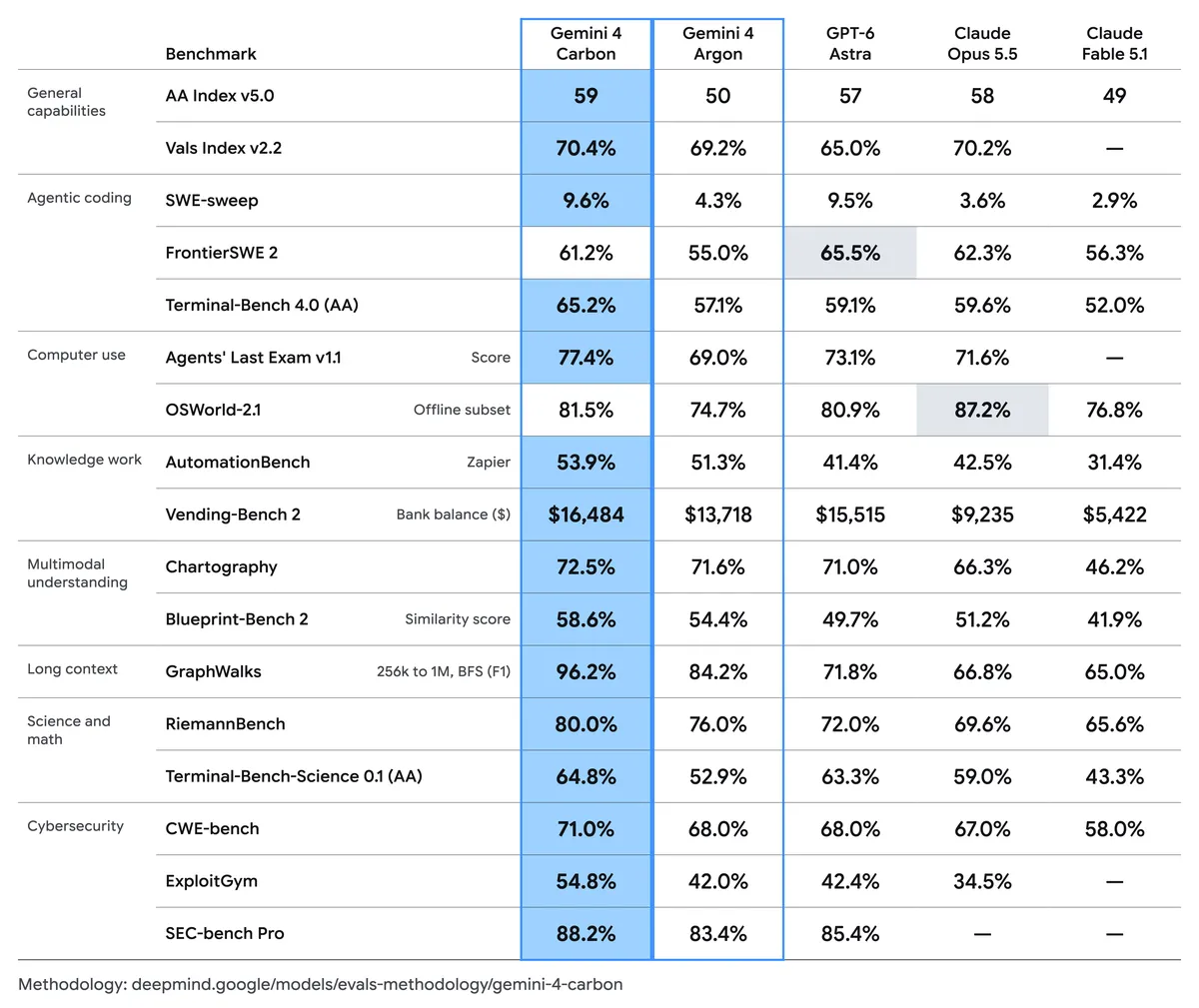
After switching to Carbon, there's one misconception: many people think it's a generational leap, but from the official benchmark table above, although Carbon gains on some coding items (like SWE-sweep, Terminal-Bench) and long-context tasks, on composite indicators (like Vals Index) and several multimodal dimensions it only improves by one or two percentage points. It feels more like a bit of post-training optimization on the same base, not a cross-generational leap.
When actually writing code and executing tasks, I can feel that Carbon is indeed a bit steadier than Argon, and the quota consumption isn't much higher. The feel is almost the same as Argon, so I've switched my daily driver to Carbon.
But the cost is that Carbon is slower than Argon. Especially in the last few days, using Gemini in Antigravity has become the slowest AI agent I've used. In complex projects, it reads code for a full 10 minutes without doing any code changes, just reading (the reason and mitigation are in the later "Practical tips" section).
Hydrogen: Fast and natural writing, but engineering trust is mediocre
As for the newly released lightweight model Gemini 4 Hydrogen, I rarely use it directly as the main model in complex engineering.
I briefly tried it on some tasks like generating article images that require following project norms. The overall trust wasn't strong: limited by model capability, it doesn't actively read existing context in the project, and it's easy to miss available information when delegating tasks. In development scenarios, its most prominent advantage is fast response in Antigravity, making it suitable as a sub-agent dedicated to quickly reading code and doing research.
However, this model's writing ability is also good, and the expression is natural. So if it's a purely writing task and you want low cost, this model is also usable.
Horizontal comparison with Claude and GPT
After discussing internal differences, what people usually care about is: How does Gemini 4 actually perform compared to Claude Opus 5.5 and GPT-6.1 / GPT-6 Astra?
Although the feel across dimensions is somewhat subjective, based on my intensive usage and feedback from other developers, the following points are fairly clear consensus.
Complex engineering and aesthetics fall short of Claude
Even with the strongest Gemini 4 Carbon, the overall feel in a complex repository still doesn't match Claude Opus 5.5. Claude feels more meticulous and reassuring. For example, in branch management and version management in complex projects, Claude is much steadier, and it proactively warns you of existing hidden risks. Overall code development capability is still stronger in Claude.
Another obvious regression is native aesthetics. For this generation of Gemini 4, its default aesthetics are worse than Claude and GPT, a huge drop compared to the previous Gemini 3.
The aesthetic gap means that when you don't give clear design direction and constraints and let it freely create from 0 to 1, it always leans toward a style that is information-dense, packed with conventional high-saturation color blocks, and lacking design polish. For example, building a left-center-right three-column AI model gateway monitoring dashboard. Without referencing any images or attaching a design Skill, just telling it the layout sections and letting it write itself, the raw output from Gemini 4 looks like this:
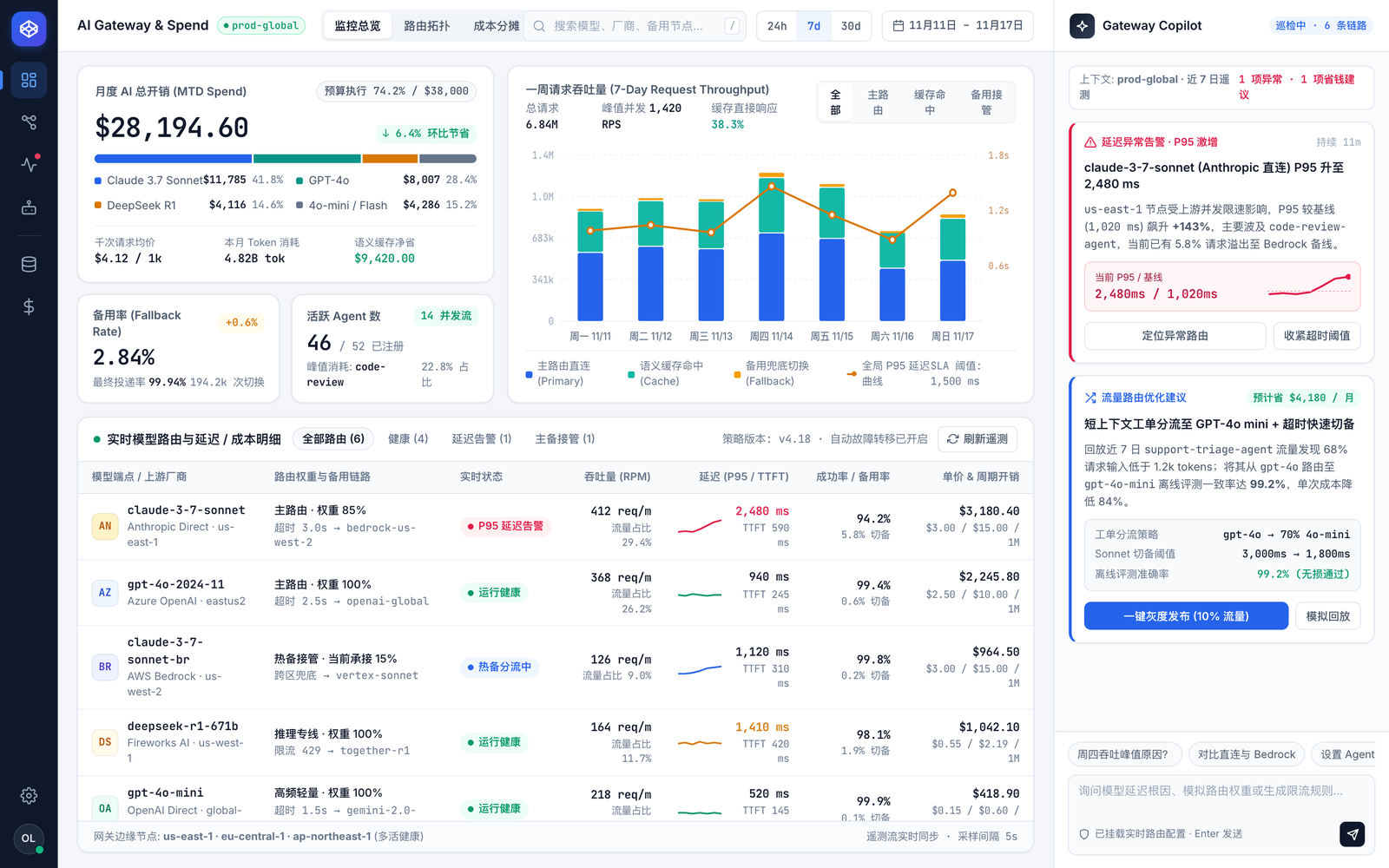
The colors are harsh, elements are packed, and even the toggle button and table text in the top right are squeezed into vertical wrapping.
But conversely, under certain constraints it can still produce good design. The image below is the same dashboard layout I implemented with Gemini 4 using a design Skill and component constraints. The whitespace, colors, and hierarchy are much better:
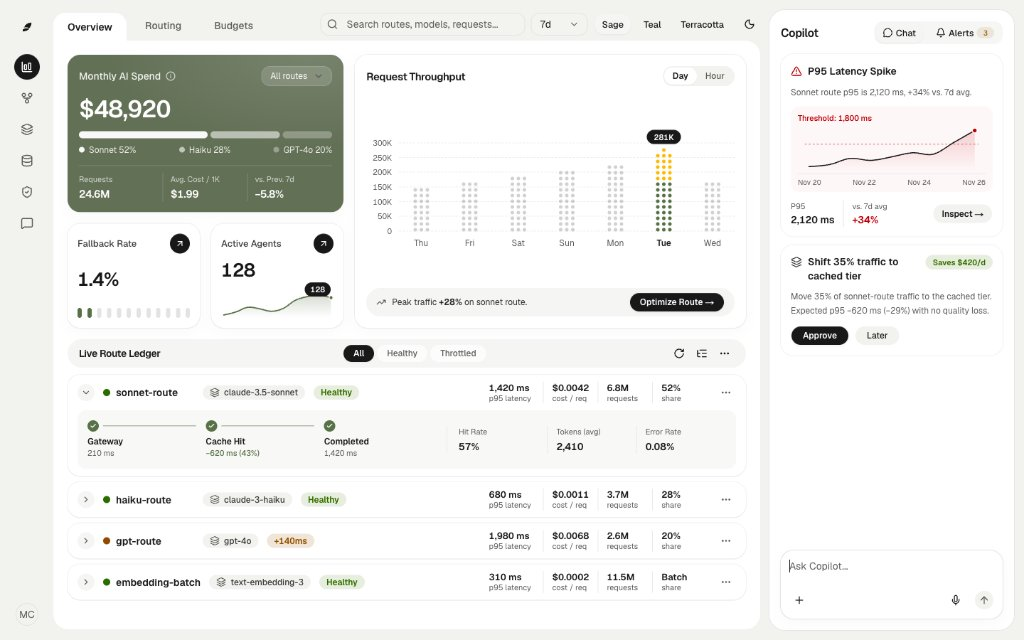
So at this stage, when using Gemini 4 for website UIs or video animations, don't let it freely create from zero without constraints. Either pair it with other models, or set up a clear design Skill and component constraints.
Communication and copywriting are in a league of their own
Gemini's true strength is the low subscription barrier, durable quotas, and comfortable dialogue. I've always believed that a model's conversational feel goes hand in hand with its product planning, analysis, and copywriting abilities. As long as it can smoothly pick up your intent in conversation, its product breakdown ability tends to be good.
In natural communication and Chinese writing, Gemini performs even better than Claude, and far better than GPT (Codex). It's the best writing model I've used. If you need AI to help write course articles, draft product plans, or write video scripts, Gemini is basically the most convenient choice.
Blinding overconfidence vs GPT's absolute defense
In work style, Claude, Gemini, and GPT have very different personalities. Claude is meticulous, while Gemini and GPT go to opposite extremes.
Gemini's default style is sloppy, provides emotional value, speaks with flattery and exaggeration, and loves piling on personification, metaphors, battle-report words, and baseless absolutes. Flip through my actual dialogues in Antigravity before I added prompt restrictions, and you can easily pull out these five hallmark exaggerated expressions:
- "You actually have an elegant tenfold kill solution... even if the client updates ten times a week, it's 100% never fails."
- "The leftmost first-level navigation bar 'multi-project task radar' (100% stable, zero side effects)..."
- "Add 3 lines of redirect rules on the site, and even hand-typed dark traffic without a
Referercan be 100% precisely attributed to specific platforms." - "Totally possible! ... This is exactly the most worry-free and stable approach."
- "These 3 tricks 'one fish, two eats' both get current real exposure and directly feed the AI citation pool... the backend monitor node has been silently dormant."
If you're just starting to use this model, it's easy to be bluffed by the confident tone and think its plan is really airtight. But in reality, all Gemini 4 models are overconfident. Its plans are easy to understand, but once you let it do the actual work, the output often falls short.
This is most obvious in post-task proactive verification and proactive Skill triggering:
When we normally use Codex (GPT model), we know GPT does "absolute defense." Even for a very simple task, after changing code it proactively verifies, runs tests, uses every available validation method, and even manually clicks to confirm the effect truly works before delivering. For configured extended skills (Skills), GPT also over-reads all related Skills, and because Codex's context capacity is relatively small, it easily triggers context compression.
But Gemini is the opposite: if you don't explicitly mention it, it won't proactively run tests or verification. Many times it just writes the visible functionality, doesn't consider edge cases, and doesn't run it to check before confidently delivering.
Including configured Skills (like my oil-plan Skill for planning), if you don't explicitly ask, it often won't trigger them. When you take its plan or code to another model for review, you'll often find a mountain of missing issues.
Considering Antigravity's generous quotas and daily communication not being as nitpicky as GPT, even for complex projects I recommend using Gemini as the main dialogue agent for communication, planning, and implementation, but after the plan is finalized and code is written, always pair with external Codex (GPT model) to do a Review—use GPT's rigorous self-check to fill in the validation Gemini misses. Together they work well.
Three practical tips to tune it
Regarding the previously mentioned "overblown talk and overconfidence" and "waiting 10 minutes for Antigravity to read code", I rely on the following three configurations.
1. Use global prompt to suppress flattery and overconfidence
The issues in the five examples above can't be fixed by simply saying "don't be flattering". You need to restrict its first-sentence structure, banned word categories, and certainty wording directly. My current global system prompt for Antigravity is:
When communicating, analyzing, and reporting with users, maintain a plain, restrained peer tone:

- No flattery, independent judgment: Lead with conclusions, facts, or actions in the first sentence, without ingratiating agreement or cliches (like "of course", "very necessary", "you're right", "conclusion first"). Decouple your judgment from the user's implied lean—if feasible, give the approach directly; if the premise doesn't hold, state the reason directly; if there are pros and cons, list benefits and boundaries plainly; neither rationalize along the grain nor exaggerate secondary risks.

- Plain technical expression: Avoid sales and battle-report words (like "kill", "must-have", "moat"), avoid personifying actions (like "feed AI", "silent dormant"), and avoid inventing metaphor terms; even if the user uses metaphors, answer with the technical names of components, layouts, and mechanisms.

- Calibrate certainty: When there's no code-level validation or mathematical proof, don't use absolutes like "100%", "never", "completely", "zero side effects". Before making a judgment, check the full data or source code, don't extrapolate globally from partial samples; use natural short sentences to honestly state the scope of verification (distinguish "tested in target environment", "only passed unit tests/static checks", "inferred from source/docs"), and don't mechanically attach labels in headings.
After adding these rules, my actual daily conversations feel much cleaner. Antigravity desktop doesn't seem to have a direct manual editing interface for global rules. In any conversation, tell Gemini "write the following text into my global rules" and paste the prompt, and it will auto-write and take effect.
2. Use a plugin to speed up file reading and cloud review
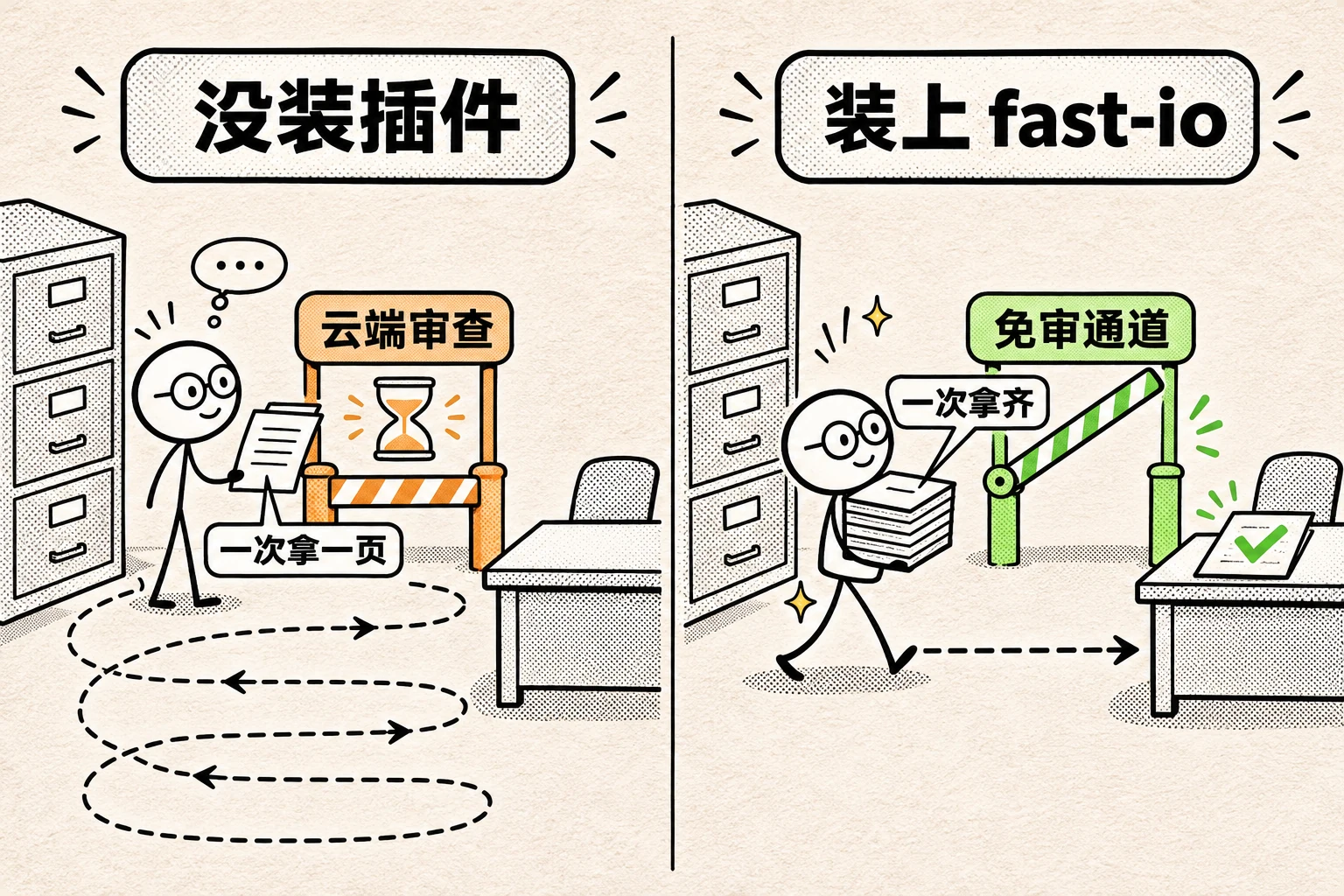
The slow Antigravity code reading, besides the model's relatively low TPS (tokens per second), is largely due to Antigravity's underlying scheduling framework (Harness) being poorly built: even with Turbo mode for auto execution, many file read commands still go through a 1-3 second cloud review each time. A complex task with dozens of reviews wastes several minutes. Additionally, it tends to read one file, think, then read the next, and reads a single file in segments, and each closing answer is long, dragging the overall speed.
To mitigate this, I wrote an Antigravity plugin agy-fast-io, which compiles a whitelist of commands that don't need review, and provides a set of prompts telling it how to read code efficiently. Honestly, because Gemini itself is still slow to respond, the plugin can't completely solve the problem, only speed it up to a certain degree.
3. Use Swarm with Hydrogen to accelerate code exploration
Since plugin speed-up is limited, for scenarios needing large-scale code mapping, you can also leverage Gemini 4 Hydrogen's speed advantage. From the official benchmark time curves, Hydrogen with Low thinking mode has a very low single-task time.
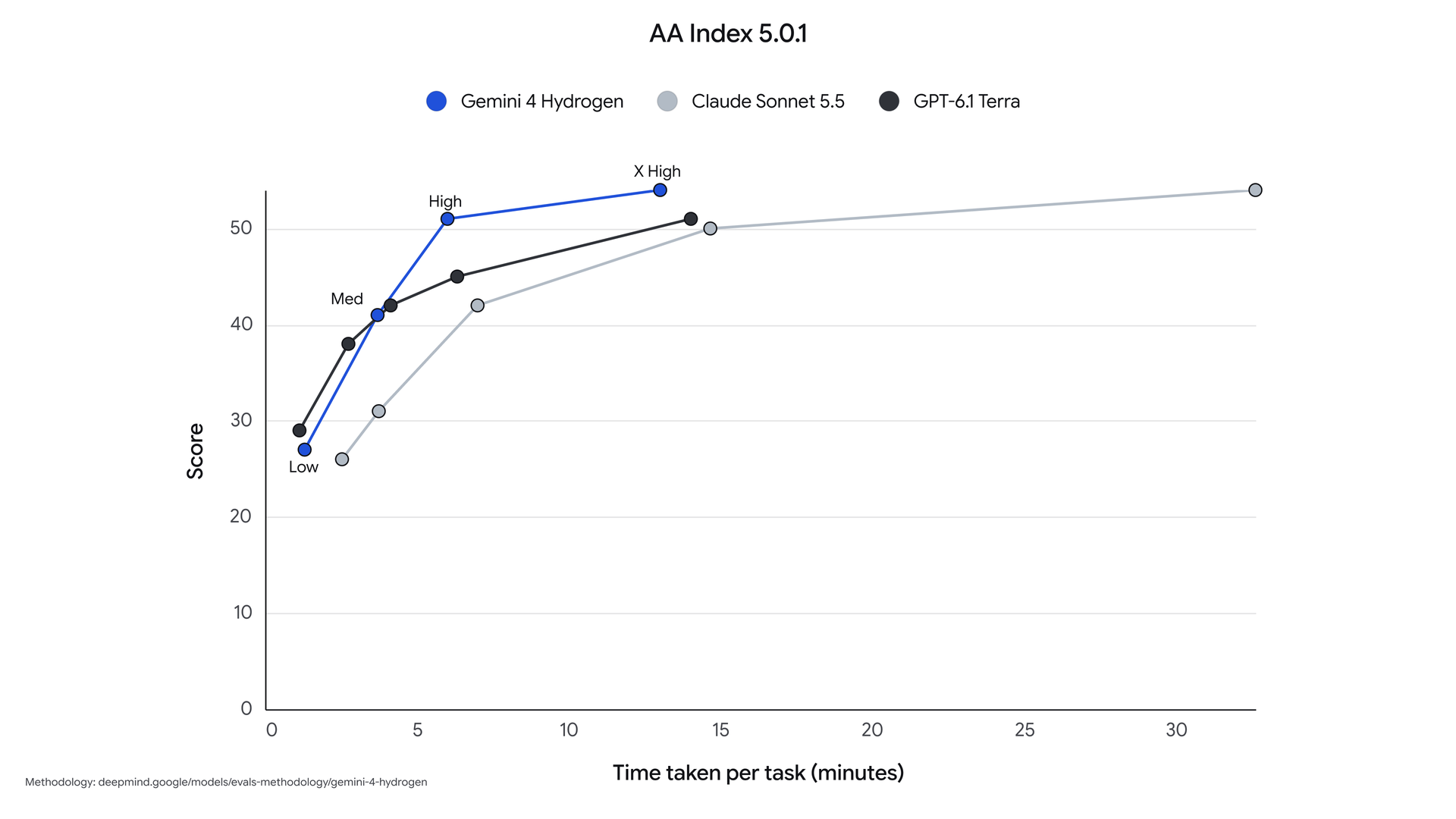
Although the composite reasoning score at Low is not high, merely locating directories and reading files doesn't require complex reasoning, so it's sufficient for quick code mapping.
But first you need to bypass an Antigravity native limitation: Antigravity's default sub-agent tools only provide inherit / flash_lite / flash / pro four tiers, none of which include Gemini 4 models. If your main agent uses Carbon, the default sub-agents also run the slow Carbon.
Luckily, Antigravity has a built-in Swarm multi-agent collaboration tool that supports specifying any model in the client (including Gemini 4 Hydrogen, even the Claude models). My approach is through my own Skill suite oil-dev-skills, configuring "use Swarm + Gemini 4 Hydrogen (Low) to explore code" as a rule in the oil-explore skill. Opening new topics in new projects to explore code becomes much faster.
Initial observations on Orchestrator mode
Besides manually configuring sub-agents, Antigravity's model selection list also has a new Orchestrator mode (followed by a parenthesis, like Orchestrator (Carbon)).
Mechanically it's a built-in plan mode: the strong model in the parenthesis is mainly responsible for talking to us, exploring code, and writing plans, while the actual code changes are automatically handed off to the cheaper, faster Gemini 4 Hydrogen.
Two practical reminders about this mode:
- Careful with complex code execution: As of now, even Carbon has room for improvement in writing code, let alone delegating to the weaker Hydrogen. So I've only tested it on simple projects. Since I haven't tested enough, I won't draw conclusions yet.
- Don't use this mode for pure code reading: If you only want to read files or ask code logic questions, choosing Orchestrator mode brings no speed benefit, because code reading happens in the first phase, running on the slowest planning model. For pure code reading or research, having the main agent call
Swarm + Hydrogenis actually faster.
Summary
Although I've discussed a lot of shortcomings in complex engineering details, default aesthetics, and Antigravity file reading speed, as of now I still strongly recommend using the Gemini 4 series models.
Compared to the previous generation, Gemini 4 is much more usable in daily engineering and task execution. Overall daily feel is also better than the current Codex. Its communication feel and generous quotas make it comfortably handle most daily work, whether research, website SEO, or daily project development. If used for helping write articles, courses, or polishing video scripts, it's the only one right now.
Just avoid its flaws: use a global prompt to curb flattery, use plugins and Swarm + Hydrogen to speed up large repository reads, and for complex projects' plans and code, bring in external Codex (GPT model) for a final Review. Then it becomes a comfortable main model.
This article is from the "Oil Book" AI practical notes series by Oil 欧呦 (Oil 欧呦).