OctaFuse Gateway 2.19.0: Unified Admin UI and 23 New Model Presets
OctaFuse 2.19.0: Reworked Admin Console Interface and Interaction, Model Catalog Updated in Sync
Author: 程序猿DD Tags: Backend
OctaFuse Gateway 2.19.0 focuses on the admin console: it unifies the visual style, reorganizes filters, details, and forms across route, model, provider, log, user, and MCP pages, and fixes a batch of query and navigation issues.
The model and provider catalog is updated in sync, adding 23 model presets, including Claude Fable 5.2, Zhipu GLM-5V-Turbo, Hunyuan HY4, and GPT Image 2.6.
This version requires no database migration, and no new or renamed environment variables or system_config keys. The data plane (Proxy and Core) has only two changes: the Qwen-Audio speech synthesis adapter match, and Command Code quota query. During upgrade, note the change in admin entry points and that new catalog items require manual import.
01|Admin Console: Unified Style, Organized Page Interactions
This version focuses on interface and interaction organization, aiming to make common operations more direct and information hierarchy clearer.
- Unified style: Light-gray workspace, white panels, black primary actions; the hierarchy of titles, filters, tables, and status is reorganized, and functional areas make full use of available width. The login page and navigation use a new blue-cyan Octafuse logo.
- Dialogs and forms: Edit, detail, import, pricing, and confirmation dialogs unify layout and keyboard focus; forms add exit confirmation for unsaved drafts. Pages adapt to narrow screens, four languages (Chinese, English, Japanese, Korean), and the "Reduce motion" setting.
- Top bar and navigation: Language switcher moves to the top right, alongside the documentation entry.
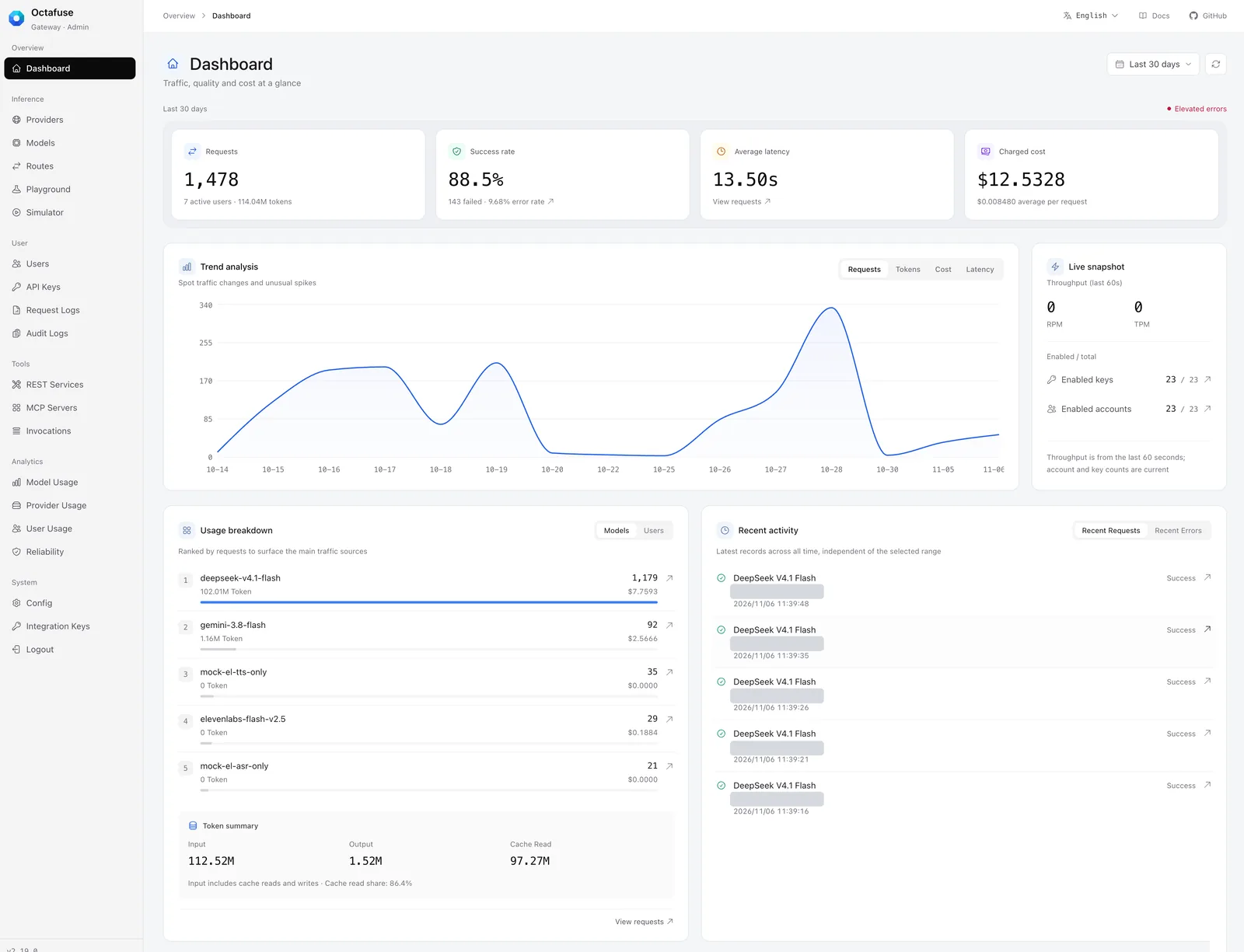
Dashboard after unified style (English interface, time range last 30 days). Bottom right shows new Token summary and recent activity; user emails are masked.
The dashboard overview cards are now equal height in a row, and token summaries for input, output, and cache reads are added. It also adds two sections: "Recent Activity" and "Real-time Overview". Recent activity shows the latest global records and does not change with the time range above; throughput in real-time overview is based on the last 60 seconds.
02|Entry Point Changes
After upgrade, the following entry points have changed location compared to the old version; the first two need to be communicated to other admins on your team.
| Item | 2.18.0 | 2.19.0 |
|---|---|---|
| Maintenance mode | Sidebar "System → Maintenance Mode" | "Maintenance Mode" section in "System → Configuration"; old URL auto-redirects |
| Integration keys | Separate "System Integrations" group | Folded into "System" group |
| Global configuration | One page flat | Divided into four sections: "Basic Settings", "Routing & Billing", "Notifications", "Maintenance Mode"; each item saves separately |
| MCP service page | "Client Access & Authorization" | "Client Access"; OAuth settings and access tokens remain in this section |
| Catalog update | "Check Official Updates" on model and provider pages | Unified as "Sync": first compare differences, then apply after confirmation |
Maintenance Mode
The functionality of maintenance mode hasn't changed: during maintenance, inference requests receive a 503 response, while health checks and read-only interfaces are unaffected. This version reorganizes the form: it centralizes duration, message text, and affected scope, and explains that during maintenance inference requests return 503 and health checks and read-only lists are unaffected.
Two points to note: custom estimated duration must be a positive integer in minutes; the estimated duration is only used for client-side display, and maintenance will not end automatically when the time expires; it still requires manual termination.
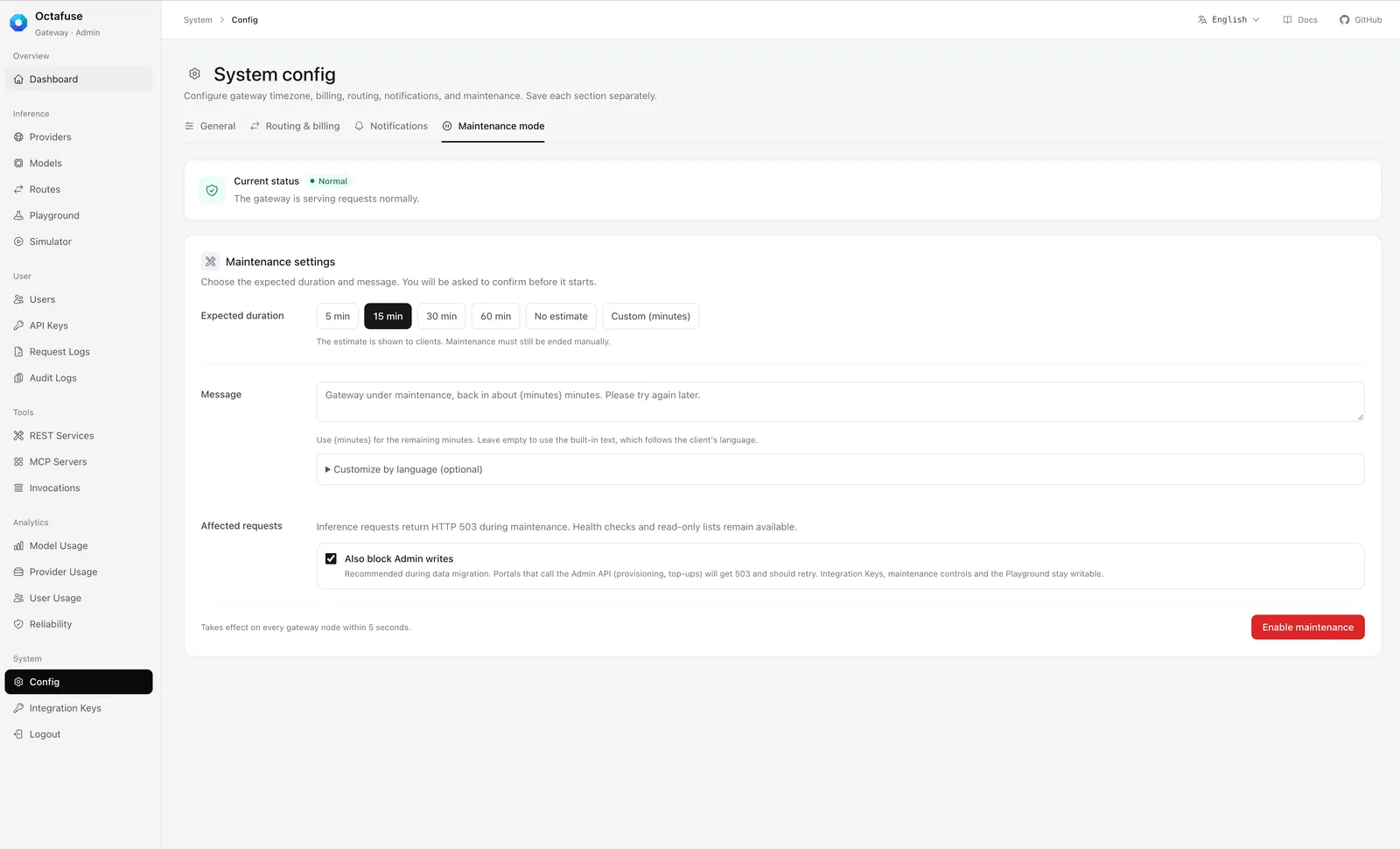
Maintenance mode is now in a section on the "Configuration" page (English interface, currently not in maintenance). The note next to the estimated duration explains that the duration is shown to the client, and maintenance still needs to be ended manually.
Catalog Sync
The model and provider pages now use a unified "Sync" entry. Clicking it first compares against the official catalog, the results are displayed centrally, and changes are applied only after confirmation. Already-imported models and providers are not overwritten, and prices default to preserving current values. Duplicate status displays have been removed from the same page.
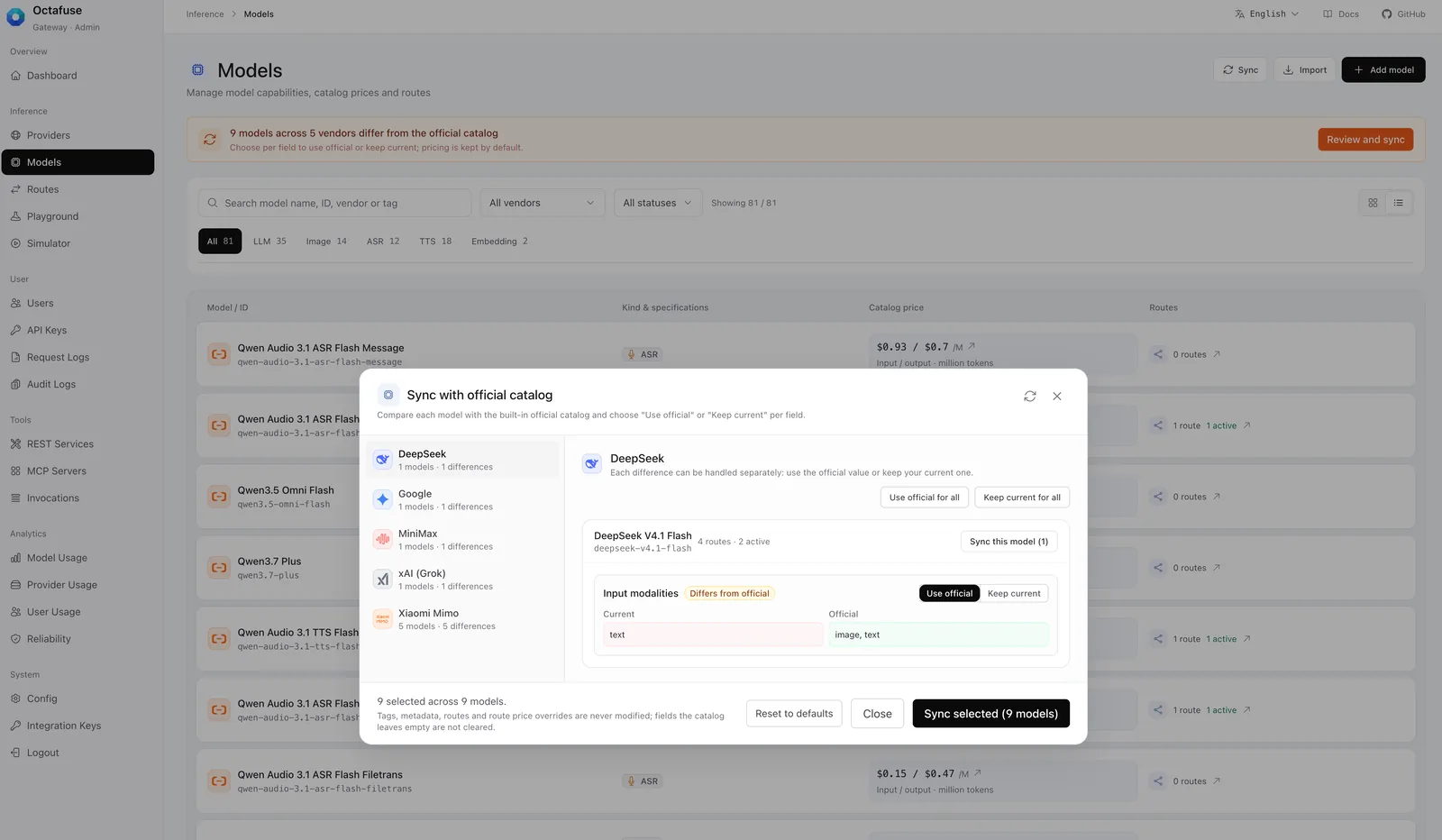
Clicking "Sync" first compares differences (English interface). The top of the page notes that prices are preserved by default, and tags, metadata, routing, and price overrides are not modified.
03|Key Changes on Each Page
Below are the changes most likely to be noticed in everyday operations.
- Providers and Models: Import and creation are centralized in the title area. The model page supports search by name, ID, vendor, or tag; the import dialog merges name and ID. Vector models only show input unit price; unconfigured scheduled pricing is collapsed by default.
- Routing: Request entry, route group, provider, and cost comparison are distinguished by model. Low-frequency filters, multipliers, paths, and sticky refresh preferences are collapsed into dialogs. "Configuration available" on the page only means both route and provider are enabled; it does not represent real-time health. Image and speech billing units are displayed according to actual billing configuration.
- Debug console and simulator: Layout for connections, targets, requests, and responses is reorganized; the simulator adds key filtering. During request sending, connection and target are locked.
- Users and API keys: Lists focus on identity, status, and quotas; full user IDs move to the detail view. When creating keys, you can search existing users, manually enter a user ID, or use an external identity; keys are masked by default.
- Request logs: Common filters are placed on top, advanced conditions are collapsed below. Time range supports business timezone, can set only start or end, or no time limit; quick ranges become direct text like "Last 1 hour" and "Last 7 days".
- Audit logs: List shows event, identity, and quota change summary; details are divided into overview, field changes, and raw record, with the ability to copy the audit ID.
- REST and MCP services: REST services consolidate connection, billing, testing, and enablement into a single dialog; saving only submits the current service, and unsaved changes can be reverted. The MCP service page adds an "Invocation Records" entry.
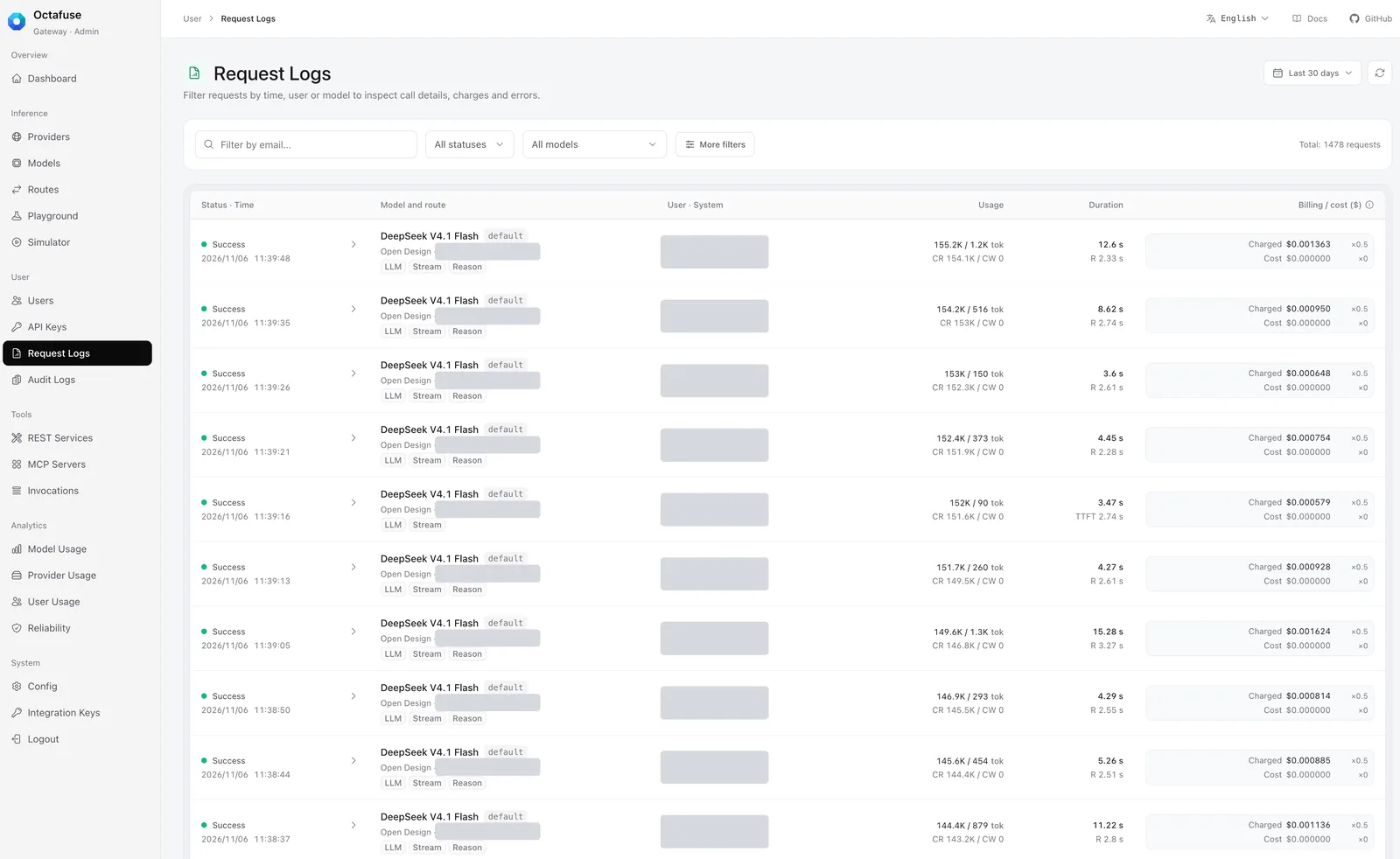
Request log list (English interface). Common filters are at the top, other conditions collapse into "More Filters". The USER · SYSTEM column and vendor accounts are masked.
04|Bug Fixes
- Logs and queries: Fixed request log default date, reload after clearing time, and time boundaries for historical error drill-down; prevented stale query results from overwriting current results. Fixed invocation record query overwrite, MCP drill-down scope loss, and historical identity filter issues.
- Status and error handling: Fixed maintenance status polling overwriting just-written results, and the simulator auto-generated
task_idbeing misjudged as manual edits. Added retry entry for REST and MCP load failures; prohibited writes before OAuth configuration loads successfully. - Log compatibility: When upstream returns HTML error pages, the list shows only a summary, with full content preserved in request details; audit details are compatible with missing snapshots and non-object extension data.
- Controls and dialogs: Unified dropdown arrow positioning, added keyboard navigation for collapsed descriptions, and close and scroll layout for user activity details.
05|Model and Provider Catalog
Compared to 2.18.0, the catalog adds 23 model presets. Already-imported models are not overwritten, and import does not automatically attach routes; new models need to be manually imported and routes configured.
Key Models in This Release
| Model | Description |
|---|---|
| Claude Fable 5.2 | New claude-fable-5-2 (2026-11-09), context 1M, max output 128K, input supports text, image, and file. Standard list price: input $8, output $40, 5-minute cache write $10, cache read $0.20 / million tokens, excluding Fast mode and Batch discount. CNY price is a placeholder at USD ×7, verify before use. |
| Zhipu GLM-5V-Turbo | New glm-5v-turbo, context 200K, max output 128K, input is text, image, video, and file. CNY list price has two tiers based on input length (input length under 32K: input ¥5, output ¥22, cache hit ¥1.2; 32K and above: ¥7 / ¥26 / ¥1.8, all per million tokens). Official USD price is not published, so the catalog has no USD price. |
| Hunyuan HY4 | New hy4 official version (2026-11-04), context 1M, max output 64K, supports text and image input, natively supports Chat, Responses, and Anthropic Messages on TokenHub. List price follows hy4-preview: input ¥6, output ¥18, cache hit ¥0.3 / million tokens. TokenHub's limited-time 50% discount is not included in catalog prices. |
| GPT Image 2.6 | New gpt-image-2.6-flare and gpt-image-2.6-sunburst (2026-11-04). List price is the same as GPT Image 2.5; CNY price is a placeholder at USD ×7. Only supported as Images API; cannot be used as a main model for Responses or Chat Completions. New complexity, svg / gif output, and GIF frame parameters are forwarded as extra fields; do not write them as route defaults. |
Other New Presets
| Vendor | New Models |
|---|---|
| OpenAI | gpt-5.5-pro, gpt-5.4-pro, gpt-5.2-pro; speech recognition gpt-transcribe, gpt-live-transcribe, gpt-realtime-whisper; image gpt-image-1.5, gpt-image-1-mini |
Image gemini-3-pro-image, gemini-3.1-flash-lite-image |
|
| Alibaba Cloud | Speech synthesis qwen-audio-3.1-tts-next, qwen-audio-3.1-tts-plus; vector qwen3.7-text-embedding-flash |
| StepFun | step-5-preview, step-3.5-flash, step-1o-turbo-vision |
| Zhipu | glm-5.3-flashx-legal (legal domain service spec), glm-ocr (document and image parsing) |
Full specs and prices are in the Model Catalog.
Tencent Cloud TokenHub Template
Pay-as-you-go templates now use the Guangzhou site tokenhub.tencentmaas.com, supporting Chat, Responses, Embeddings, and Anthropic Messages. The individual Token Plan uses /plan/v3 and /plan/anthropic, with Responses added. The general package and Hy package share the same address and sk-tp- prefixed keys; the Singapore site tokenhub-intl.tencentmaas.com requires separate configuration.
Retirement Dates and Context Corrections
- Gemini 2.5:
gemini-2.5-proandgemini-2.5-flashhave been recorded with the shutdown date 2026-12-01 announced by Google. From that day, Google will automatically route requests togemini-3.8-flashandgemini-3.5-flash-literespectively; check relevant routes in advance. - Other retirement dates:
gpt-image-1.5andgpt-image-1-miniare 2026-12-01,qwen3.5-plusis 2027-01-19. Only official shutdown dates are recorded; routing and billing are unaffected. - Context and max output: MiniMax M2.5, M2.7, M2.7 Highspeed unified to 200000;
hy4-preview, Doubao Seed 2.1 Pro / Lite (260915), and MiMo V2 Pro, V2.5 Pro, V2.5 unified to 1000000, recorded with K = 1000, M = 1000000.
06|Other Updates
- Qwen-Audio speech synthesis:
dashscope-tts-qwen-audioand DashScope'saudio.speech,audio.speech.streampassthrough now supportqwen-audio-3.1-tts-nextandqwen-audio-3.1-tts-plus; preset billing is unchanged. - Command Code quota: Added monthly included quota; subscription or usage query failures do not affect display of balance, 5-hour, and weekly windows.
Upgrade Notes
Upgrading from 2.18.0 to 2.19.0 does not require database migration. When upgrading from earlier versions, any pending migrations from the interim must still be applied.
- Update Proxy, Admin, and migrate images to the same version, then rolling restart.
- After upgrade, spot-check routes, request logs, debug console, and simulator to confirm filters and navigation behave as expected.
Also note during upgrade:
- Admin entry points: Maintenance mode and integration keys have moved; see "Entry Point Changes" above. The old maintenance mode address redirects to the new location.
- New catalog items: Claude Fable 5.2, GLM-5V-Turbo, HY4, GPT Image 2.6, etc., require manual import and route configuration. Catalog updates do not overwrite already-imported models and providers.
- Gemini 2.5: Starting 2026-12-01, Google automatically reroutes; check relevant routes in advance.
Full changes are in GitHub Release v2.19.0 and the Changelog.
If OctaFuse helps your project, feel free to give a Star on GitHub and submit PRs. We are also looking for part-time or full-time partners interested in the project.