juejin-cli: A CLI Workflow That Humans and AI Agents Can Rely On for Publishing
juejin-cli is a command-line tool that connects local Markdown to the Juejin publishing process. This post discusses how it enables humans and AI agents to share a reliable writing workflow. It now also manages check-ins, lottery draws, and can start a daily check-in task on a schedule of your choice.
This article was automatically published with juejin-cli, details below
Installation and usage guide · GitHub open-source project · npm package
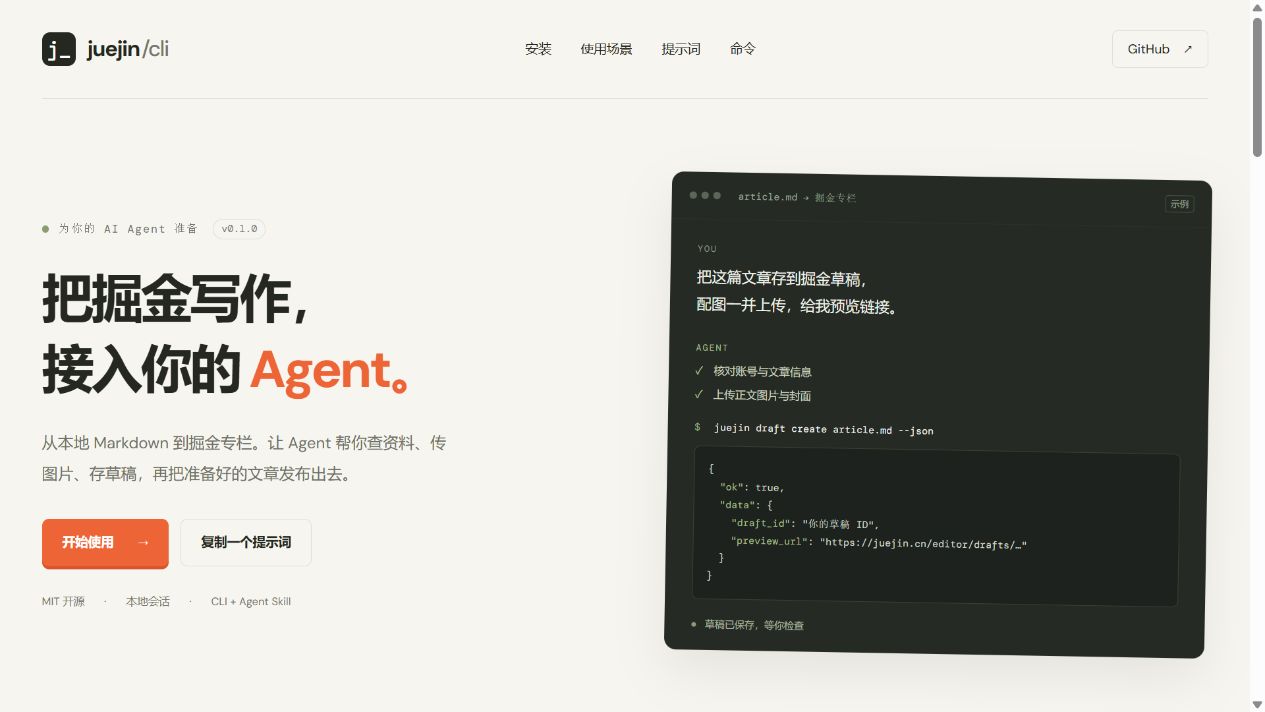
The website provides installation commands, usage scenarios, and copyable agent prompts. The image above is an actual screenshot.
After writing a technical article, there is still repetitive work before publication: filling in categories and tags, uploading images, creating a draft, selecting a column, and confirming the platform accepts the submission. Once you have accumulated more than a dozen articles, these steps are worth turning into a repeatable workflow.
I built juejin-cli hoping that local Markdown could become the entry point for writing, allowing both humans and AI agents to complete querying, draft management, and publishing through the same set of commands. The first version is already published to npm. This post combines implementation details and real publishing tests, recording a few design issues that matter more than 'wrapping an HTTP request'.
1. Let commands describe capabilities, let structured results connect the next step
Ordinary users can view help; agents need to know parameters, required fields, and valid options. juejin-cli generates a schema from the same Commander command definitions, avoiding the situation where a command has been modified but a separate hand-written description has not been updated.
juejin schema article publish --json
juejin draft create ./article.md --dry-run --json
In --json mode, a JSON document is returned on stdout on success, and an error document is returned on stderr with a non-zero exit code on failure. Callers can read the draft_id from this output and pass it to later update or publish commands, without having to guess from natural language.
This is part of interface design. For agents, a stable result structure and clear failure semantics directly affect whether the entire workflow can continue.
2. Put responsibility boundaries where changes happen
The executable entry point only starts the CLI. Domain commands are registered in src/cli/commands/, dependencies are assembled in context.ts; platform requests and types are placed in src/platform/juejin/, and the HTTP layer uniformly handles business errors and empty data.
Markdown parsing, image path recognition, and body replacement are placed in src/content/. Sessions, browsers, and Skill installation belong to the runtime. Write flows such as drafts, columns, and publishing are orchestrated by WritingService, which handles locking, read-merge, and operation receipts.
This split has a practical benefit: when platform APIs change, the platform layer can be modified centrally; when user tips need adjustment, CLI display can be changed; the SDK and CLI still reuse the same underlying capabilities. Command trees are also instantiated per call, avoiding parameter pollution from multiple runs in the same process.
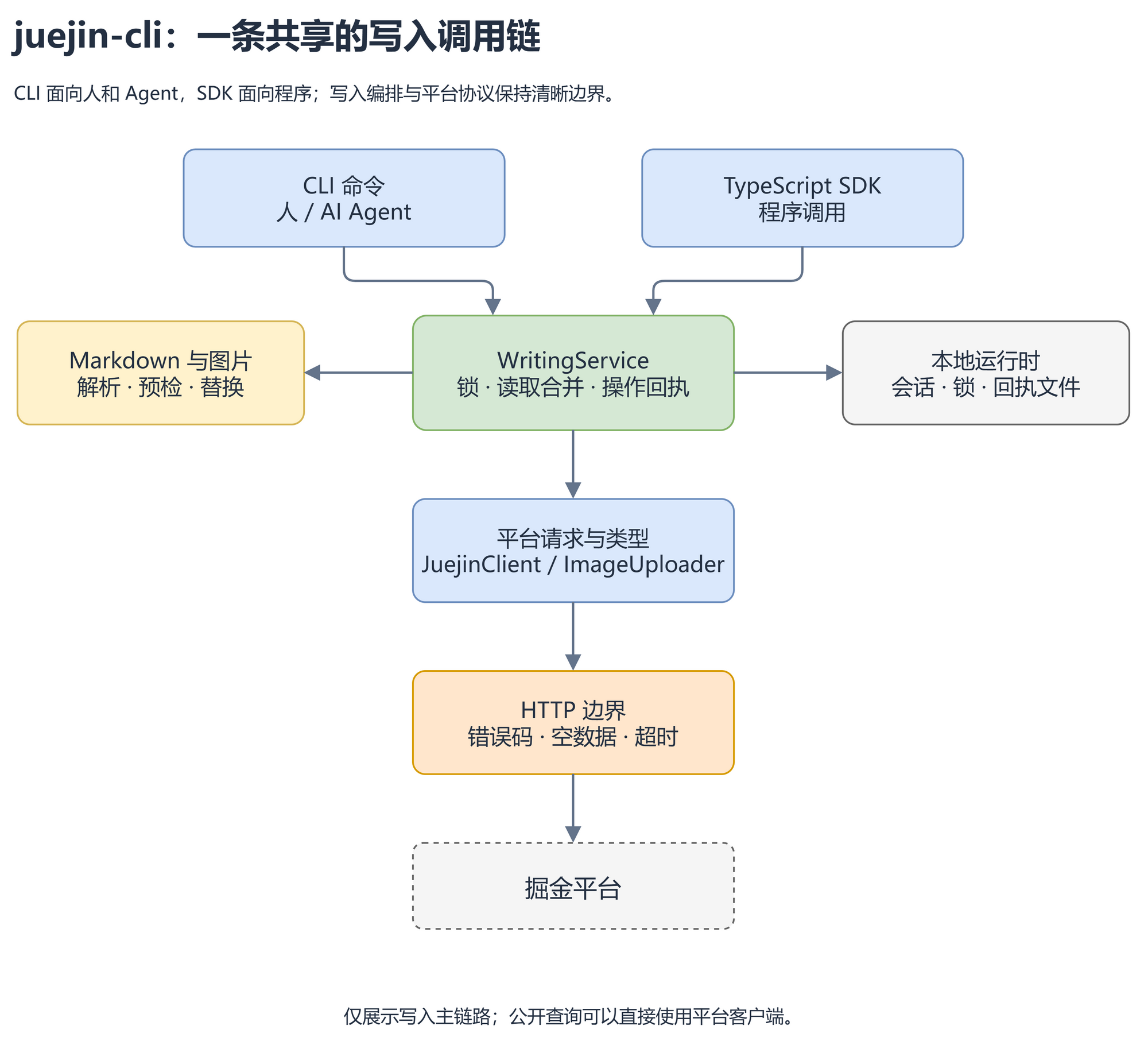
In the diagram, SDK refers to interfaces that programs call directly. Both entry points share write logic, avoiding different business behavior between command line and programmatic calls.
3. Markdown is input; publishing configuration should also be reusable
Article files can carry frontmatter, placing title, summary, category, and tags next to the body:
---
title: My TypeScript Practice
brief: Here is a fifty-to-one-hundred character summary of the article, outlining the problem, method, and result.
category: Dev Tools
tags:
  - "6809640543006490638"
---
The summary above is just a field illustration; the actual content still needs to meet the length requirement. Tag IDs are stored as strings; this also avoids the precision issue of JavaScript for large integers.
Local image paths are relative to the article file. Before upload, the file is checked for existence and supported format; after upload, the body references are replaced, while the original Markdown remains unchanged. For authors, articles and assets can still be managed in their own directory or Git repository.
Fixed information is suitable for templates, but templates should not fabricate content for the author. Tutorials fit the 'problem-implementation-verification' structure, troubleshooting records fit the 'symptom-location-fix' structure; publishing configuration prefers the article's existing information and the user-specified column. Stylistic judgment requires understanding content; the command line is responsible for faithfully executing an already-organized file. The new version bundles writing principles and draw.io drawing skills together, so agents can directly read local guides, decide chapters based on materials, and export editable diagram sources as clear illustrations.
4. Write timeout does not equal write failure
The most easily overlooked situation is: the platform has already saved the draft, but the client did not receive a response. In that case, automatic retry of creation may produce a second draft; the same applies to publishing operations.
juejin-cli does not automatically replay writes after request exceptions or timeouts. Before and after write operations, it records an operation ID, the stage, and any known draft or column IDs. Later, receipts can be viewed:
juejin history --json
Receipts cannot eliminate network uncertainty, but they leave clues for the recovery process. Users or agents should first verify the remote state before deciding whether to continue. Existing draft IDs should be reused; use draft update to update the article instead of creating another draft.
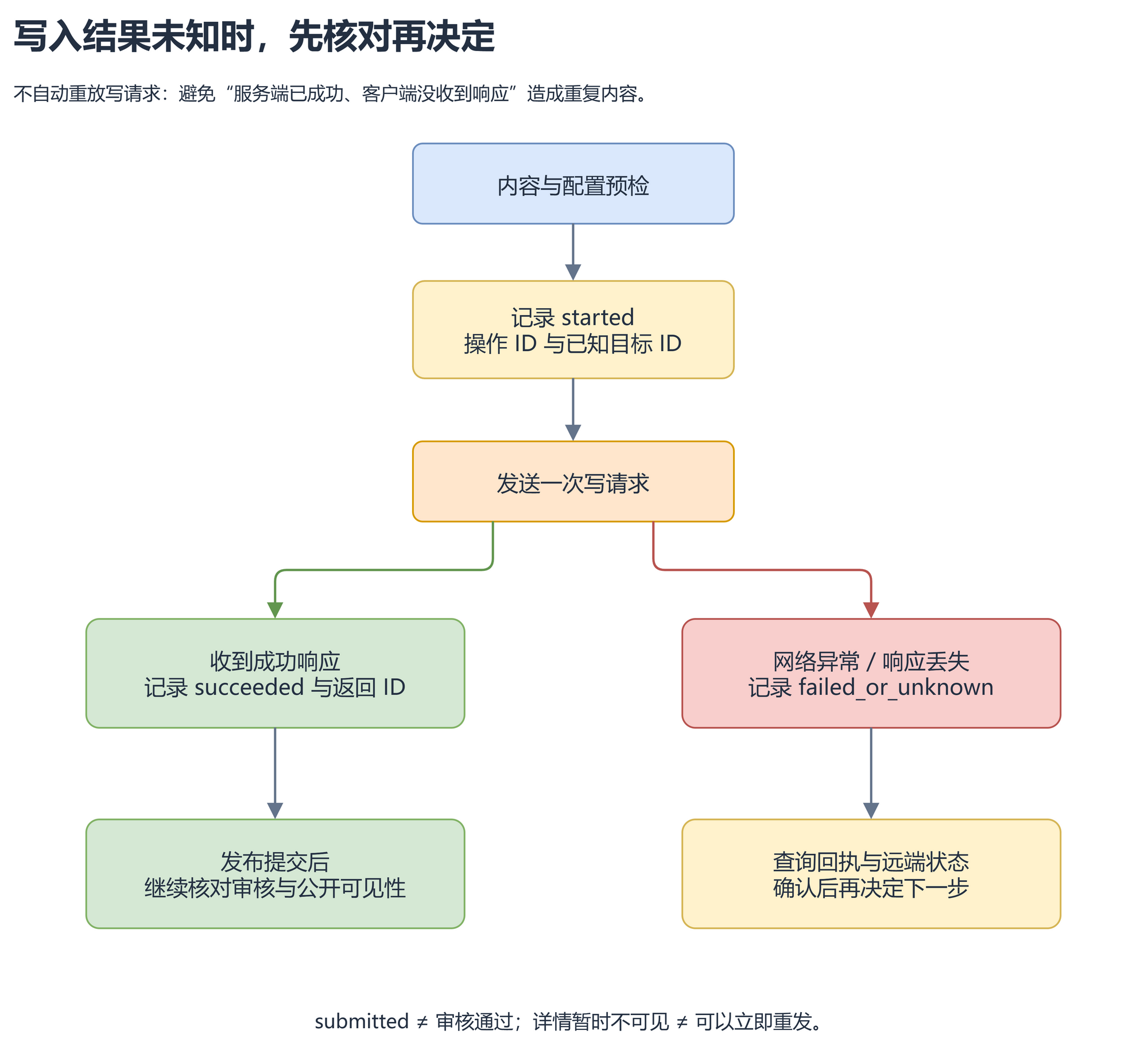
This last branch does not automatically return to 'send request'. It preserves the uncertain state, giving the recovery process a basis.
Similarly, submitted in the publish result only means the platform accepted the submission. When review or indexing is not complete, the public details may be temporarily invisible. The tool should make this distinction clear to avoid users mistaking it for a failed publish and resubmitting.
5. Speed optimization first comes from reducing unnecessary work
In real testing, the draft preparation stage resolved tags by name, and even when finding an exact match, the original implementation continued iterating through subsequent tag pages. This improvement makes exact matches terminate immediately, while preserving complete results for public tag search.
A more direct approach is to write confirmed tag IDs into templates. This way, every article save doesn't need to re-search the name. It reduces unnecessary reads and does not change the principle of not auto-retrying write requests.
For users, waiting also needs understandable feedback. The 0.2.0 update adds waiting prompts in normal mode and states review status after submission. JSON mode continues to provide stable single-document results for automation consumption.
6. Batch publishing needs preflight and progress, not just a loop
This round adds a directory-level publishing entry: unify preflight of all Markdown files in the same directory, then publish one by one to a specified column, saving each article's draft ID and article ID.
Its key constraint: find input errors first, then start writing; articles already confirmed complete can be skipped; when the result of the last write is unknown, stop automatic execution and prompt to check the receipt. Otherwise, a simple loop easily creates duplicate content after an interruption.
Directory-level publishing is available in 0.2.0; the 0.1.0 release does not include this command. The architecture discussion does not mean all goals are implemented: for example, the actual behavior of the search API's limit, review status queries, and test content cleanup still need further work.
7. Hand the daily check-in to system scheduling
This time I added check-in capabilities to the CLI. In addition to executing a check-in once, it can view today's status, consecutive days, last month and previous month records, ore balance, and make-up check-in cards. checkin run first queries today's status; if already checked in, it directly returns already_checked_in. It shares the account write lock and operation receipt with article publishing, and after a request timeout, it first checks the result before deciding the next step.
juejin checkin status --json
juejin checkin run --json
juejin checkin stats --json
juejin checkin balance --json
Typing it manually every day is still easy to forget. I separate 'execute once' from 'when to execute': the CLI is responsible for completing this check-in, and the system scheduler is responsible for invoking it daily. To run at 9 AM every day, you can enable a task called daily:
juejin checkin schedule enable --at 09:00 --name daily
juejin checkin schedule status --name daily
juejin checkin schedule disable --name daily
Enabling the same task name again updates the time. Each time the task starts, it executes checkin run --json, writes the result to a local log, and exits. Task time uses the computer's local timezone; check-in date is calculated by Beijing time. The computer needs to be online and the current user environment must be available. After session expiration, re-login is needed, and errors remain in the log.
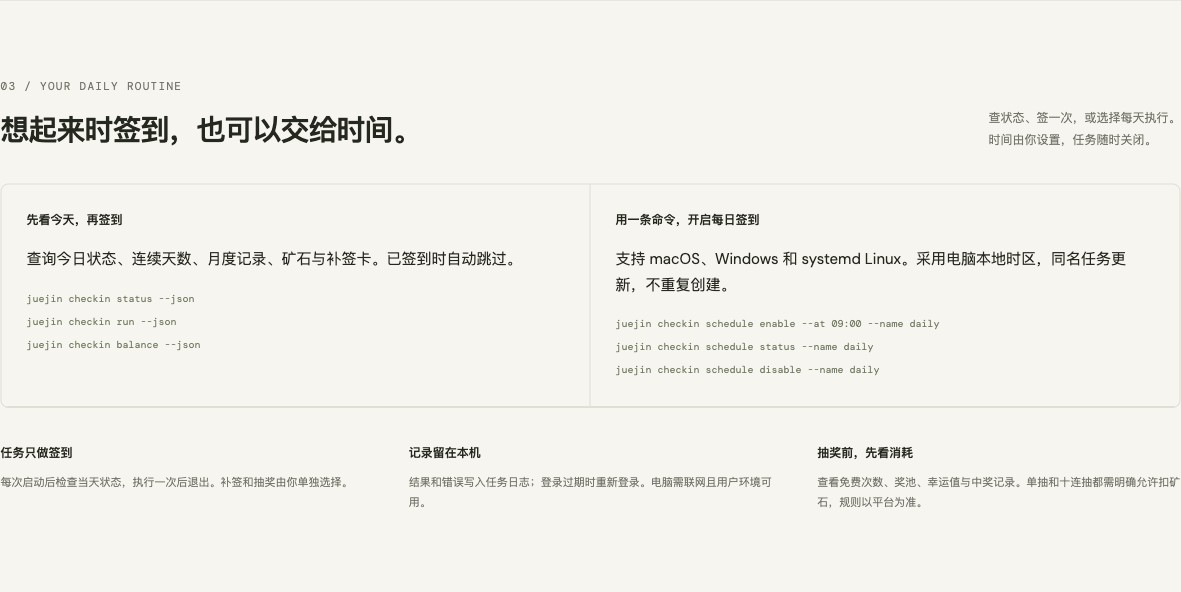
macOS uses launchd, Windows uses Task Scheduler, and Linux uses systemd user timers. I tested registration, status query, removal, and triggered the runner via a side-effect-free test entry on macOS; Windows and Linux task definitions and lifecycle are covered by offline tests, and native environment verification still needs to be supplemented.
Make-up check-in and lottery draws each have their own commands. Make-up requires a date within the last thirty days, excluding today, and uses --dry-run first to preview the platform result. Lottery can query free draw count, prize pool, winning records, and luck value, and also provides single draw, ten-draw, 'borrow luck', and lucky draw.
juejin lottery status --json
juejin lottery draw --dry-run --json
juejin lottery draw --count 1 --allow-spend --json
Here is an easily misjudged point: free single draw and paid single draw share the same interface. During preview, there might be one free chance, but another device might use it later. Therefore, an actual single draw also needs to explicitly pass --allow-spend, leaving the caller to decide whether to accept the platform deducting ore according to current rules. The scheduled task only does check-in; make-up and lottery remain separate choices for the user.
Interface integration also hit a specific issue: the lottery config direct connection returned HTTP 200 but with an empty body. After loading the official lottery page, the secure SDK that runs normally in the page could read it. Protected requests are therefore executed on the corresponding backend official website page, while the response still goes to the original HTTP layer to handle business codes and big integers; on failure, write requests are not re-sent using a different transport.
This round passed 57 offline tests and archive installation checks. Real account status, records, balances, and lottery consumption previews have also been verified. Actual reward writes for check-in, make-up, and lottery still need verification during use; passing offline tests is not written as real reward crediting.
8. Define 'success' where the user actually cares
API returning success, draft saving successfully, publish submission succeeding, and readers seeing the article are different results. Acceptance should record them separately, not uniformly classify them as 'passed'.
Existing real tests cover login, query, image upload, draft creation and update, article submission, column creation and update. A placeholder test article succeeded in submission but was later rejected by review, prompting us to restrict automated tests to drafts and add body preflight for actual publishing. A single success cannot prove a long-term success rate of 95%; a more credible method is to continuously record specific scenarios, request durations, and failure reasons, while keeping inputs that can reproduce issues.
The technical choices of juejin-cli revolve around these specific issues: making commands discoverable, input preflighted, results chainable, and failures recoverable. It is still evolving, and every time it is used to publish a real article, the next detail worth improving is exposed.
Project source: Ganzhib/juejin-cli
Published package: @ganzhibin/juejin-cli
Top 1 of 3 from juejin.cn, machine-translated. The original thread is authoritative.
Can it check in?
It's supported now—welcome to try it out on the official site.
Awesome awesome awesome.