ESQueryStudio Unifies Elasticsearch Operations: Six Query Modes, MCP for AI Clients, and a Spring Boot / Chrome Dual Transport
Building an Elasticsearch Query Workbench for Spring Boot Teams: Six Modes, Three MCP Integration Surfaces, and Direct Browser Connection
An open-source Elasticsearch query and operations console. The same Vue source code can be embedded in a Spring Boot application as a starter, or packaged as a Chrome MV3 extension that connects directly to ES. Online demo: https://dengmeiluan.github.io/esquerystudio/
MCP support has been added recently: 19 tools across three integration surfaces, so Claude Desktop, Cursor, and in-page agents can query ES directly.
Why build another ES console
Most Elasticsearch consoles split "querying" into disconnected tool pages: DSL builder on one page, SQL on another, Explain on a third. After building a condition tree you have to hand-copy JSON; autocomplete only understands keywords, not whether a field is text or keyword, not the analyzer or cluster version; score problems are a guessing game, and slow queries require digging through logs.
For Spring Boot teams there is an extra layer of friction: to get a query console you have to deploy a whole Kibana instance, and its login state, menus, permissions, and audit trail cannot be wired back into the host application.
ESQueryStudio targets this whole chain: it pulls "how to write, how to run, why it matched, why it is slow" into one continuous query context, and the console can be delivered as part of a Spring Boot application.
Six modes, sharing one context
The console is not six tools that jump between pages, but the same query context under different views:
- DSL Builder + Raw Editor: condition tree and JSON stay bidirectionally synced; unknown clauses fall back to raw editing without silently dropping structure.
- ES-SQL: supports
_sqlqueries, cursor deep pagination, field inspection, table / JSON / Tree / card result switching, and conversion to DSL for further refinement. - Lucene: preserves original highlighting and matched lines, can be taken to the builder for further editing.
- Query Sandbox: freely write DSL, see raw responses, compare
_sourcewith highlighting, good for validating a hypothesis. - PIT Deep Pagination: stable page-through based on Point-in-Time; a broken cursor can be explained and resumed, without stopping at the 10k window.
- SQL ⇄ DSL Syntax Bridge: preserves semantic difference hints when translating; doesn't treat "translated successfully" as "semantically equivalent".
Switching modes, paginating, or refreshing never clears a query you are halfway through writing; history, favorites, drafts, and shared deep links all use the same context.
A semantic layer that actually understands ES
Autocomplete and lint should not just recognize keywords. ESQueryStudio's semantic layer reads live information from the current index:
- field type,
text/keywordsub-fields, nested structure; - analyzers, normalizers, synonyms, and
analysissettings; - sortability, date formats, field roles;
- capability boundaries for the current cluster version.
All of this feeds autocomplete, value enumeration, pre-execution checks, and semantic lint. For example: sorting directly on a text field will warn you to use .keyword; fields that don't exist, non-sortable types, mismatched date formats, and aggregation/sort conflicts all get actionable fixes before execution.
After you edit the condition tree, JSON updates immediately; after you edit JSON, the tree rebuilds semantically. One side silently going stale while the other is edited never happens.
Relevance Lab: from "why matched" to "why slow"
The query workbench and the relevance lab share the same query context:
- Score Anatomy: expands each matched document's BM25 factor tree down to
tf/idf/boost/norm; - Rank Detective: asks "why this document" for a single document, comparing score paths under different queries;
- Query X-Ray: looks at terms, hit counts, and the actual analyzer-rewritten query clause by clause;
- Clause Hit Matrix: which clauses hit which documents, aligned on one screen, built specifically to catch conditions that are "written but not working";
- Boost Tuning Sandbox: adjust weights and see ranking changes immediately;
- Profile Flame Graph: expands time spent in query / collector from
profile=true, locating whether slowness is in rewrite, build_scorer, or next_doc.
One Vue codebase, two delivery forms
This is the architecture choice the project most wants to share: the console has exactly one set of Vue 3 sources, and only the bottom transport layer differs between server mode and browser mode.
ui/ (Vue 3, 52 pages)
  ├─ server mode  → /internal/es/index → Spring Boot console
  └─ browser mode → browserApi.ts      → Elasticsearch REST directly
Server mode: Spring Boot provides the /internal/es/index adapter layer; the console ships with the application, sharing the host's login state, routes, menus, and page-level permissions. Delivery forms include a standalone jar, an embedded console module, host SPI, and a rebuild-only engine.
Browser mode: the browser build of the same source runs inside a Chrome MV3 extension, connecting directly to Elasticsearch without a backend. The first connection asks for the ES address and credentials, and supports multiple local connection profiles with top-bar switching; monitoring, audit, rebuild/migration jobs all stay in local IndexedDB / localStorage.
The most important thing here is not "moving the UI into a plugin", but that capability coverage must be bounded and honest:
- Browser mode has no cross-instance distributed locks or code provider; the system page shows local job locks, and configuration drift is based on the local first-run baseline;
- After a tab is closed, the service worker still writes cluster / per-node / top-index rows for each connection every minute, and continues threshold alerting;
- When a restricted account lacks
_nodes/_cat/_statspermissions, only_cluster/healthis hard-depended on; node/index detail degrades to empty instead of fabricating a fake RED; - Client-side cross-cluster migration is marked
INTERRUPTEDafter the tab closes and requires explicit recovery.
To prevent "implemented only in server mode, forgot pure frontend" from happening again, the repo adds scripts/check-browser-parity.mjs: it scans api.ts, backend Controller mappings, and page contract prefixes at the same time, and a new endpoint without a browser implementation will fail CI; the handful of endpoints that truly cannot be implemented must register a reason and show the real boundary in the UI.
MCP: three integration surfaces so AI can use ESQueryStudio directly
ESQueryStudio is not just a console for humans; it can also be called directly by AI clients as an MCP Server. Three surfaces share the same tool contract, avoiding "one set for server, another for frontend" capability drift:
| Mode | Connection | Suitable for | Boundaries |
|---|---|---|---|
| Server mode | POST /mcp (JSON-RPC 2.0) + optional stdio bridge |
Claude Desktop, Cursor, any MCP client | Requires esquerystudio.mcp.enabled; supports service-level Bearer token or per-login/per-role signed API keys |
| Pure frontend mode | window.ESQueryStudioMCP |
In-page AI / Agent, automation inside console plugins | Browser tabs cannot listen on TCP; external-process clients go through server or local Node |
| Local Node mode | mcp/esquerystudio-local-mcp.mjs (stdio) |
Local Claude Desktop / Cursor / Agent, no Spring Boot, no browser | Node 18+ connects directly to ES; multiple connection profiles stay local; write tools default off, need --allow-write |
All three modes share 19 tools: connection / index / cluster health, mapping / settings / aliases / templates / nodes / tasks, DSL query / count / ES-SQL, explain / index stats, document CRUD, raw REST passthrough. Read-only by default; write tools must be explicitly issued with write permission by an ADMIN.
When given to AI, the most valuable thing is not "being able to send a DSL", but handing over the query context and governance together:
- Read mapping before writing queries: AI can run
es_get_mapping,es_get_settingsfirst, then generate DSL; use lint / explain before execution, so it doesn't blindly sort atextfield. - Slow query location:
es_list_tasks+es_search(profile=true)+es_explain_doccombo lets AI explain whether slowness is in rewrite, build_scorer, or next_doc. - Per-connection authorization: the same key can give QA/UAT
["read","write"]and production connections["read"]; unlisted connections inherit default permissions, and unauthorized writes return a tool error directly, never sending a production write request to ES. - In-page agents: the browser build can directly call
window.ESQueryStudioMCP.handle(...)/callTool('es_search', ...), zero ports, no server credentials read.
Shortest configuration for Claude Desktop / Cursor:
{
  "mcpServers": {
    "esquerystudio": {
      "command": "node",
      "args": ["/path/to/esquerystudio/mcp/esquerystudio-mcp-stdio.mjs"],
      "env": {
        "ESQ_MCP_URL": "http://localhost:5601/mcp",
        "ESQ_MCP_TOKEN": "esq_mcp_xxxxxxxx.yyyyyyyy"
      }
    }
  }
}
Keys are not "issue a permanent token": plaintext appears only once in the creation response, storage keeps only SHA-256; supports per-minute / per-day / per-month quotas, connection-level read/write, tool whitelisting, rotation, and revocation. The server's Dev Tools → MCP panel can issue keys and view usage in real time.
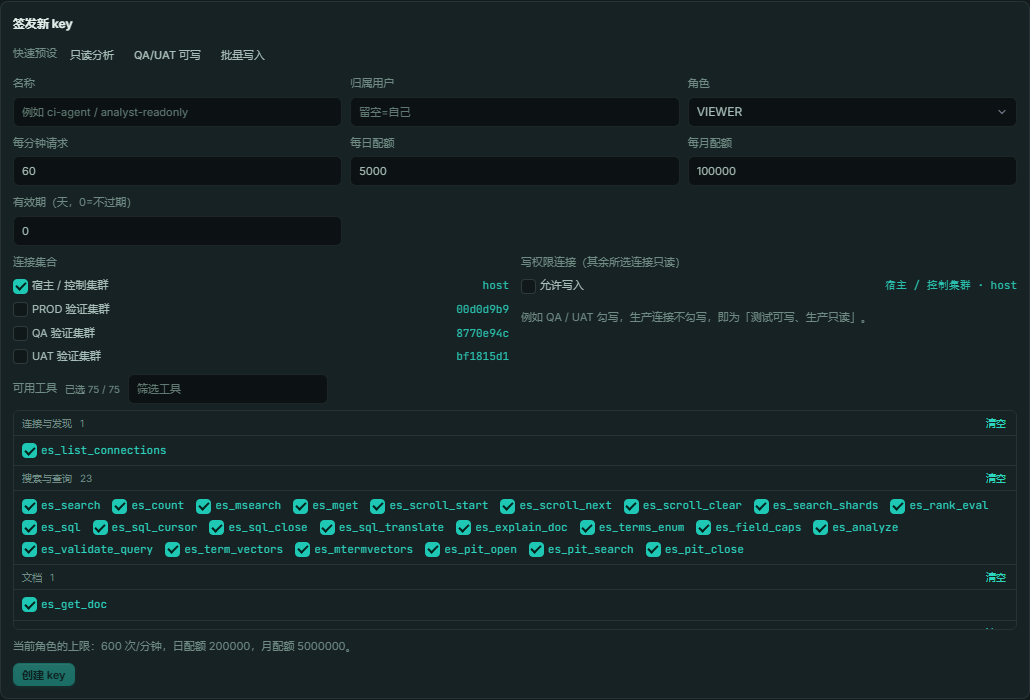
In one sentence: before it was "a human opens a console to query ES"; now "humans, in-page agents, Claude/Cursor can all query ES with the same toolset, and permissions and quotas remain the same set".
Engineering and quality
- 52 pages, 13 groups, 11 feature packages; the page contract
META-INF/esquerystudio-pages.jsonis the single source of truth for frontend navigation, backend page gates, and host menu registration. - Page-level authorization enforces "connection × page × read/write", not hidden menus masquerading as permissions.
- Full frontend/backend test suites: frontend 1,519 files / 12,209 cases, backend covering auth, page authorization, rebuild state machine, mapping reconciliation, cross-cluster migration, and storage buckets.
- Real-browser probes, permission matrix, reproducible builds, SBOM, CodeQL, OpenSSF Scorecard, Dependabot all in place.
- Four SPIs,
ConsoleHostIntegration,ConsoleAuthDelegate,ConnStore,ConsoleAuditContributor, take over branding, auth, connection directory, and audit respectively, without hardcoding host business fields into the platform.
A few real console screenshots
Query workbench: condition tree, raw DSL, results, and histogram on the same screen.
Score anatomy: BM25 factor tree for each matched document.
Chrome extension: same 52-page Vue console runs inside the extension and connects directly to ES.
5-minute experience
Standalone deployment:
java -jar esquerystudio-server-1.0.0.jar
# open http://localhost:5601/esquerystudio.html
Embedded in Spring Boot:
<dependency>
  <groupId>io.github.dengmeiluan</groupId>
  <artifactId>esquerystudio-console</artifactId>
  <version>1.0.0</version>
</dependency>
The ES client stack is provided by the host as a provided contract; at startup, actual type signatures are compared, and mismatches reject startup directly with a repair path.
- Online demo (synthetic data, click to play): https://dengmeiluan.github.io/esquerystudio/
- GitHub: https://github.com/dengmeiluan/esquerystudio
- Documentation: https://github.com/dengmeiluan/esquerystudio/blob/main/docs/README.md
Who it's for
- Teams using Spring Boot / Java with Elasticsearch as primary search or log storage, wanting the console to ship with the application;
- Search quality / relevance teams that need scoring, hit matrix, and Profile in one context;
- Platform teams delivering "queryable, changeable, governable" ES capabilities that need page-level permissions, connection directory, and audit SPI;
- Teams doing index rebuilds, cross-cluster migration, or capacity governance.
Finally
The project is open source under Apache-2.0, currently in initial-version rolling updates. If you are doing Elasticsearch querying, relevance tuning, or Spring Boot console integration, you're welcome to try it, file issues, or talk about use cases directly.
Top 2 from juejin.cn, machine-translated. The original thread is authoritative.
Recently patched in MCP: three access surfaces — server /mcp, browser window.ESQueryStudioMCP, local Node stdio — sharing 19 tools; read-only by default, authorized per connection, Claude Desktop / Cursor can query ES directly. The MCP deep-dive is updated in the article (visible once the review passes), docs: https://github.com/dengmeiluan/esquerystudio/blob/main/docs/mcp.md
One more implementation layer: MCP is not 'just add an endpoint' — it's the same 19-tool contract aligned across three transports: server /mcp, in-page window.ESQueryStudioMCP, local Node stdio. The repo includes server/frontend/docs contract alignment tests (with negative controls) to prevent capability drift. Permissions are clamped by 'connection × tool': keys are issued per login user/role, connection-level read/write (QA/UAT writable, production read-only), tool whitelist, rpm/day/month quotas, rotation/revocation; plaintext appears only once in the creation response, storage keeps only SHA-256. Raw REST also classifies read/write: GET/HEAD read-only, POST query APIs read-only, write APIs and unknown POST/PUT/DELETE fail closed — a valid key doesn't automatically open writes. The version layer walks EsIndexAdmin: SQL, explain, update paths auto-rollback for ES 6/7/8/9; browser mode is zero-port and write tools are off by default; local Node connects directly to ES, so Claude Desktop / Cursor don't need to start Spring Boot. The management surface lives in Dev Tools → MCP panel, issuing keys and showing tools/call request counts and quotas. Deep usage for AI: fetch es_get_mapping/settings first, then generate DSL, lint/explain before execution; slow queries use list_tasks + profile + explain_doc; production read-only, QA writable relies on connection-level permissions, not prompt constraints.