Ditching QQ's Official Bot for a Self-Hosted SnowLuma + AstrBot Stack
Abandoning QQ's Official Bot: Self-Hosting a QQ Bot with SnowLuma + AstrBot
一、Why Replace the Official Bot
The starting point was QQ's official bot. After a few months of use, three problems couldn't be worked around:
1. Capabilities are tiered by developer type. Individual-certified developers are directly denied a large batch of interfaces, with only one line left on the page:

2. Friend private messages are unavailable, and group chat is also restricted. The official bot is positioned as a "service account within channels/groups", not "an account that can chat with you privately". Using it as an ordinary friend is impossible.
3. Card messages fail entirely on TIM. This hurts the experience most: card-type messages returned by the bot still display on mobile QQ, but the TIM desktop client turns them into a string of placeholders:
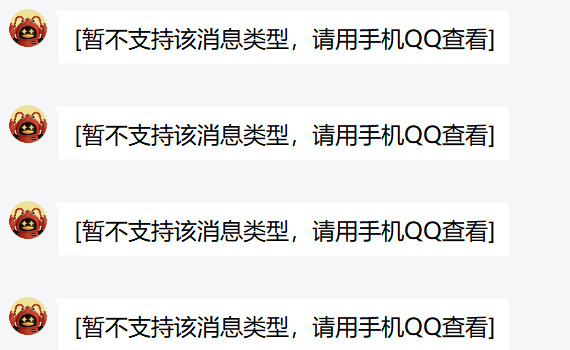
In one sentence: the official bot is a product for enterprises to build service entry points, not a tool for individuals to make an "AI groupmate". The goals don't align, and the longer you use it, the more awkward it feels.
二、Why SnowLuma Instead of NapCat
The mainstream self-hosted path uses protocol clients like NapCat. The problem: I previously had an account banned using NapCat, and accounts have a cost. I didn't want to gamble again.
SnowLuma's route differs from NapCat. Instead of reimplementing the QQ protocol, it runs a real QQ client inside a container and uses ptrace to inject hooks into it. To Tencent's side, that looks like a normal client running.
Community feedback is generally "more stable than NapCat", and in my actual use there was no abnormal disconnection. But it must be said clearly: this is still third-party injection. No one gives you any security guarantee, and you bear the risk yourself. Don't play with your main account.
Two details actually made me switch:
- Built-in noVNC: QR login happens directly in the browser, no local QQ installation needed
- Full OneBot v11 implementation: frameworks like AstrBot and NoneBot can connect directly
三、Architecture: Two Halves, Plus a Direction
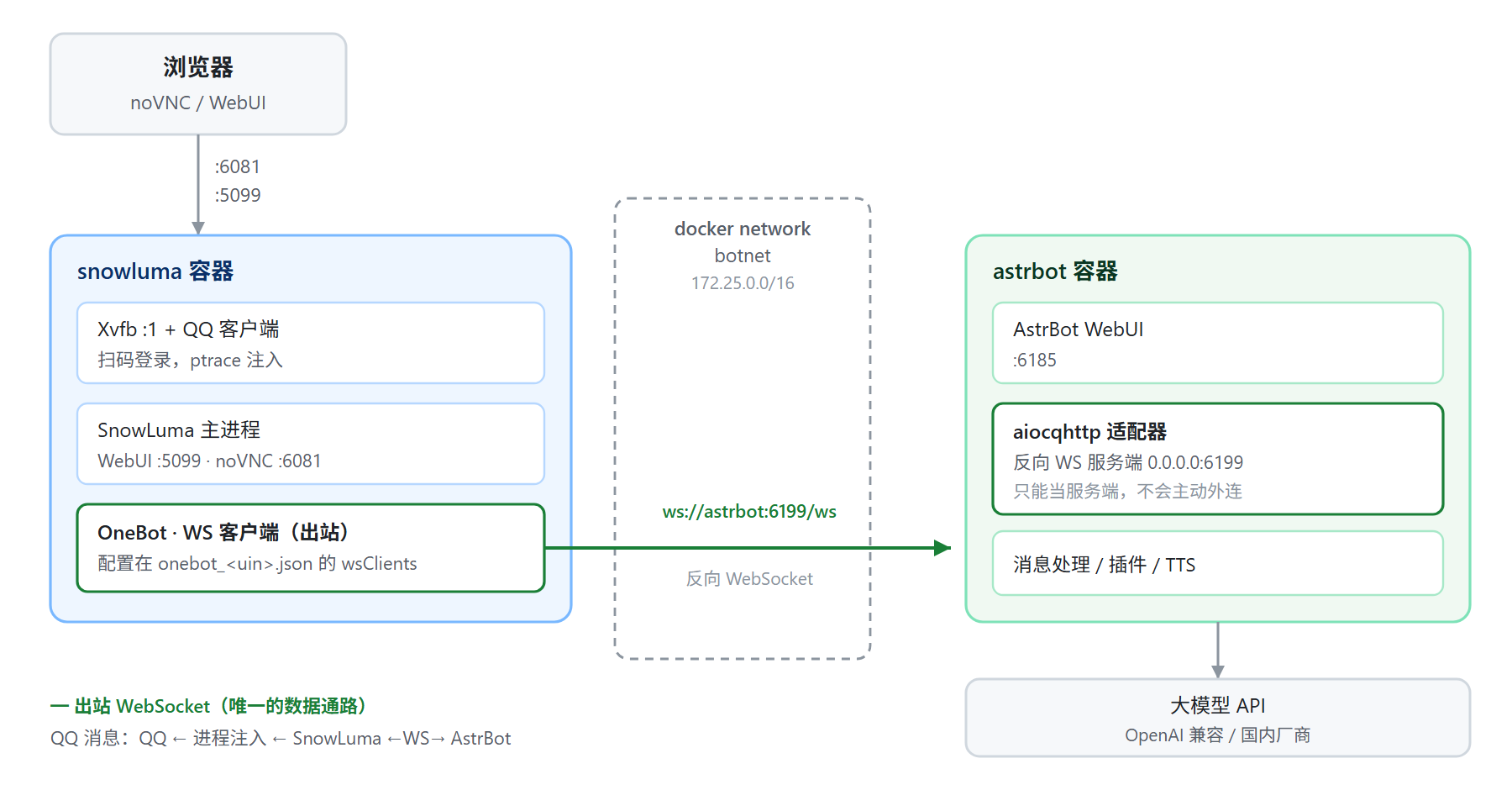
- SnowLuma handles QQ access, wrapping the client into a OneBot v11 interface
- AstrBot handles conversation: calling models, running plugins, managing persona
- The two connect over WebSocket
Data flow: QQ ← process injection ← SnowLuma ←WS→ AstrBot → LLM API
Port division:
| Port | Owner | Purpose | Mapped to host |
|---|---|---|---|
| 6185 | AstrBot | WebUI admin panel | Yes |
| 6199 | AstrBot | OneBot v11 reverse WS server | No (via docker internal network) |
| 6081 | SnowLuma | noVNC remote desktop, for QR login | Yes |
| 5099 | SnowLuma | SnowLuma WebUI | Yes |
| 3000 / 3001 | SnowLuma | OneBot HTTP / WS server | No (not used in this setup) |
Note the last row: SnowLuma's own 3000/3001 are completely unnecessary to expose in this approach. Two fewer open ports means two fewer entry points.
四、Three Things the Official Docs Don't Clarify
This section is the core of the article. SnowLuma's Docker deployment docs are written properly, but they only cover one usage: "SnowLuma itself exposes OneBot services externally". The information needed for connecting AstrBot is missing in three places.
1. The docs only describe it acting as a server, not as a client
The docs' port table is clear: in the container, 3000 is OneBot HTTP and 3001 is OneBot WebSocket, and the compose example maps both by default.
It's natural to think: since SnowLuma has a WS server, let AstrBot connect to ws://snowluma:3001.
That path doesn't work. AstrBot's OneBot v11 adapter (aiocqhttp) is, by design, a reverse WebSocket server. It has no ability to actively connect out: its config options only include "reverse WS host / port / token", with no field for filling in a peer address.
SnowLuma's docker docs, meanwhile, never mention wsClients (the reverse WS client) even once. That capability only appears in the WebUI's "OneBot protocol endpoints → WS clients" page, and in the fields of config/onebot_<uin>.json.
The correct direction is exactly the opposite:
❌ AstrBot(client) ──connect──> SnowLuma:3001(WS server)
✅ SnowLuma(WS client, outbound) ──> AstrBot:6199/ws(WS server)
There is only one criterion for judgment: whichever end has an input box for "filling in the other side's address" is the client. Don't assume something is the side being connected to just because it says "server".
2. The docs make you edit JSON by hand, but the WebUI already has the entry point
The docs give this modification method:
docker exec -it snowluma bash -c "vi /app/data/config/onebot_<uin>.json"
docker restart snowluma
Following that also works, but it's a detour with three extra risks:
- One missing comma invalidates the whole config; the container comes up but OneBot doesn't work
- The file has 0600 permissions and is owned by
nodeinside the container; casually editing as root changes the owner - The config uses
"mode": "overlay", and the account-level fileonebot_<uin>.jsonoverrides the base fileonebot.json; editing the wrong file is editing for nothing
In fact the WebUI has had a graphical interface all along: OneBot protocol endpoints → WS clients → create WS client, fill in URL, token, message format, click save, and the app persists it itself.
Conclusion: all OneBot-side configuration should go through the WebUI first; editing files is only a fallback.
3. How the two containers talk to each other is never covered
AstrBot and SnowLuma are two separate compose files, each creating its own independent bridge network, mutually unaware of each other. The docs assume the reader handles this layer, but it's the most likely point of getting stuck: both sides have correct config and still can't connect.
The fix is to create a shared network yourself and attach both running containers to it; see section six.
五、Deployment
AstrBot
The environment already exists, kept minimal. The key point: do not put 6199 in ports; let the docker network handle it.
services:
  astrbot:
    image: astrbot-pw:local
    container_name: astrbot
    restart: unless-stopped
    security_opt:
      - no-new-privileges:true
    ports:
      - "6185:6185"
    environment:
      - TZ=Asia/Shanghai
    volumes:
      - /vol1/1000/docker/astrbot/data:/AstrBot/data
SnowLuma
services:
  snowluma:
    image: motricseven7/snowluma:latest
    container_name: snowluma
    restart: unless-stopped

    shm_size: 1gb
    ulimits:
      nofile:
        soft: 65536
        hard: 1048576

    cap_add:
      - SYS_PTRACE
    security_opt:
      - seccomp=unconfined

    environment:
      TZ: Asia/Shanghai
      VNC_PASSWD: ${VNC_PASSWD}
      SNOWLUMA_UID: 1000
      SNOWLUMA_GID: 1000
      SNOWLUMA_WEBUI_HOST: 0.0.0.0
      SNOWLUMA_WEBUI_PORT: 5099
      SNOWLUMA_HOOK_AUTOLOAD: 1

    ports:
      - "6081:6081"
      - "5099:5099"

    volumes:
      - /vol1/1000/docker/snowluma/data:/app/data
      - /vol1/1000/docker/snowluma/config:/app/.config
      - /vol1/1000/docker/snowluma/share:/app/.local/share
Four parameters cannot be omitted:
| Parameter | Function | What omitting it does |
|---|---|---|
cap_add: SYS_PTRACE |
the hook injects into the QQ process via ptrace | won't attach; QQ runs but no messages are received |
security_opt: seccomp=unconfined |
default seccomp blocks ptrace | same as above |
shm_size: 1gb |
QQ is Chromium-based and depends on /dev/shm |
QQ crashes randomly a few seconds after startup |
SNOWLUMA_HOOK_AUTOLOAD: 1 |
auto-load hook after QR scan | must manually Load in WebUI every time |
After startup, verify injection capability first, don't rush to scan the QR code:
docker exec snowluma getcap /usr/local/bin/node
# expected to include cap_sys_ptrace=ep
QR Login
http://<NAS_IP>:6081/, password is the VNC_PASSWD from compose. In the remote desktop, QQ has already auto-started; scan the QR code directly.
Then open http://<NAS_IP>:5099/; initial credentials are in the logs:
docker logs snowluma 2>&1 | grep -E "initial credentials" | tail -1
This password is shown only once. Accept the EULA first, then change it immediately.
A successful injection looks like this:
[preload] succeeded. /opt/QQ/resources/app/major.node
[Hook] pipe connected: PID=86
六、Networking: Connecting Both Containers into the Same Network
docker network create botnet
docker network connect botnet astrbot
docker network connect botnet snowluma

docker network inspect botnet | grep -E '"Name"|"IPv4Address"'
Both should appear on the same subnet:
"Name": "astrbot",   "IPv4Address": "172.25.0.2/16"
"Name": "snowluma",  "IPv4Address": "172.25.0.3/16"
Verify the network layer first, then touch the config:
docker exec snowluma node -e "require('net').connect(6199,'astrbot').on('connect',()=>{console.log('6199 OK');process.exit(0)}).on('error',e=>{console.log('FAIL',e.code);process.exit(1)})"
Continue only after 6199 OK. This step rules out most "config is right but can't connect" cases in advance.
七、Configuration on Both Sides
AstrBot side
WebUI (6185) → Robots → create robot → OneBot v11:
| Field | Value |
|---|---|
| Reverse WebSocket host | 0.0.0.0 |
| Reverse WebSocket port | 6199 |
| Reverse WebSocket token | a random string |
The host must be 0.0.0.0. Filling in 127.0.0.1 makes the container listen on loopback only, and other containers can't connect.
SnowLuma side
WebUI (5099) → OneBot protocol endpoints → WS clients → create new:
| Field | Value |
|---|---|
| Name | astrbot |
| URL | ws://astrbot:6199/ws |
| Token | exactly the same as the AstrBot side |
| Message format | array |
| Role | Universal |
Use the container name for the URL rather than an IP: IPs change when containers are recreated, container names don't. After saving, the status should immediately become normal · connected:
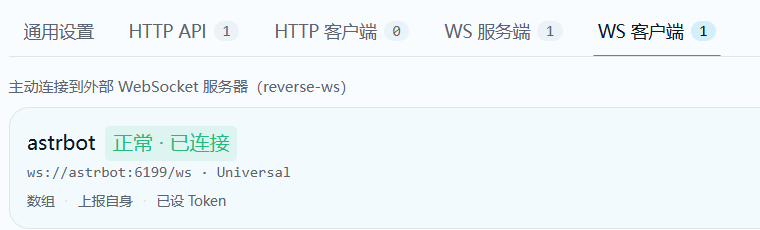
八、Verification
docker logs --tail 30 astrbot | grep -i aiocqhttp
This line appearing means it works:
[aiocqhttp.aiocqhttp_platform_adapter:107]: aiocqhttp(OneBot v11) adapter connected.
Then send a message from another account; AstrBot's logs will print the event:
[core.event_bus:117]: [default] [snowluma(aiocqhttp)] nickname/QQ: message content
九、Other Pitfalls Hit
1. docker compose build has no output
The compose file only has image: and no build: section, so build is a no-op returning 0 immediately. The real time cost is docker compose up -d pulling the image (~2GB).
Also --progress is a global flag; the position matters:
docker compose --progress plain build   # correct
docker compose build --progress=plain   # gives a warning
2. .env didn't get passed through, password became an empty string
level=warning msg="The \"VNC_PASSWD\" variable is not set. Defaulting to a blank string."
.env is a dot-prefixed hidden file that ls doesn't show, easy to miss when copying. Confirm with ls -la, then check variable expansion with docker compose config.
3. 401 Unauthorized is not a failure
Probing a port with curl returns:
HTTP/1.1 401
server: hypercorn-h11
That is evidence the port is completely fine. Being rejected for a missing token means TCP works, HTTP works, and the WS route is there. How to read it:
| Return | Meaning |
|---|---|
401 |
service normal, only the token is wrong |
Connection refused |
port not mapped to the host |
| timeout | blocked by firewall/security group |
4. wsClients is an empty array
If AstrBot shows the adapter loaded successfully but no "connected" status, look at this line first:
docker exec snowluma sh -c "cat /app/data/config/onebot*.json"
"wsClients": [] means the client was never created, so no connection was ever initiated. Checking ports at this point is checking a problem that doesn't exist.
5. No ss / netstat in the containers
Both images are slim builds: sh: 1: ss: not found. Three alternatives:
# ① from the host, check mappings
docker port astrbot

# ② direct TCP probe (AstrBot is a Python app)
docker exec astrbot python -c "import socket;socket.create_connection(('127.0.0.1',6199),3);print('OPEN');s.close()"

# ③ install nothing: read /proc/net/tcp, port in hex
docker exec astrbot sh -c 'grep ":1837" /proc/net/tcp'
For ③, column 4 being 0A means LISTEN. Common port mappings:
| Port | hex | Port | hex |
|---|---|---|---|
| 3000 | 0BB8 |
5099 | 13EB |
| 3001 | 0BB9 |
6081 | 17C1 |
| 6185 | 1829 |
6199 | 1837 |
6. Don't copy online tutorials verbatim
Two places got me:
- One tutorial used
/app/snowluma-datafor the SnowLuma volume path; the official docs say/app/data. Following it means config and login state go into a directory nobody reads, and everything is lost on restart. - One tutorial wrote the URL as "
ws://AstrBotDocker网段:6199/ws"; that's just a placeholder, not an instruction to fill in a subnet. Use the container name or a concrete IP.
7. docker network connect is not persistent
When a container gets recreated (docker compose up -d recreates containers when it detects compose changes), the manually connected network is lost, and the connector can't reconnect.
For a permanent solution, declare the external network in compose:
networks:
  default:
    name: botnet
    external: true
8. Client private-message reporting is unavailable
[QQHook.Runtime] Client private-message reporting is unavailable: PID=86 status=-1 reason=1
Normal output while logged out; it disappears on its own after successful QR scan. If it keeps appearing after login, private messages can't be received (group messages are unaffected), and you need to check whether SnowLuma and the QQ client versions match.
十、Security
The risk points of this stack differ from ordinary web services:
6081is a remote desktop that can operate your QQ. Once the port is exposed, anyone who scans it can take over the account directly. Don't expose it bare on the public internet; for remote access, put a reverse proxy with authentication in front, or go through Tailscale / WireGuard.6199is not mapped to the host, only visible on thebotnetnetwork; one less layer of exposure than "mapped to host".- Don't leave the token empty (assuming the port is mapped). Empty means anyone who can reach the port can connect in.
- The
sharevolume stores the QQ login state; deleting it means re-scanning the QR code. - Third-party protocol clients carry a ban risk. This is an inherent cost of this technical route, not something configuration can remove. Don't use your main account.
十一、Quick Reference
# status
docker compose ps
docker exec snowluma supervisorctl status
docker exec snowluma getcap /usr/local/bin/node

# network
docker network inspect botnet | grep -E '"Name"|"IPv4Address"'
docker exec snowluma node -e "require('net').connect(6199,'astrbot').on('connect',()=>{console.log('OK');process.exit(0)}).on('error',e=>{console.log(e.code);process.exit(1)})"

# logs
docker logs --tail 50 astrbot  | grep -i aiocqhttp
docker logs --tail 50 snowluma | grep -iE "hook|onebot|ws-client"
The two final successful log lines:
snowluma: [OneBot.WS-Client] [astrbot] connected ws://astrbot:6199/ws
astrbot:  aiocqhttp(OneBot v11) adapter connected.
Summary
The real cost of this migration wasn't deployment; it was information gaps: the official docs only cover half of the usage, and the rest has to be filled in by trial and error.
Three lessons:
- In reverse WebSocket, the "passive party" is the server. Judge the client by whether it has an input box for "filling in the peer's address", not by the feature name.
- If a GUI exists, don't edit config files. For entries already in the WebUI, editing files only adds three risks: permissions, formatting, and overlay overrides.
- Verify the network layer first, then the higher-level config. In the wrong order, time goes to the wrong places.