Spec-Driven Development Stops AI-Generated KMP Code from Drifting
This article is translated from 'Design a screen, get a Clean Architecture feature — Spec-Driven Development that keeps AI-generated KMP code from drifting', original link https://proandroiddev.com/design-a-screen-get-a-clean-architecture-feature-and-keep-ai-generated-kmp-code-from-drifting-c134ffc9bfc2, published by Ali Sadeghi on July 23, 2026.
The description, simply put, is to let AI complete design, construction, testing, and review on Android and iOS platforms, and enforce "Clean Architecture," rather than just hoping for it.
When using AI to generate features, there's a hidden problem no one warns you about: each feature seems fine on its own. The first screen is clean, the second screen is clean. But by the fifth screen, the app has two different state conventions, a repository quietly accessing a ViewModel, and a screen folder with completely inconsistent layouts. It's not that any single prompt is wrong; it's that the codebase drifts because nothing enforces the architecture between prompts.
You can't fix this by improving prompts. You need to make the architecture a constraint the model must satisfy, not a suggestion it can freely reinterpret.
This is exactly what KMPilot does: a template I built to make AI strictly follow Clean Architecture. I applied it to a real application: Kickoff26, a companion app for the 2026 World Cup, built design-first then feature-by-feature. This article documents what I learned about keeping AI-generated code disciplined.
Why AI-Generated Code Drifts
When you build an app one prompt at a time, four problems emerge.
Pattern drift. The first prompt generates a UiState sealed class. The fifth prompt "improves" it, and now two different state conventions exist in the same app.
Layer leakage. The fastest path from A to B is often a shortcut through a layer that shouldn't know about another. The model takes it because it compiles.
Tests disappear. They are the first casualty of "just make it work," and no one notices until everything is broken.
Design never matches the screen. The mockup has 24dp corners and a specific tinted title. The shipped version is roughly the same. Multiply that by 20 screens, and the app looks nothing like what was designed.
None of these are intelligence problems; they are memory and enforcement problems. The model has no persistent record of how this codebase works, and nothing today stops it from working differently.
The model itself is never the problem. The problem is that nothing constrains its work.
The Pattern: Spec-Driven Development, Applied to KMP
Spec-driven development isn't my invention. Tools like GitHub's spec-kit and OpenSpec have already popularized this approach for general codebases: write the spec first, then let AI build against it, rather than planning in a scrolling chat history. The idea is simple: write down the conventions, place them next to the code, and make the code follow them. My approach applies this to the Kotlin Multiplatform domain, divided into three parts:
Architecture is a constraint. Clean Architecture, with the same structure for every feature, unchangeable. This isn't politeness: a hook physically blocks direct edits to feature code, so the model cannot quietly reshape it. It executes inside the structure.
Design is input, not an afterthought. The screen starts as an approved prototype, and the prototype's elements flow into the code.
A living
spec.mdfile is the specification. One spec per feature, version-controlled, updated as the code changes. It is the memory the model reads before doing anything.
Under the hood, KMPilot is a set of skills and agents running on top of Claude Code. Every screen in Kickoff26 was built on it.
How a Feature Is Actually Built
Take the "Matches" tab as an example: a group-stage browser plus knockout rounds, from the Round of 32 to the final. No single prompt could build it. It is assembled as a series of short skills, each with one job, each leaving an artifact for the next skill to read.
It starts with design, using ***/design-ui**. You describe the screen in plain language:
/design-ui matches — a tab that toggles between a group-stage match list (filterable by matchday and group) and a knockout bracket from the Round of 32 to the final
It drives Stitch (Google's AI design tool) via an MCP connection: it generates a mockup, you refine it by talking to it (make the live badge red, tighten the bracket spacing), until it's right. Approving it is where the interesting part happens. The skill pulls back the finished screen from Stitch and runs it through a token-extraction script that pulls every color, radius, font, and spacing value directly from the design, rather than eyeballing them, then downloads the exact icons and images the mockup used. All of this lands in a blueprint: the design captured as explicit Compose instructions, down to a negative goal difference becoming error red and the bracket connectors becoming Canvas. The screen treats Stitch as a contract, not a screenshot, so the next step builds it token-by-token, not approximately.
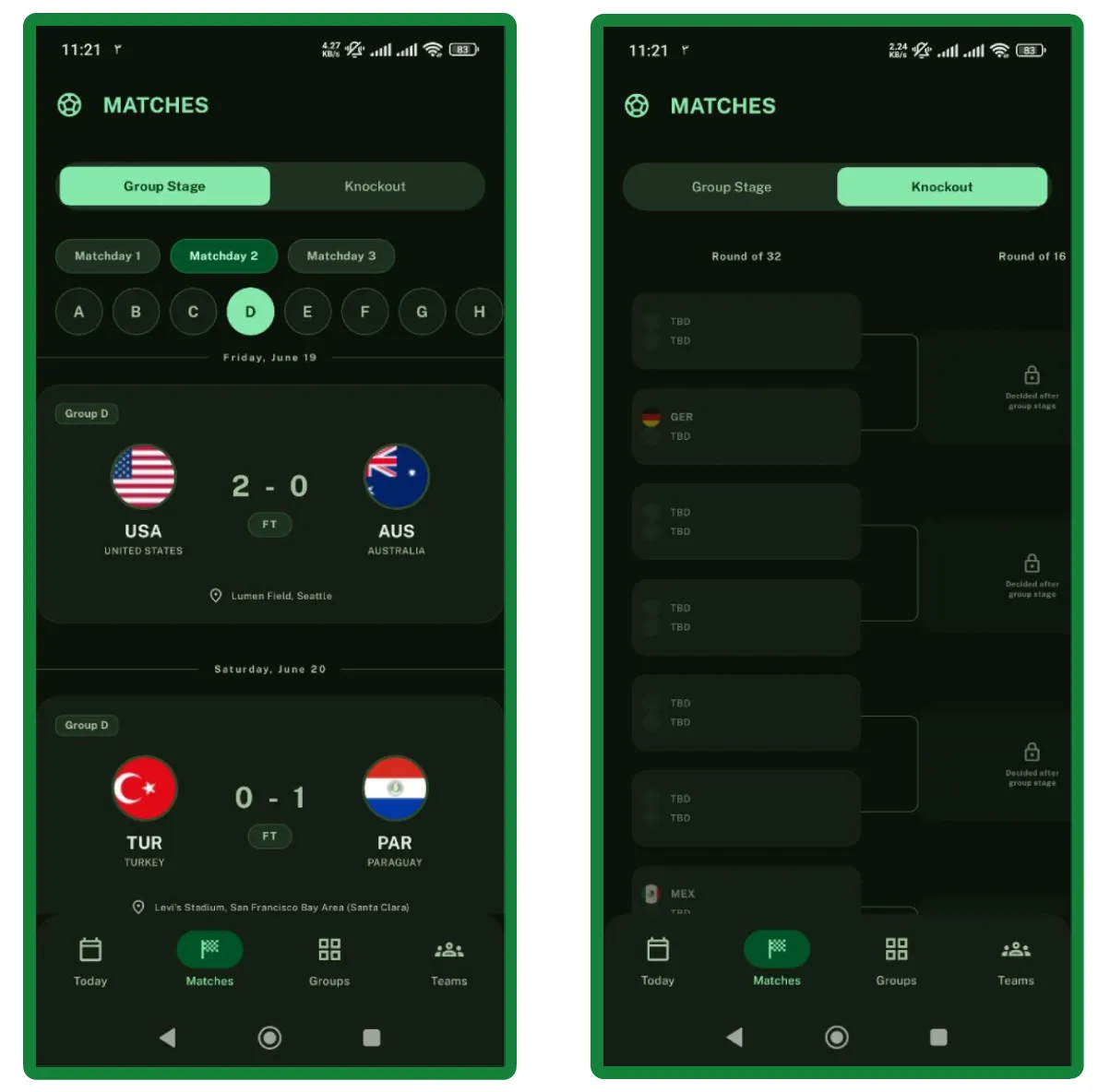
Then it builds using ***/create-feature**. This skill is the core of the system. It already has the design, the blueprint; you provide the data contract, the API endpoint, and the shape of the return:
/create-feature matches — fixtures from GET /get/games, where each match has home_team_id, away_team_id, local_date, stadium_id, matchday, type, finished, and time_elapsed
From there, it proceeds in stages, pausing between each for your sign-off:
- It turns the request into a short PRD (what the feature does, screens, data, edge cases), then waits.
- Once you approve, it breaks the PRD into discrete tasks (data layer, UI, wiring), then waits again.
- Only after the second confirmation does it hand the tasks to specialized agents running in parallel, each owning one layer:
- Data: serializable models for JSON, repository, Ktor calls
- ui: ViewModel, Compose screen and its components
- Integration: dependency injection, navigation, Gradle wiring
- Platform: per-platform code behind a shared interface, only when the feature reaches device capabilities (GPS, camera, biometrics)
Matches is plain networking, so the first three cover it. Because each agent owns a separate layer, they never collide, and what comes back isn't a sketch you finish by hand. It is a complete, wired feature module, laid out the same way for every feature:
32 files across data, presentation, and DI, generated by a single design and a single build command, laid out identically to every other feature in the app. (_Browse on GitHub).)
Predictable structure means you review behavior, not boilerplate.
But the module is only half of what */create-feature generates. Beyond that, the skill also writes a spec.md and stores it outside the feature tree at .claude/docs/matches/spec.md, versioned and committed alongside the project. The spec is the feature's memory, structured rather than free-form: a metadata header (version, status, date), the feature's goals and non-goals, a design decisions table with rationale and rejected alternatives, and requirements written as GIVEN / WHEN / THEN scenarios. A trimmed portion of the matches spec:
This is the short version. full matches/spec.md exists in the repo. The version number and dated changelog make each feature's history scannable at a glance.
Changes later use ***/modify-feature**. Once a feature exists, you never edit it by hand; you describe the change:
/modify-feature matches — add a "Live" filter chip that shows only in-progress matches
It reads the spec first, plans the change against the already-recorded decisions, and edits the feature through the same agents, not by hand: a hook physically blocks raw edits to files under feature/. When finished, it writes back to the spec: a new version, with a new date line in that changelog. Because it starts from the spec, it builds on the existing design rather than reshaping it, and the code and spec are never updated separately, so the two don't drift apart.
Asking the model nicely isn't enforcement. Blocking writes is.
The remaining skills are all gates, run the same way. /verify-ui matches rechecks the built screen against the design tokens, /test-feature matches writes the test suite (fixtures, repository, ViewModel, UI, and end-to-end pass), and /review-feature matches audits the result against the architecture rules. Any of them can hand work back to the others. That is the core loop; the full skill catalog covers the rest.
The Honest Part
I didn't believe in this at first. For weeks, I kept expecting to open the project and find the usual AI sprawl: three ways of doing the same thing, one layer quietly leaking into another, tests I'd end up writing myself anyway. It never appeared. The closest I came to mess was my own: I let each feature keep its own copy of the network layer, and by the fourth feature, the duplication was impossible to ignore. That's normally the cleanup you keep postponing because it touches everything. Here, I described one change, the spec told me exactly what each feature had decided and why, and it was done in an afternoon without breaking anything.
It's still young: Kickoff26 still says under development, and KMPilot has rough edges I haven't polished yet. But after months of watching AI-assisted codebases fast-forward into rot, the part I keep coming back to is that this one didn't. Nothing drifted. That's the point.
Try It
If you write Kotlin Multiplatform and you've seen codebases drift under AI-generated code, the pattern is worth stealing even without the template. Make architecture a constraint. Make design an input. Give the model a living spec to read.
KMPilot is the version I actually use, MIT-licensed, one command to start:
curl -fsSL https://raw.githubusercontent.com/ThisIsSadeghi/KMPilot/main/install.sh \
 | bash -s <MyApp> <com.acme.myapp>
Repo and full pipeline: github.com/ThisIsSadeghi/KMPilot. If the idea resonates, a star is the cheapest way to tell me to keep building it.
Welcome to search and follow the public account 「稀有猿诉」 for more high-quality articles!
Protect originality, do not reprint!
Top 1 from juejin.cn, machine-translated. The original thread is authoritative.
Looks like it was generated by AI [innocent dumbfounded]