An Open-Source Agent Skill That Generates China Software Copyright Filings From Your Codebase
theme: smartblue
Hello, everyone, I'm Ivan.
After finishing a project, you might encounter a problem: you need to apply for a software copyright. At this point, the application form, operation manual, and code materials all need to be reorganized, which is troublesome and a waste of time.
So, I turned this part into a software copyright Skill, named software-certificate-skill. After you hand the project over to it, it will read the code, pages, and interfaces in the project, and then generate the application form information, operation manual, and code materials.
The skill is already open source, the GitHub link is https://github.com/IvanCodesDev/software-certificate-skill
1. Installation
First, clone the project locally:
git clone https://github.com/IvanCodesDev/software-certificate-skill.git
cd software-certificate-skill
Then run the installation script:
python scripts/install_agent_skill.py --platform all --scope project --project E:\path\to\project --force
This script supports Codex, Claude Code, Cursor, OpenCode, WorkBuddy, QoderWork, and TraeWork. To preview the installation location first, you can use --dry-run:
python scripts/install_agent_skill.py --platform all --scope project --project E:\path\to\project --dry-run
Then install the project dependencies:
python -m pip install -r requirements.txt
If you need to automatically take screenshots for a web project, you also need to install Playwright and Chromium:
python -m pip install "playwright>=1.49,<2"
python -m playwright install chromium
2. Using in Codex
After installation is complete, you can directly enter the following in the target project (of course, I specify the location myself):
Generate software copyright application materials for the current project
At this point, your Agent will first read the current project, and then centrally confirm information such as the software name, version, copyright owner, completion date, and publication status. This content cannot be judged solely based on the code, so you still need to fill in or confirm it yourself.
After the information is confirmed, the subsequent project analysis, source code selection, screenshots, document generation, PDF conversion, and checking will continue to execute. The final generated formal materials are placed separately in the project directory, while the evidence and diagnostic files used in the process are saved in the system temporary directory.
3. Generated Materials
The formal materials directory will retain the following files:
Formal Materials/
├─ Application Form Info.txt
├─ <Full Software Name>_Operation Manual.docx / .pdf
├─ <Full Software Name>-Code(First 30 Pages).docx / .pdf
└─ <Full Software Name>-Code(Last 30 Pages).docx / .pdf
Application Form Info.txt is used to organize the content that needs to be filled in the registration system. Both the operation manual and code materials will generate DOCX and PDF formats. DOCX can be further checked and modified, and PDF is used to prepare for upload.
The operation manual organizes chapters based on the real functions in the project, using A4 and black, white, and gray layout. When the project content is relatively large, it usually generates 40 to 60 pages; for small projects, it is shortened according to the actual content.
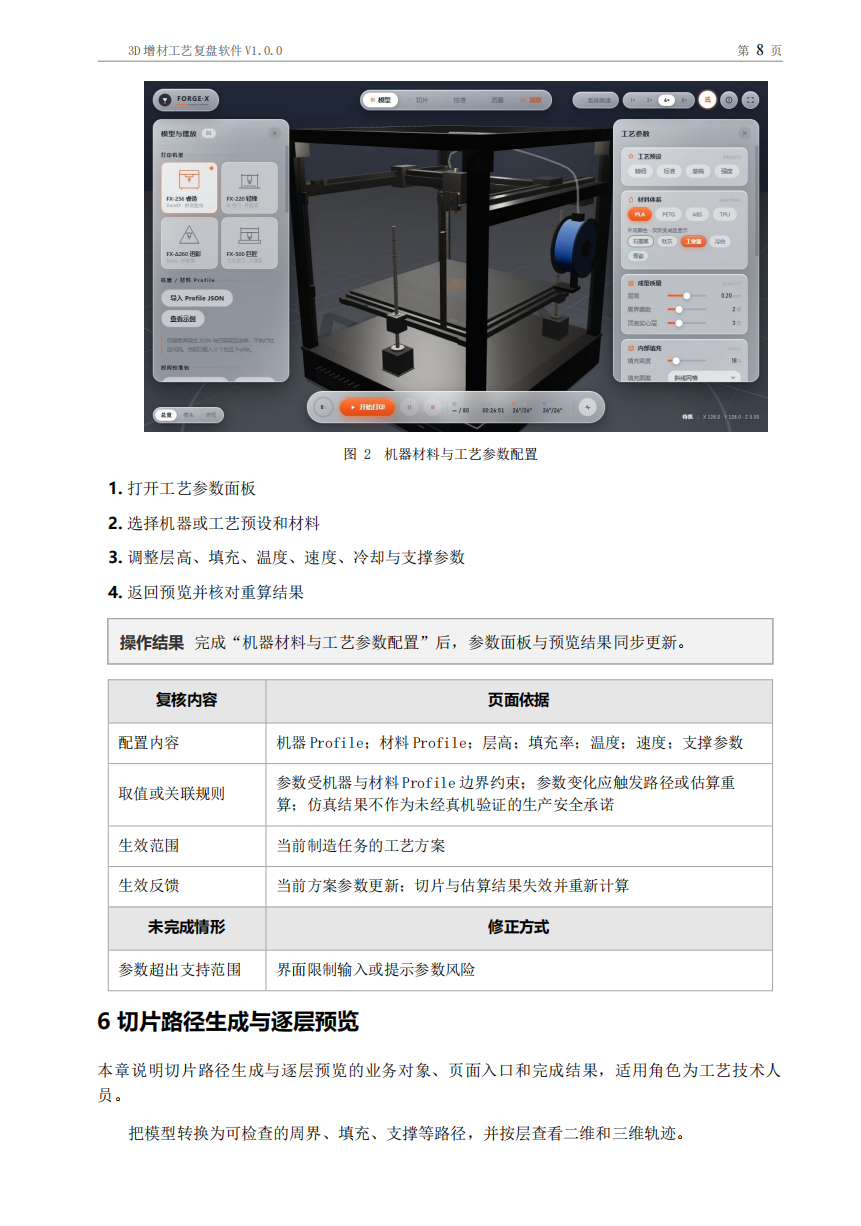
The code materials are selected from the project's entry points, routes, pages, components, services, APIs, models, and algorithms, while excluding dependencies, build files, lock files, and irrelevant code. When the source code reaches 60 pages, the first 30 pages and the last 30 pages are generated; if it is less than 60 pages, all of it is submitted.
The application form information is also organized separately, which can be used to fill in the current registration system when submitting.
4. What Processing is Done in the Project
This Skill does not generate materials based solely on the README. It also scans your configuration, routes, pages, components, services, APIs, models, tests, deployment files, and existing screenshots. The generated functions need to be able to find corresponding content in the project.
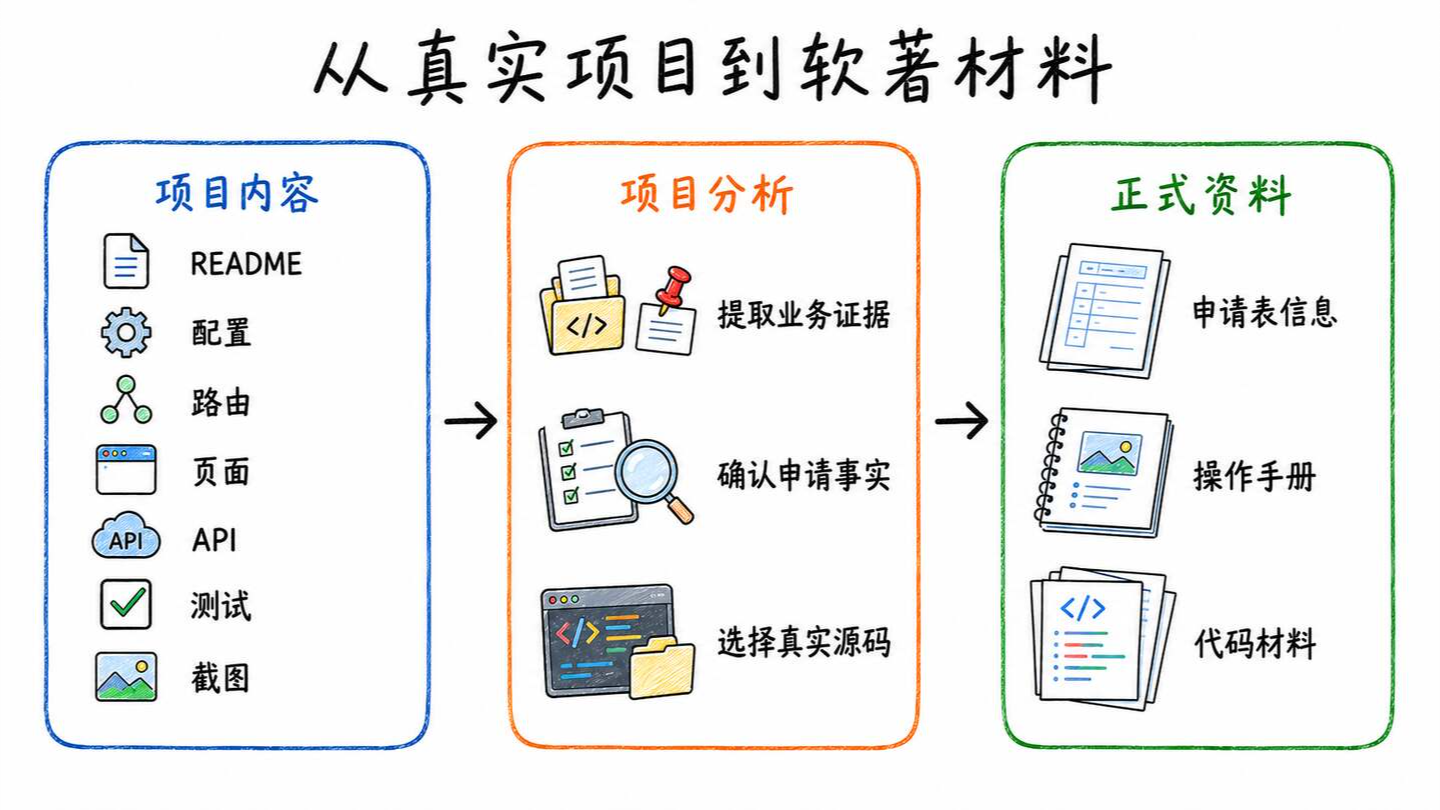
When generating code materials, the skill retains the source file, original line numbers, and hash. After generating the PDF, it checks the page count, headers, and whether the front and back volumes are continuous. When generating the operation manual, it supports automatic screenshots, Computer Use, and manual upload. If there are no screenshots, a draft can be generated first.
The application form, operation manual, and code materials share the same set of information. After a name or version is modified, only the relevant files are updated. After DOCX is converted to PDF, pagination, images, and tables are checked again. Ownership and dates are still confirmed by the user.
5. Verification in Qoder
We can also try it with a domestic AI IDE — Qoder, and the effect is the same. Just say, "Help me install this skill."
The final generated operation manual and code materials are also very good.
6. Testing
The repository provides unit tests, Skill checks, and self-test scripts:
python -m unittest discover -s tests -v
python scripts/validate_skill.py
python scripts/self_test.py --workdir "${TEMP}/software-certificate-self-test"
During testing, a desensitized project is created in the system temporary directory and automatically cleaned up after completion.
7. Summary
Currently, I have successfully run the entire process on various Agent platforms. If you encounter any problems during use, feel free to raise an Issue on GitHub.
Top 1 of 2 from juejin.cn, machine-translated. The original thread is authoritative.
Are the screenshots in the manual generated automatically?
Yes, fully automatic. You just need to confirm the basic info. [lightbulb moment]