Android IoT Bluetooth Network Configuration Simple Encapsulation
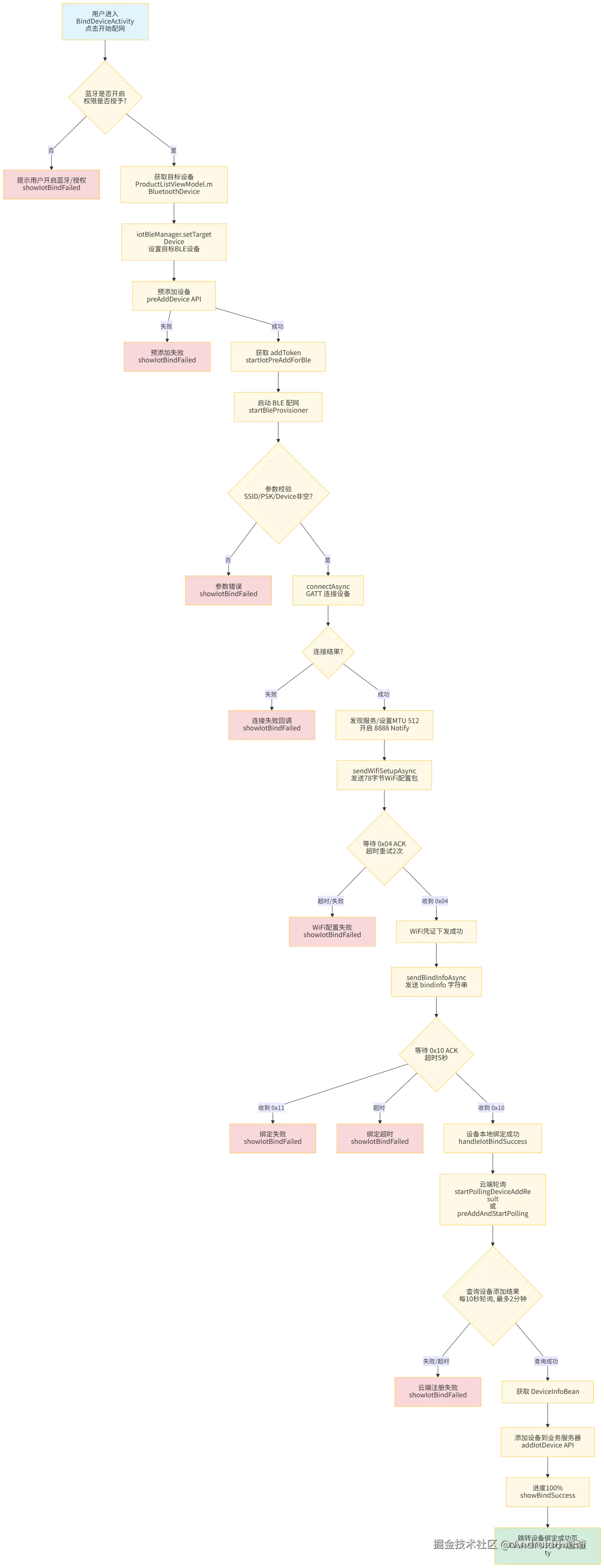
1. Bluetooth Network Configuration Flowchart:
2. Bluetooth Network Configuration Sequence Diagram:
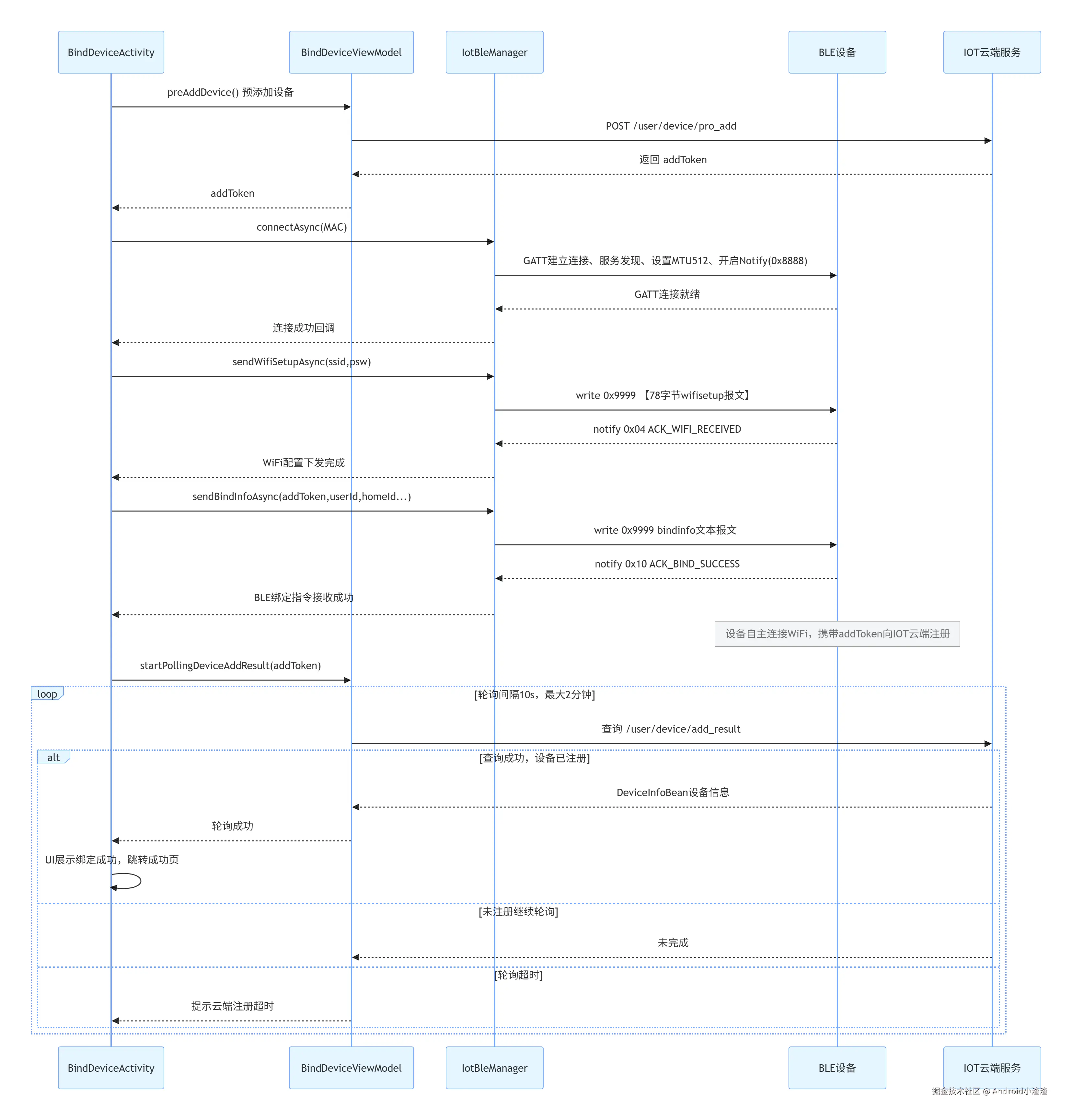
IoT BLE Network Configuration Process:
- APP scans for BLE devices, filtering by name prefix IPC_XX_
- Enter the network configuration page, close Tange and Ali other configuration branches
- APP calls preAdd, cloud generates a session, obtains addToken
- BLE sends wifisetup message (SSID+password)
- Device returns 0x04 via BLE (WiFi configuration message received)
- BLE sends bindinfo (addToken/userId/deviceMac/homeId, etc.)
- Device returns 0x10 success / 0x11 failure (bindinfo reception acknowledgment)
- Device connects to WiFi, actively registers and binds to IoT cloud with addToken
- APP polls pollAddResult(addToken) to query binding result
- Cloud returns device_id, network configuration successful
3. IoT Configuration Management Overall Architecture:

4. Implementation Steps:
User clicks start configuration
     ↓
Enter IoT BLE Flow (pause Tuya old BLE)
     ↓
BLE connects to device
     ↓
Send wifisetup (78 bytes)
     ↓
Receive notify ACK = 0x04
     ↓
[Bind Phase begins]
     ↓
Call preAdd → get add_token
     ↓
Send bindinfo (contains add_token / uid / deviceId / homeId)
     ↓
Receive notify ACK = 0x10 / 0x11
     ↓
Start pollAddResult(add_token)
     ↓
Polling success → return device_id
     ↓
UI displays "Added successfully"
5. IoT Device Search:
5.1 Device Search Flowchart:

5.2 Core Communication Flowchart:
CoolKit Device Communication Flow
flowchart TD
A([connectGatt<br/>ssid, psd, deviceId]) --> B[HTTP get secretKey<br/>GET /v2/device/fdbaseinfo]
B --> C[connectGatt<br/>autoConnect=false<br/>TRANSPORT_LE + PHY_LE_2M]
C --> D{onConnectionStateChange}
D -->|STATE_CONNECTED| E[gatt.discoverServices]
D -->|STATE_DISCONNECTED| F{reConnectTime < 3<br/>and not successful?}
F -->|Yes| C
F -->|No| G[bleConnStatus = false<br/>end]
E --> H[onServicesDiscovered<br/>requestMtu512]
H --> I{Iterate characteristics}
I -->|UUID_WRITE<br/>0000bbb0| J[Cache writeCharacteristic<br/>Delay 2s write data]
I -->|UUID_READ<br/>0000bbb1| K[Cache readCharacteristic<br/>Delay 1s enable Notify]

J --> L[Write AES encrypted UUID<br/>handshake request]
K --> M[Wait for device report]

M -->|0x01| N[Parse deviceCode<br/>Reply AESUUID_deviceCode]
N --> M
M -->|0x03| O{data[4] == 0x00?}
O -->|Yes| P[Reply {4,0,3,0,1,0,5}<br/>Start WiFi scan polling]
O -->|No| Q[Handshake failed<br/>bleConnStatus=false]

P --> R[Send scan command every 5s<br/>until 0x06 received]
M -->|0x05| S[Parse SSID/BSSID/RSSI<br/>match target WiFi]
S --> T[Build WiFi connection request packet<br/>Password AES encrypted]
M -->|0x06| U[Scan ended<br/>Send connWifiData]

M -->|0x08| V{WiFi connection status}
V -->|0x00| W[Connection successful]
V -->|0x02| X[Password error<br/>bleConnStatus=false]
V -->|Other| Y[Connection failed<br/>bleConnStatus=false]

W --> Z[0x0A Report device info<br/>deviceId / apikey / chipId]
Z --> AA[addDevice register to CoolKit cloud]
AA --> AB[Send dispatch server address<br/>0x0B command]
AB --> AC[0x0C Configuration complete<br/>status=0x00 success]
AC --> AD[bleConnStatus = true<br/>close GATT]

style AA fill:#d4edda
style G fill:#f8d7da
style X fill:#f8d7da
style Y fill:#f8d7da
TanGe / IoT Device Communication Flow

5.3 GATT Services and Characteristics:
| Device Type |
Direction |
UUID |
Property |
Description |
| CoolKit |
App → Device |
0000bbb0-0000-1000-8000-00805f9b34fb |
Write |
Command delivery |
| CoolKit |
Device → App |
0000bbb1-0000-1000-8000-00805f9b34fb |
Read / Notify |
Status and data reporting |
| TanGe/IoT |
App → Device |
00009999-0000-1000-8000-00805f9b34fb |
Write |
WiFi packet / binding info write |
| TanGe/IoT |
Device → App |
00008888-0000-1000-8000-00805f9b34fb |
Read / Notify |
ACK / JSON data reporting |
5.5 Scan Broadcast Packet Parsing (CoolKit PN Value)
| Offset (relative to AD Type segment) |
Length |
Content |
Byte Order |
| +2 ~ +3 |
2 bytes |
PN Value |
Little-endian (needs reverse read) |
| +4 |
1 byte |
Reserved value |
- |
| +5 |
1 byte |
Product type |
- |
5.5 CoolKit Device Communication Protocol
General Packet Structure (both device reporting and App delivery follow this):
[0]      cmd_id      // Command identifier
[1]      0x00        // Reserved
[2]      len_low     // Subsequent data length (low byte)
[3]      len_high    // Subsequent data length (high byte)
[4..N]   payload     // Data payload
Command Set
| cmd_id |
Direction |
Command |
Payload Description |
0x01 |
Device→App |
Handshake Response |
[len(2B), AES(deviceCode)] |
0x03 |
Device→App |
Handshake Confirmation |
[status: 0x00=success] |
0x05 |
Device→App |
WiFi Scan Result |
[ssidLen, ssid..., bssid[6], rssi, isConnect] |
0x06 |
Device→App |
WiFi Scan End |
No payload |
0x08 |
Device→App |
WiFi Connection Status |
[status] 0success 1failure 2password error 3no AP 4timeout |
0x0A |
Device→App |
Device Identity Info |
[deviceIdLen, deviceId..., apikeyLen, apikey..., chipIdLen, chipId...] |
0x0C |
Device→App |
Configuration Complete Status |
[status: 0x00=success] |
0x0E |
Device→App |
IP Acquisition Result |
[status: 0x00=success] |
5.6 Key App Delivery Command Examples
| Scenario |
Byte Stream |
Description |
| Initial Handshake |
{0,0,(byte)appCodeLen,0} + AES(UUID) |
UUID is randomly generated, AES encrypted |
| Handshake Reply |
{2,0,(byte)secretDataLen,0} + AES(UUID_deviceCode) |
Reply after device returns deviceCode |
| Trigger WiFi Scan |
{4,0,3,0,1,0,5} |
Fixed command, sent every 5s polling |
| WiFi Connection Request |
{7,0,dataLen,0, bssid[6], isConnect, timeout, pwdLen} + AES(pwd) |
Sent after matching target SSID |
| Send Dispatch Address |
{11,0,(byte)(urlLen+2),0,0,(byte)urlLen} + urlBytes |
Sent after CoolKit cloud registration succeeds |
AES Encryption Parameters
| Parameter |
Value |
| Algorithm |
AES/CBC/PKCS7Padding |
| Key |
secretKey (Hex decoded to 16 bytes) |
| IV |
1111111111111111 (16 bytes ASCII) This is just an example |
| Base64 |
Base64.NO_WRAP |
5.7 TanGe / IoT Device Communication Protocol
78-byte WiFi Configuration Packet (App → Device)
Written via 00009999 characteristic, fixed 78 bytes:
| Byte Offset |
Length |
Content |
Padding |
| 0 |
1 |
0x01 (Frame header) |
- |
| 1 ~ 12 |
12 |
"wifisetup" (UTF-8) |
Pad with 0x00 |
| 13 ~ 44 |
32 |
SSID (UTF-8) |
Pad with 0x00 |
| 45 ~ 76 |
32 |
Password (UTF-8) |
Pad with 0x00 |
| 77 |
1 |
0x04 (Frame tail) |
- |
Device Response (Device → App, via 8888 Notify)
| Data Format |
Content |
App Handling |
Single byte 0x01 |
Same format as sent packet |
Ignore |
Single byte 0x02 |
WiFi connection failed |
bleConnStatus = false |
Single byte 0x03 |
WiFi password error |
bleConnStatus = false |
| JSON string |
Device info (DeviceInfoTanGeBean) |
Parse and report to cloud, close GATT, mark success |
6. Key Mechanism Description:
| Mechanism |
Implementation Details |
| Connection Retry |
Non-TanGe devices automatically reconnect on disconnect, up to 3 times (reConnectTime count) |
| TanGe Timeout |
Independent 3-minute (180s) timeout timer, if not successful on timeout then bleConnStatus = false |
| Total Timeout |
180-second countdownTask heartbeat timeout, forces end of configuration |
| WiFi Scan Polling |
Every 5 seconds via scanWifiTask sends a 0x05 scan trigger command, until 0x06 scan end is received |
| Resource Cleanup |
resetData() unified release: stop scanning, close GATT, clear device list, cancel all Disposables, reset status bits |
| Data Write |
All sent data uniformly goes through setWriteCharacteristicData(byte[]), forced WRITE_TYPE_NO_RESPONSE |
7. IoT Device Binding:
7.1 Binding Success:
/**
 * Binding success
 */
private void showBindSuccess() {
        closeCountDown(); // Immediately stop countdown
        mDataBinding.ivFaild.setVisibility(View.GONE);
        mDataBinding.tvProgress.setVisibility(View.VISIBLE);
        mDataBinding.vProgress.setVisibility(View.VISIBLE);
        mDataBinding.btnProblem.setVisibility(View.GONE);
        mDataBinding.btnRebind.setVisibility(View.GONE);
        mDataBinding.tvBindingStatus.setText(UIUtils.getString(R.string.ty_bind_email_success));
        mDataBinding.tvBindingDesc.setText("IoT device binding successful");
        mDataBinding.titleview.setTitle(UIUtils.getString(R.string.ty_bind_email_success));
        mDataBinding.titleview.showLeftImage(false);
    }

/**
 * Go to next step, display binding success interface then jump to success interface
 */
public void gotoNext() {
    if (mData != null) {
        SharedPrefs.getInstance().setBindDevicePic(mData.getPic());
        DeviceBindSuccessActivity.startActivity(mContext, mDevId, mData.getHome_device_id(), mProductId);
    } else {
        LogUploadUtils.d("bind device viewModel gotoNext mData is null");
        bindResult.setValue(false);
    }
}
7.2 Binding Failure:
/**
 * Binding failure UI
 */
private void showBindFailed() {
        if (isBindSuccess) return;
        mDownCount = 0;
        setClickText();
        mDataBinding.titleview.setTitle(UIUtils.getString(R.string.text_bind_faild));
        if (TextUtils.isEmpty(mRobotViewModel.bindErrorMsg)) {
            mDataBinding.tvErrorBind.setVisibility(View.GONE);
        } else {
            mDataBinding.tvErrorBind.setText(mRobotViewModel.bindErrorMsg);
            mDataBinding.tvErrorBind.setVisibility(View.VISIBLE);
        }
        mDataBinding.tvErrorBind.setVisibility(View.VISIBLE);
        mDataBinding.ivFaild.setVisibility(View.VISIBLE);
        mDataBinding.tvProgress.setVisibility(View.INVISIBLE);
        mDataBinding.vProgress.setVisibility(View.INVISIBLE);
        mDataBinding.btnProblem.setVisibility(View.VISIBLE);
        mDataBinding.btnRebind.setVisibility(View.VISIBLE);
        mDataBinding.llFailTipsNew.setVisibility(View.VISIBLE);
        mDataBinding.tvBindingStatus.setVisibility(View.GONE);
        mDataBinding.tvBindingDesc.setVisibility(View.GONE);
        mDataBinding.titleview.showLeftImage(false);
        mDataBinding.btnRebind.setOnClickListener(v -> {
            mRobotViewModel.onDestroyed();
            ProductListActivity3.startActivity(mContext, false, false);
        });
    }
8. Summary
- CoolKit devices use a proprietary protocol of "AES encrypted handshake + phased command interaction", completing identity verification, WiFi scanning, connection, and cloud registration through
bbb0/bbb1.
- TanGe/IoT devices use a simplified protocol of "78-byte fixed-length WiFi packet + single-byte ACK / JSON response", completing network configuration through
9999/8888, and reporting device information in JSON upon success.
- Both rely on
BluetoothLeScanner for device discovery, distinguish device types by name prefix, and manage the connection lifecycle with a static state machine inside BleScanUtils.
- The network configuration protocol for each IoT project is different, but the core is similar; encapsulate according to your own project.