Four Plugins That Turn DeepSeek Harness Into a Usable Coding Environment
Hello everyone, I'm Goodnight Code.
Last week I made DeepSeek Harness (DSH) my primary coding environment. After tinkering for a few days, my biggest takeaway is this: the framework itself is a bare shell, but the plugin ecosystem has already assembled the entire renovation crew. Today I'm sharing 4 DeepSeek Harness plugins I most want to recommend—one that gives a text-only model eyes, one that arms the web interface to the teeth, a native macOS desktop version, and one that turns model replies into interactive panels. (Tested in August 2026, DSH is still in developer preview, plugins iterate very fast, remember to check versions before installing.)
Let's spend 30 seconds getting to know the main character.
DeepSeek Harness (DSH): DeepSeek's official open-source coding agent runtime. The core philosophy is "everything is a plugin"—model adapters, tools, and interfaces can all be replaced or enhanced via plugins. You can think of it as "DeepSeek's open-source version of Claude Code." The official repository is at deepseek-ai/deepseek-harness. A single command npx @deepseek-ai/dsh web runs it locally on port 3080. Next, I'll walk through the four plugins with a "fill the gaps" approach. Read on and remember to bookmark.
1. ModLens: Giving a Text-Only Model Eyes
The biggest shortcoming of a text-only model is that it's blind—DeepSeek itself can't see images. I paste a screenshot of an error or drop a UI design draft, and it can only stare blankly at the text.

ModLens (repo: liustack/modlens) calls itself DSH's first visual plugin. The first line of its README is "Give a text-only model sight." Once installed, images can be pasted directly into the chat box. It uses a native modlens_read_image tool to convert images into structured textual evidence, which is then fed to DeepSeek for answering. The core idea is outsourcing the "seeing" task to a dedicated vision model—DeepSeek remains a text-only model but suddenly gains a pair of eyes.
Vision Model (VLM): A large model that can directly understand image content, such as Gemini or GLM-4V. A text-only model cannot read images; a vision model "translates" the image content into text, which the text-only model can then process—like having a friend who can see describe the picture to you.

Installation is a single command, but there's a catch:
npx -y @deepseek-ai/dsh plugin --profile web add @liustack/[email protected]
Here's the catch to mention upfront: the README specifically reminds you to lock the version number and not use @latest—the author says pnpm 11 can hold back new versions released within 24 hours, so installing @latest directly can easily cause mismatches. At the time of writing, the stable version marked in the official README is 3.17.2; install it as shown and it works first try.

On the vision model side, it supports six built-in providers plus four reusable CLIs. The easiest path is to reuse the Claude Code / Gemini login you already have on your machine—zero configuration to get started.
2. dsh-web-ui: The Web Interface All-in-One I Tested
If I could only install one plugin, I'd pick the dsh-web-ui all-in-one package. The interface experience improvement is immediate. The default dsh web interface is just a bare chat box; after using it for a while, you'll feel it's "too plain." After installing this plugin set, it turns into a fully furnished house—a task board, Git graph, right-side panel, whale mascot pet, real-time token statistics, and a skin center, all provided in one go.
dsh-web-ui (repo: zhu1090093659/dsh-web-ui) is essentially an aggregated package of many small plugins; dsh-web-ui-all installs them all at once. The ones that surprised me most in my testing:
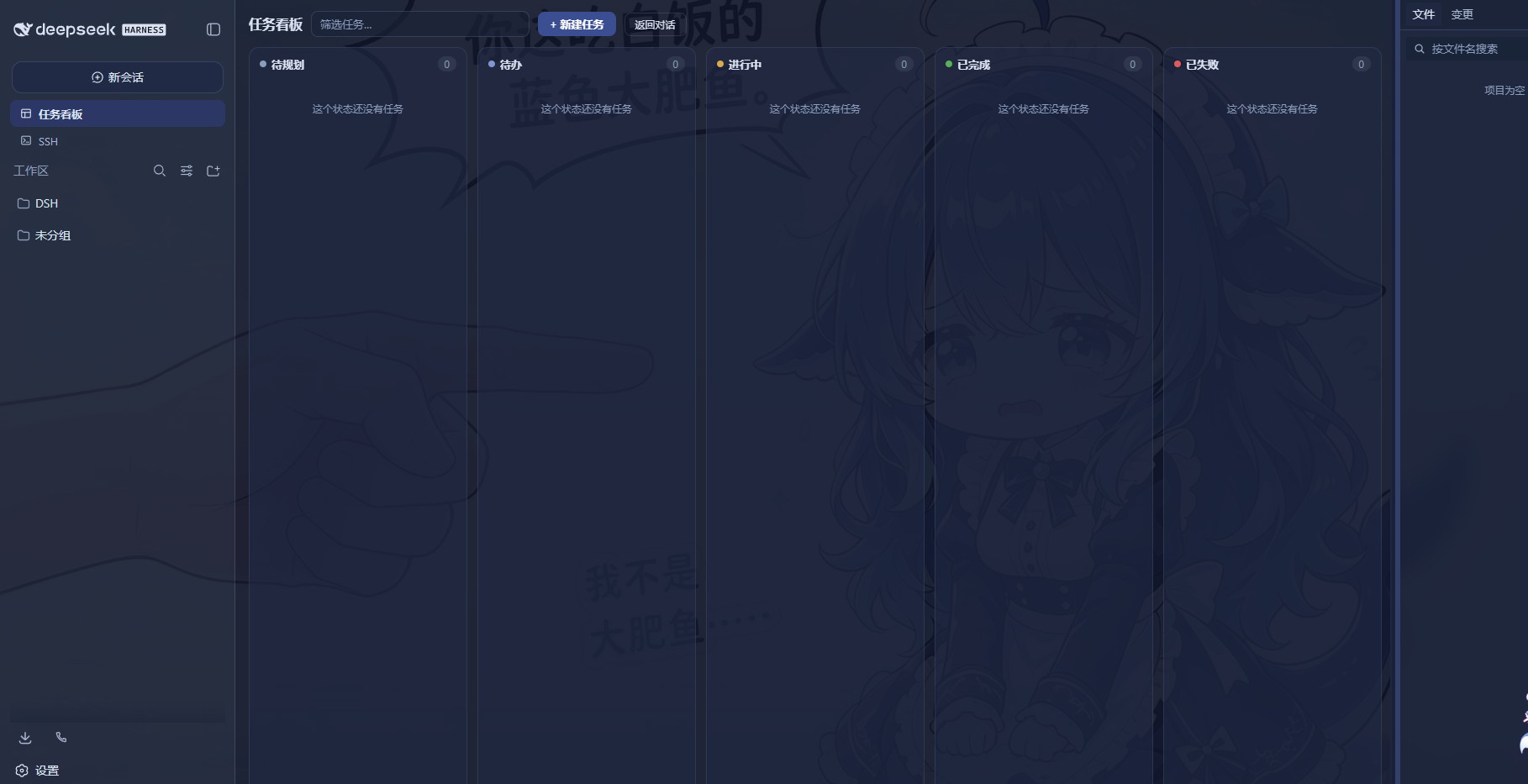
- Task Board (dsh-task-board): A five-column board—To Plan / To Do / In Progress / Done / Failed. Cards can be directly handed off to real DSH sessions for execution, automatically updating status upon completion, and it even supports cron scheduling (e.g., auto-upgrade DSH every day at 23:00).
- Git Graph (dsh-git-graph): Branch swimlanes plus commit history visualization. Switch branches directly above the input box; even large repositories allow you to locate changes at a glance.
- Whale Mascot Pet (dsh-pet): A desktop pet that changes animations based on the agent's state—thinking, waiting, working, celebrating, each with its own motion effect. You can pet its head, feed it small dried fish to increase affinity, and even rename it, like a nurturing game.
- Real-time Token Stats (dsh-live-stats): Real-time input/output token counts and TPS displayed below the input box. Watching the quota burn fast is painful but keeps you aware.
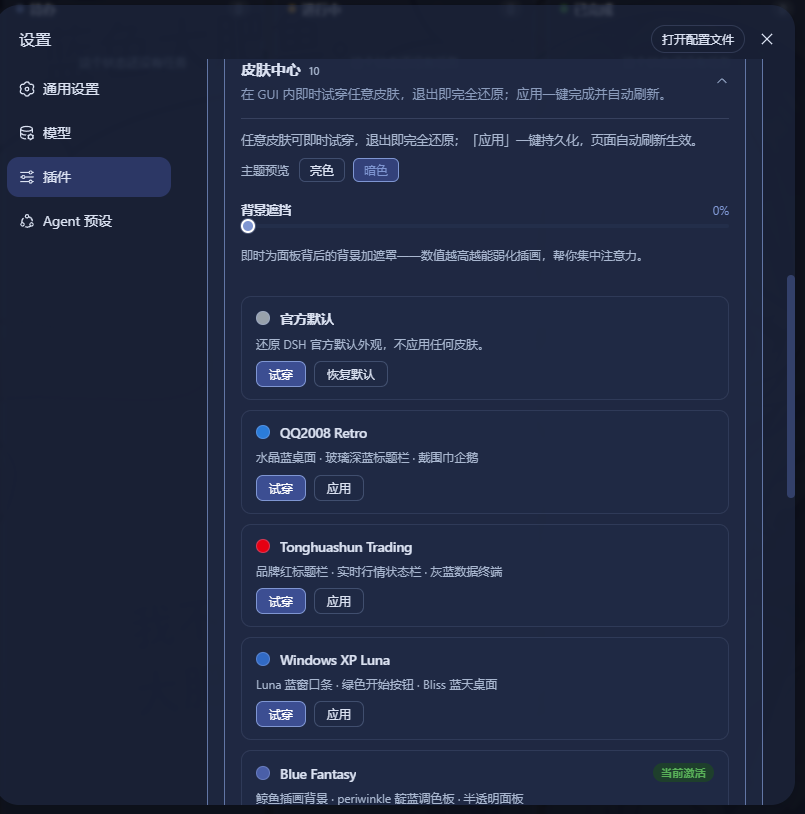
- Skin Center (dsh-skins): 10 skins to switch between freely, supports trying before applying. There's even a Windows XP style, full of nostalgia.
Pictures first. These are screenshots I took after installing; feel the vibe (Image 2: Task Board, Image 3: Whale Mascot, Image 4: Skin Center, Image 5: Real-time Token Stats):


Installation is also a single command:
dsh plugin --profile web add @linxin666/dsh-web-ui-all
After installation, restart dsh web for it to take effect. Skins can be installed separately with @linxin666/dsh-skins.
Cordis: The underlying plugin framework for DSH. Plugins take effect by declaring bundles mounted to a profile. You can think of it as "the plugin socket for DSH"—knowing the one install command is enough.
3. deepseek-harness-app: A Native Swift macOS Desktop Client
If you want to use DSH for coding on a Mac, the easiest way is to install deepseek-harness-app—a macOS application written in native Swift. The repository (Skyearn/deepseek-harness-app) is a fork of the official DSH, wrapping a native shell around the web runner: Swift + WKWebView. It starts dsh web and displays the same interface in an embedded window; quitting the app terminates the service and releases the port.
Unlike a bunch of Electron / Tauri desktop shells, this one is truly native. Using it feels like "this is a proper Mac App" rather than "a wrapped webpage." A few things I like:
- Bundled runtime: Comes with a trimmed-down Node.js, no need to install Node yourself. Download the zip, extract, and run.
- Chinese interface: Menu bar and right-click menus are localized in Chinese.
- Solid process management: Single instance, can reclaim orphaned server processes after a crash, ensures port release before quitting. Upgrades won't leave a mess.

Mac users can just go to GitHub Releases and download DeepSeek-Harness-<version>-macos-universal.zip; it works for both arm64 and x86_64. If you want to compile it yourself, run apps/macos/build.sh --universal --bundle-dsh.
4. dsh-genui: Rendering Model Replies as Interactive Panels
The default model reply is just a blob of markdown. When you need to compare two files or view a flowchart, relying solely on text and emojis is really hard on the eyes.

The dsh-genui plugin (repo: omdsh-dev/dsh-genui) allows the model to render interactive UI directly in its replies. The principle is simple: the model writes the interface description as a JSON code block marked with a dsh-ui fence, and the browser side parses and renders it into components. It supports 30+ component types—cards, tables, charts, forms, tabs, file trees, timelines, diff comparisons, mermaid flowcharts, 3D scenes, quizzes, and even function curves that can be redrawn in real-time by dragging sliders.
dsh-ui fence: A special code fence marker in the model's reply. The browser side parses it into interface JSON for rendering. You don't need to read it; the model writes it, and you see the rendered panel.
Even better, it has an event loop: clicking buttons or submitting forms sends an action back to the model, and the model can continue replying based on your operation—this is not just "rendering" but "interaction." Install from the git source:
dsh plugin --profile web add git+https://github.com/omdsh-dev/dsh-genui.git
After installation, restart dsh web and do a hard refresh on the page. Since version 0.7.2, it supports streaming rendering; components pop up in real-time as the model writes, which is very satisfying to watch.

5. How to Choose Among the Four Plugins (A Table at a Glance)
These four plugins don't conflict with each other; their scenarios are completely distinct. Installing all of them is fine. I've organized the positioning, target audience, and installation difficulty of each into a table:
| Plugin | What It Solves | Who It's For | Installation |
|---|---|---|---|
| ModLens | Reading images for text-only models | People who frequently paste screenshots, view UIs, or need OCR | One command (lock version number) |
| dsh-web-ui | Web interface all-in-one suite | Heavy users of dsh web | One command (aggregated package) |
| deepseek-harness-app | Native macOS desktop client | Mac users, people who find environment setup troublesome | Download zip and use |
| dsh-genui | Rendering interactive UI in replies | People who want a visual experience | One git+https command |
Some might ask: Do these plugins require payment?
All are open-source and free. ModLens's vision model part can use the free GLM-4V endpoint or reuse your existing local Claude Code / Gemini login; the dsh-web-ui all-in-one package is Apache-2.0; deepseek-harness-app is a fork of the official DSH; dsh-genui is also an open-source plugin. The only thing that costs money is the API quota for your own model calls; the plugins themselves cost nothing.
DSH is still in developer preview, and the plugin iteration speed is so fast that—while I was writing this, I was checking version numbers against several READMEs one by one, and a few days after installing, I had to upgrade again. This is normal, don't panic.

Based on my experience installing over the past few days, the one to install first is dsh-web-ui—once the interface is comfortable, you'll have the patience to use it. Next is ModLens, to fill the visual gap of the text-only model. Only then do the DeepSeek Harness plugins truly close the loop on daily workflows. The remaining genui is a nice-to-have bonus.
Reference Links
- DeepSeek Harness Official Repository (Search: deepseek-ai/deepseek-harness)
- ModLens Visual Plugin (Search: liustack/modlens)
- dsh-web-ui All-in-One (Search: zhu1090093659/dsh-web-ui)
- deepseek-harness-app Native Mac Client (Search: Skyearn/deepseek-harness-app)
- dsh-genui Interactive Rendering Plugin (Search: omdsh-dev/dsh-genui)
- For more DeepSeek Harness plugins, see the awesome-dsh-plugin curated list (Search: awesome-dsh-plugin)
References and Notes
- This article is independently written based on the official READMEs of each plugin (verified August 2026) and personal installation experience. The views and expressions are the author's own.
- When installing DeepSeek Harness plugins, please refer to each repository's README. DSH versions update frequently; commands and version numbers may change.
I'm Goodnight Code, continuously sharing practical programming content. If you find it useful, remember to like, bookmark, and follow~ Also welcome to chat in the comments: What plugins have you installed for DeepSeek Harness? Which one do you most want to recommend or warn against?