A Four-Skill TRAE Work Pipeline That Writes Release Notes in Two Minutes
Hello everyone, I'm Buru Moyuqu, the main maintainer of wot-ui. Welcome to my AI sharing column.
I usually maintain a component library and also write some technical articles. Logically, most of what I write about is stuff I've done myself, so it shouldn't be hard to start writing.
The reality is: I can code for half a day in one go, but I can get stuck on an article's opening for an entire evening.
So when AI first became capable of writing long-form articles, I was quite happy. Give it a topic, add a few requirements, and in the time it takes to drink some water, an article of two or three thousand words is ready.
Then I'd spend another half a day editing it. The AI flavor was too strong, and it didn't sound like me. "Furthermore" — delete. "It is worth noting that" — delete. "This is not just... but also..." — delete too...
After a few rounds of this, I realized that asking AI to write a complete article in one go is a bit too much. It has to understand the topic, organize the content, mimic my tone, and finally handle the WeChat public account formatting properly. If it were me, I wouldn't want to do so many tasks at once either.
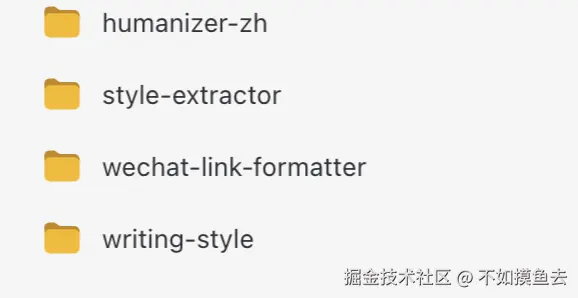
So I broke down the article-writing process and used these 4 Skills in TRAE Work to help me write:
humanizer-zh: Introduced to remove the AI flavor from the first draft.writing-style: To rewrite the article back into my own tone.style-extractor: To analyze articles I like.wechat-link-formatter: To handle external links for WeChat public accounts.
After using this workflow, writing things like release announcements usually takes just 2 minutes. For example, this article: Open Wot 1.0.5 Release: Let AI Access wot-ui with Just Two Commands.
An AI First Draft Is Just a First Draft
I used to have high expectations for AI writing.
I would dump the topic, target audience, article structure, and tone into a prompt all at once, and then wait for it to deliver a finished piece. The result was often that the first few requirements were met, but the later ones started to get sloppy. The content looked complete, but upon closer reading, it was all correct yet useless statements.
For example, sentences like this:
Through the above steps, we have not only improved writing efficiency but also built a sustainable, reusable, and scalable content creation system.
I recognize every word, but I definitely wouldn't say it like that normally.
Later, I stopped asking it to "directly write a publishable article" and only had it organize the materials I provided into a first draft. I supplied the cases, viewpoints, and real experiences; it was responsible for building the framework, leaving missing information blank instead of making things up.
After lowering my requirements, it actually became more useful.
Removing the AI Flavor First
AI has some very fixed habits when writing Chinese: it likes to lay out a large background first, lists three points for something that could be explained in three sentences, and often adds a concluding significance at the end of a paragraph. After reading enough of it, you can even guess what the next sentence will be.
For this reason, I introduced humanizer-zh. It checks for empty words, exaggerated rhetoric, repetitive conclusions, overly neat sentences, and high-frequency expressions like "not only... but also...". When processing, it only changes the phrasing and does not add opinions for me.
In most scenarios, AI will automatically scan and use skills, but of course, you can also explicitly tell TRAE Work to use humanizer-zh:
Use `humanizer-zh` to optimize this first draft.

Keep the original information and viewpoints, do not supplement content on your own.
Delete empty words, clichés, and excessive summaries, making the sentences read like a normal person speaking.
The Article Should Sound Like Me
Articles written by AI: sometimes like technical documentation, sometimes like product advertorials, and occasionally like a leader's speech.
This was unbearable, so I found some articles I had written before and had TRAE Work analyze my openings, paragraphs, common expressions, and article structure, finally organizing them into writing-style.
"Learn and Practice Often"
Writing articles also requires learning. Previously, when I saw a good article, I usually just bookmarked it and that was the end of it. Later, I created style-extractor. When I see an article I like, I can give it the text or a link and have it break it down: how the opening introduces the problem, in what order the content unfolds, why the paragraphs read comfortably, and what fixed expressions the author uses.
I don't use the analysis results to directly imitate writing, as that easily copies someone else's flavor. The more common usage is to pick one or two points that suit me and add them to writing-style.
For example, if an article's opening is very crisp, I look at what padding it cut out; if a tutorial reads effortlessly, I study how it intersperses code and explanations. This way, the bookmarked articles are truly put to use.
WeChat Public Account External Links
My articles are usually published on WeChat public accounts, and technical articles often contain links to GitHub, official documentation, and online demos. Markdown makes linking convenient, but copying them to a WeChat public account doesn't work. Before each publication, I have to change external links into a "text + URL" format.
This task has no difficulty, only repetition.
So I created wechat-link-formatter, specifically to handle links before publishing:
Use `wechat-link-formatter` to process the external links in this article,
converting them into a "text + link" format suitable for WeChat public accounts. Do not modify other content.
Previously, the worst part was finishing the main text and suddenly remembering that a dozen links still needed fixing. Now I just hand it over for a run and only check the results. Although it doesn't save hours, being able to do a little less of this kind of work brings me one step closer to slacking off.
Summary
After using TRAE Work combined with skills to create a workflow, writing things like release announcements and experience reports has become simple. First, get the thing done, then have TRAE Work summarize a first draft, use humanizer-zh to clean up the expression, and use writing-style to retrieve my own tone. Regularly learn new writing techniques through style-extractor, and let wechat-link-formatter wrap things up before publishing.
These 4 Skills haven't turned me into some writing master; they've just solidified the things that required repeated revision and re-explanation every time.
The time saved still needs to be spent on thinking of topics, doing practical work, and writing about my real feelings.
Top 1 of 2 from juejin.cn, machine-translated. The original thread is authoritative.
Fish bro is awesome again
[I want to be quiet]