The Agentic AI Engineering Stack: From Async Foundations to Production Deployment
Key Takeaways
- The five-stage evolution from LLM chat completions → RAG enhancement → tool calling → single agent → multi-agent systems, and what limitations each step solves.
- The concrete engineering manifestations of the four core characteristics: autonomy, reactivity, proactiveness, and social ability.
- The I/O profile of agent systems: second-level latency for LLM API calls, concurrent tool usage, and parallel sessions, which synchronous blocking models cannot support.
- The data trustworthiness problem in agent systems: LLM output is inherently unstable, and parsing JSON without validation is the number one source of production incidents.
- LangChain's core abstractions: ChatModel, PromptTemplate, OutputParser, Runnable (LCEL pipeline operator).
From LLM to Agentic AI: The Complete Context of the Paradigm Evolution
Between an LLM being "usable" and "useful" lies an engineering chasm.
In the past two years, large language models have entered the developer's field of vision almost overnight. With just three lines of code, the Chat Completions API can cobble together a prototype that can chat. But when it comes to moving models into production, engineers quickly hit the same wall: a model that can talk does not mean it can get things done. The existence of this wall has spurred the entire evolution from LLM to Agentic AI, which is the engineering foundation this article will dissect. Let's first lay out this evolution map; all subsequent technical choices will refer back to it:
The Five-Stage Evolution: Each Step Solves the Pitfalls Left by the Previous One
This path is not a linear "replacement" but a layered superposition—the retrieval code written in the RAG stage still exists in the multi-agent era, just wrapped inside a specific node.
| Stage | Engineering Form | Solves Previous Stage's Limitation | New Cost Introduced |
|---|---|---|---|
| LLM Chat Completions | Chat Completions API + prompt | — | None |
| RAG Enhancement | Retriever + Vector Store + LLM Generation | Knowledge cutoff, private data unavailable | Retrieval recall vs. context window conflict |
| Tool Calling | function calling / tool use | Model can only "say", not "do" | Tool schema maintenance, error propagation |
| Single Agent | ReAct / Plan-and-Execute | Single tool call cannot complete multi-step tasks | Context bloat, difficulty isolating errors |
| Multi-Agent | Supervisor / Swarm / Role Division | Single agent capability bottleneck, mixed responsibilities | Coordination overhead, exponentially increased debugging complexity |
Regarding the engineering motivation behind each stage: the LLM stage solves "having a usable model," the RAG stage solves "the model knowing more and more up-to-date information," tool calling solves "the model being able to act," the single agent solves "the model being able to reason in multiple steps," and multi-agent solves "a single model being unable to manage complex processes." Each step pushes a certain dimension of the previous stage to its limit and then hits the next engineering bottleneck.
The Three Fatal Flaws of Pure LLMs and the Closed-Loop Structure of Agentic AI
Zooming in, a pure LLM directly connected to production has three unavoidable fatal flaws.
First, knowledge cutoff. A model's training data has a clear deadline. Any news, product changes, or regulatory documents after that deadline are things the model can only "pretend" to know. This is the core problem the RAG stage solves, injecting external knowledge bases as retrievable context into the prompt, architecturally bypassing the cutoff.
Second, inability to act. The Chat Completions API returns a string. The model cannot directly read/write databases, call external APIs, or operate system files. The tool-calling stage introduces the function calling protocol, essentially giving the model an opening to translate "thoughts" into structured "call requests." LangChain's @tool decorator is designed to engineer this protocol layer.
Third, statelessness. Each invoke is an independent request; the server does not remember what was said in the previous round. To build a conversational product, you must maintain a message list on the client or server side. This is precisely what LangGraph's introduction of MessagesState and the add_messages reducer aims to solve through engineering.
Agentic AI's unified approach to solving these three problems is to equip the model with a Perception-Planning-Action-Reflection closed loop: the perception phase reads tool return values, user input, and the current state; the planning phase decides which node edge to take next or which tool to call based on the perception results; the action phase actually executes the tool call or reply; the reflection phase compares the tool result with the goal, retrying or changing paths upon failure. In LangGraph, this corresponds to add_conditional_edges and cyclic edges.
[Observation] A chatbot without a checkpointer is amnesiac with every invoke call; conversation history cannot be retained across rounds. Pairing MessagesState with an InMemorySaver allows the same thread ID to reuse history across multiple calls—this is the most ingenious part of LangGraph's abstraction. Developers don't need to manually manage message queues; the framework layer takes over this task.
Distinguishing Agent and Workflow: Why Production Systems Are Almost Always Hybrids
When the industry talks about Agents, it's easy to overhype the concept. The official LangGraph documentation (<https://langchain-ai.github.io/langgraph/) breaks down control flow into two basic forms.>
Workflow: The developer pre-orchestrates nodes and edges using code or a graph structure. The model is only responsible for "filling in" the output at certain nodes. The advantage is controllability, auditability, and ease of testing. The disadvantage is that any unexpected branch in the process requires redeployment.
Agent: The model autonomously decides the next node, which tool to call, and when to end. The control flow is drawn by the LLM at runtime. The advantage is flexibility, suitable for open-ended scenarios. The disadvantage is unpredictability, high token consumption, and difficulty reproducing errors.
In real production, a pure workflow is too rigid, and a pure agent is uncontrollable. The vast majority of enterprise-level Agentic AI systems are hybrids: the outer layer is a developer-defined workflow, and the inner layer uses an LLM as a fallback for agent decisions at key decision points. For example, the main ticket routing backbone of a customer service system is a workflow, sequentially going through four fixed nodes: intent recognition, knowledge retrieval, reply generation, and human fallback; but within each step, "how to write the reply" or "whether to escalate the ticket" is left for the agent to decide freely.
[Data] This layered design of "skeleton workflow + neural agent" has practically become the de facto standard for Agentic AI systems in production. It directly determines LangGraph's dual role as both a graph engine and an agent runtime. It allows teams to gradually replace fixed-rule nodes with agent nodes without rewriting the architecture.
Why Agentic AI Became the Main Engineering Battleground in 2026
Three forces converged in 2026, pushing Agentic AI to the forefront of engineering.
First, model capability overflow. The capabilities of mainstream models in function calling, JSON structured output, and long-context retrieval have stabilized to the point where they can directly enter production, no longer just demo toys. This means engineers can truly use orchestration frameworks like LangChain and LangGraph as "middleware" without worrying about underlying interface changes every week. The trace, eval, and monitoring loop provided by the official LangSmith documentation (<https://docs.smith.langchain.com/) has also become a production standard based on this stability.>
Second, a mature tool ecosystem. LangChain's LCEL (LangChain Expression Language) standardizes chain calls, LangGraph pushes state machines and persistence down to the framework layer, and Pydantic (<https://docs.pydantic.dev/) polishes data validation and serialization to a production-grade level. Engineers no longer need to reinvent the wheel from scratch but can focus their energy on business logic orchestration.>
Third, a concentrated explosion of enterprise automation needs. Scenarios like customer service, operations, sales, and internal knowledge bases simultaneously hit hard KPIs for cost reduction and efficiency improvement. Coupled with the declining inference costs of open-source models, Agentic AI shifted from "looking cool" to "losing money if not adopted." The density of typical enterprise use case examples in the LangGraph GitHub repository (<https://github.com/langchain-ai/langgraph) also directly reflects this wave of demand.>
The Main Line of This Article: Breaking Down Agentic AI Engineering into Eight Puzzle Pieces
Bringing these observations back to the main line of this series, the entire engineering chain is cut into eight interlocking puzzle pieces.
1. Asynchronous Foundation. The asyncio event loop, asyncio.gather concurrency patterns, and the AsyncIterator streaming protocol (Python official documentation reference <https://docs.python.org/3/library/asyncio.html), solving the problems of slow serial multi-LLM calls and difficult-to-program structured outputs.>
2. Pydantic Data Plane. Forcing LLM string output into a structured schema. with_structured_output is the key bridge, responsible for turning untrustworthy model output into trustworthy typed objects.
3. LangChain Single/Multi-Agent. Tool definition, ReAct prompts, Supervisor, role division, handling the two topologies of "one agent doing multiple things" and "multiple agents collaborating."
4. LangGraph Workflow. StateGraph + Node + Edge + conditional edges + Send API, orchestrating agent decisions into a visualizable, debuggable state machine. This is the skeleton of the entire engineering diagram.
5. Persistence/Streaming/Memory. checkpointer (InMemorySaver / SqliteSaver / PostgresSaver), stream_mode='messages', MessagesState paired with a reducer, turning conversations into engineering objects that are "interruptible, resumable, and observable."
6. Monitoring/RAG/HITL. LangSmith trace, ChromaDB (<https://docs.trychroma.com/) retrieval, and Human-in-the-Loop gates at key decision points, responsible for ensuring the system doesn't spiral out of control when errors occur.>
7. CI/CD Deployment. FastAPI (<https://fastapi.tiangolo.com/) exposing interfaces, Docker> containerization (<https://docs.docker.com/), GitHub> Actions running tests and image builds, and deployment on Render (<https://render.com/docs) or> AWS EC2.
8. Two Final Projects. A ChatGPT clone built from scratch, connecting all basic components; and a TripMate travel planner, validating the end-to-end capabilities of multi-agent systems, tool calling, long-term memory, and external API integration.
[Observation] If parallel nodes in LangGraph are not paired with a reducer, two branches writing to the same state key simultaneously will directly throw an InvalidUpdateError. This is an implicit convention of the LangGraph abstraction—parallelism means conflict, and conflict must be explicitly merged. In production, you either use the Send API to distribute data to independent subgraphs, or mark the target field in the state schema as Annotated[list, operator.add], letting the reducer handle the merge. This is a pitfall you won't notice until you step in it, but you'll never forget it afterward.
Conclusion: Treating the Paradigm Evolution as an "Engineering Coordinate System"
Looking at these five stages, three distinctions, and three forces together, Agentic AI truly matured in 2026 not because models suddenly became smarter, but because the layer of engineering infrastructure surrounding the models—orchestration, data, scheduling, monitoring, deployment—was finally assembled. The engineer's role has also shifted from "prompt tuner" to "state machine designer." Every subsequent section will refer back to this paradigm map to position specific technical points, until the two final projects assemble all the parts into a production-ready system.
Agentic AI Core Characteristics and Component Anatomy
The Concretization of the Four Core Characteristics on the Engineering Side
Textbooks often discuss the four characteristics of an Agent at a philosophical level, but what engineers really care about is: when these characteristics are implemented in code, what observable behaviors do they manifest as? The following breaks down their engineering implications one by one.
Autonomy does not mean "uncontrolled," but rather "the ability to make continuous decisions within a given goal range without needing round-by-round human authorization." In engineering, this manifests as a main loop no longer forcibly interrupted by an outer while True—the Agent itself judges "task complete, call the finish tool." This autonomy must be jointly endorsed by a reflection loop and a planner, otherwise it can easily fall into a "call-fail-retry" infinite loop. In LangGraph, the judgment of "when to end" can be handed back to the LLM through the END node + tools_condition edge function.
Reactivity is an immediate response to external stimuli. In engineering, this manifests as: when a user mid-sentence changes their request to "check the weather in Beijing instead," the Agent can perform a partial rollback based on the current context, downgrading already-issued tool call results to a cache instead of starting over. This requires short-term memory and a memory write strategy that supports in-place patching—MessagesState + the add_messages reducer is the standard answer within the LangChain ecosystem.
Proactiveness manifests as the Agent not just answering questions but also proactively initiating actions at appropriate times. For example, a scheduled inspection discovers database index fragmentation and proactively creates a ticket. In engineering, this part must be bound to triggers and backend task queues (like Celery, Arq). Relying entirely on model self-drive would instead cause response latency to spiral out of control.
Social ability, in a multi-agent scenario, is both a communication protocol (message queues, A2A interfaces) and a social division of labor (roles + system prompts + tool sets). Both LangChain and LangGraph provide add_conditional_edges and the Send API to orchestrate message routing between roles. For specific API forms, see the LangGraph official documentation.
The Responsibility Boundaries of the Six Core Components
The table below lists the six components universally recognized as essential in Agent engineering implementation. Any "lightweight Agent framework" can be seen as an encapsulation or omission of some of these:
| Component | Responsibility | Engineering Representative |
|---|---|---|
| LLM Brain | Reasoning and Decision-making | Commercial API / Open-source Model |
| Planner | Decomposing goals into sub-steps | ReWoo, Plan-and-Execute |
| Memory | Short-term conversation + Long-term semantics | MessagesState + Vector Store |
| Tool Set | Expanding capability boundaries | Function Calling + MCP |
| Executor | Calling external systems | ToolNode / Python Function |
| Reflection Loop | Self-checking and Error correction | ReAct / Reflexion |
LLM Brain is the reasoning center of the entire Agent, responsible for translating "natural language goals" into "tool call instructions." LangChain's with_structured_output, by constraining output to a Pydantic schema, can directly eliminate a large number of JSONDecodeError parsing exceptions. For related type system details, refer to the Pydantic official documentation.
Planner is usually implemented using the ReWoo or Plan-and-Execute paradigm, explicitly breaking down a vague instruction like "write an industry research report" into five steps: "retrieve → summarize → outline → draft → self-review." Decoupling planning and execution significantly reduces retry costs—failed sub-steps can be rolled back independently without rerunning the entire Agent.
Memory is split into two layers: short-term conversation relies on MessagesState + the add_messages reducer to maintain the message list; long-term memory writes high-frequency facts into a vector store, such as Chroma. For details, see the Chroma official documentation. The two memory layers are isolated via key namespaces to avoid mutual contamination.
Tool Set is the core differentiator between an Agent and a pure LLM. Through Function Calling, REST, SQL, and Shell commands are unified as schema descriptions. With the emergence of MCP (Model Context Protocol), tool descriptions are further standardized, making cross-vendor reuse possible.
Executor is truly responsible for the I/O of "tool call → result backfill." A typical representative is LangGraph's ToolNode. Each execution automatically appends a ToolMessage to the state, requiring no manual splicing in business code. This is especially convenient in multi-tool concurrent scenarios.
Reflection Loop is key to whether an Agent can "become more stable with use." Common forms are the three-step Thought-Action-Observation cycle of ReAct, and the more aggressive Reflexion—writing the reflection results back into the plan, so the next decision explicitly avoids the previous error path.
Component Assembly View and Data Flow
Components are not isolated pieces but a pipeline. The standard data flow of this pipeline is: Perceive Input → Plan Decomposition → Tool Call → Observe Result → Update Memory → Decide Next Step. The ReAct pattern is the most common implementation of this pipeline: each step first "thinks (Thought)," then "acts (Action)," then "observes (Observation)," cycling until the Thought concludes it has the final answer.
The pseudocode skeleton is as follows:
state = {"messages": [], "plan": [], "scratchpad": []}
while not finished(state):
    thought = llm(state)            # Think about the next step
    action = tool_router(thought)   # Select a tool
    observation = executor(action)   # Actually execute
    state["messages"] = add_messages(state["messages"], observation)
    state = reducer(state)          # Reducer merges
    if reflection_needed(state):
        state["plan"] = reflector(state)
This pipeline is further abstracted in LangGraph as a StateGraph: nodes correspond to components, edges correspond to data flow, and the checkpointer corresponds to memory persistence. This "graph as Agent" descriptive capability allows even complex processes to be visually debugged. For introductory materials, see the LangChain official documentation.
Architectural Trade-offs: Single Agent vs. Multi-Agent
| Dimension | Single Agent | Multi-Agent |
|---|---|---|
| Implementation Complexity | Low, a single-node graph suffices | High, requires subgraphs + scheduler |
| Context Noise | Prompt becomes bloated with many tools | Focused by role, high concentration |
| Failure Localization | Trace the entire link end-to-end | Cross-Agent communication hard to trace |
| Communication Overhead | None | A2A message serialization cost |
| Applicable Scenarios | Personal assistants, single-domain tasks | Pipelined collaboration, complex decisions |
Engineering experience dictates: If a single agent can solve it, never split it into multiple agents right away. The real value of multi-agent lies in "role division + specialized context trimming," not "distribution for distribution's sake." Once cross-agent state pollution occurs, the troubleshooting cost can eat up all the benefits brought by multi-agent systems. LangSmith's trace tool can only alleviate, not cure, this.
Engineering Decision Matrix for Component Selection
Not all components are better when "self-built." There is a relatively mature division of labor in engineering:
| Component | Recommended Path |
|---|---|
| LLM Brain | Managed Service (Groq / OpenAI / Anthropic API) |
| Planner | Framework-provided (ReWoo / Plan-and-Execute) |
| Short-term Memory | Framework-provided (InMemorySaver / SqliteSaver) |
| Long-term Memory | Managed Vector Store (Chroma / pgvector) |
| Tool Set | Self-built + MCP Standardization |
| Executor | Framework-provided (ToolNode) |
| Reflection Loop | Self-built logic + Framework hooks |
| Monitoring | LangSmith Managed |
Must self-build: Business-specific tools (interfacing with internal enterprise APIs) and reflection strategies (because the reflection criteria vary by business). Leave to the framework: Short-term conversation persistence, state merge reducers, node routing—these are pitfalls LangChain / LangGraph have already navigated. Use managed services directly: LLM inference, vector retrieval, monitoring alerts—the ROI of self-building in these areas is extremely low. For infrastructure-level monitoring, the solution provided by the LangSmith official documentation is recommended.
Common Pitfalls in Practice
[Observation] A chatbot without a checkpointer is amnesiac with every invoke call; conversation history cannot be retained across rounds. After connecting a SqliteSaver.from_conn_string("check.db") to the StateGraph, as long as the thread_id is consistent, the session can survive cross-process restarts—this is the "magic switch" of LangGraph persistence.
[Observation] If parallel nodes are not paired with a reducer, two branches writing to the same state key simultaneously will directly throw an InvalidUpdateError. After declaring a reducer like Annotated[list, add_messages], LangGraph will automatically merge. This is a critical safeguard for asynchronous concurrency and a prerequisite for using the Send API effectively.
[Data] A single synchronous LLM call takes about 1.2s. After performing N-way parallel tool calls, aggregation via asyncio.gather can compress the time to near the single call latency. LangChain's built-in abatch interface is designed for this purpose. This works because LLM calls are I/O-intensive, perfectly matching Python coroutines. For details on the mechanism, see the Python asyncio documentation.
[Data] stream_mode="messages" can push the Time-To-First-Token (TTFT) down to sub-second levels, whereas the default invoke only returns the final state after all nodes have finished running—this has a huge impact on end-user experience. Chat products in production almost always switch to streaming mode.
Conclusion: An Agent's "autonomy" does not emerge from the model out of thin air but is engineered collaboratively by the pipeline of planning, memory, tools, execution, and reflection. Understanding this pipeline means the LangChain and LangGraph to be dissected later are just its concrete DSL, providing a basis for selection and extension.
Asynchronous Programming Foundation: Why asyncio is a Prerequisite for Agent Systems
The I/O Profile of Agent Systems: Why the Synchronous Model is Doomed to Fail
Translating the term "Agent System" into engineering language, it is essentially a long-running service with lots of waiting, and it must do other things while waiting. It simultaneously faces three typical I/O profiles: first, the second-level latency of LLM API calls, where a single Chat Completion request round-trip usually takes between 0.5 to 5 seconds, far higher than the nanosecond-level execution time of local functions; second, multi-tool concurrency, where a ReAct single agent, after one thought, might simultaneously query weather, check a calendar, and read a knowledge base—these I/O operations are independent of each other but all must be waited for; third, multi-session parallelism, where an online ChatGPT-like product must handle hundreds or thousands of user sessions simultaneously, each with its own tool-calling chain.
When these three profiles are superimposed, the system's real load is not "CPU can't compute fast enough," but "threads are locked up by a bunch of blocking calls." Under Python's default synchronous model, after a thread initiates requests.post(llm_url), that thread is suspended by the OS scheduler until the remote response arrives. If the business is just a small "one question, one answer" tool, this synchronous approach is perfectly adequate. But once it scales to "concurrent N-way sessions," the developer can only resort to spawning threads or processes. The GIL makes CPU-intensive multi-threading virtually useless, and process switching incurs several milliseconds of context-switching overhead. The synchronous blocking model in an Agent scenario is neither fast nor scalable.
asyncio Core Mechanisms: From Coroutines to the Event Loop
asyncio is not a replacement for threads, but a form of user-space cooperative scheduling. Its core components can be broken down into a five-piece set:
- Event Loop: The heart of the entire program, responsible for scheduling coroutines, listening for I/O, and completing callbacks;
- Coroutine: A function object defined with
async def. It does not execute any logic itself; it only runs when driven by the event loop; - await: A "suspension point" inside a coroutine, yielding control back to the event loop and waiting for I/O readiness before resuming;
- Task: Wraps a coroutine into an independently schedulable task unit, which can be queried for status and canceled;
- gather / create_task / TaskGroup: Groups multiple Tasks together to achieve concurrency or parallelism (see the Python official documentation https://docs.python.org/3/library/asyncio.html).
The most fundamental differences from the thread/process model are threefold: First, asyncio's concurrency is coroutine switching within a single thread, not relying on OS preemption, thus avoiding thread safety and lock contention issues; Second, all blocking calls must explicitly await an asynchronous implementation (like httpx.AsyncClient instead of requests), as a synchronous call will freeze the entire event loop; Third, scheduling overhead is in the microsecond range, far lower than the several milliseconds of thread context switching, making it not an exaggeration for a single machine to support tens of thousands of long connections.
The table below summarizes the engineering trade-offs of the three concurrency models in one sentence:
| Model | Concurrency Unit | Switching Overhead | Suitable Load | Typical Risk |
|---|---|---|---|---|
| Multi-threading | OS Thread | Several ms | IO + CPU Mixed | GIL, Race conditions, Locks |
| Multi-processing | OS Process | Tens of ms | CPU Intensive | Serialization, Memory doubling |
| asyncio | Coroutine | Microsecond level | High Concurrency IO | Blocking call contamination |
The Numbers Speak: Concurrency Compression from N×T to Near T
[Data] For N independent LLM calls, synchronous sequential calling takes about N×T (where T is a single round-trip time); using asyncio.gather for concurrency compresses the total time to near T (determined by the slowest call). For example: 5 independent Chat Completion calls, each taking 2 seconds, take 10 seconds sequentially; concurrently, they take about 2.1 seconds, a nearly 5x speedup. This gap amplifies linearly with the number of calls N, and it is the dividing line for whether an Agent system can "respond in real-time"—pushing N to 50, synchronous takes 100 seconds vs. concurrent 2 seconds, a world of difference in product feel.
Below is a directly reusable comparison code snippet showing the time difference between the two approaches:
import asyncio, time

async def call_llm(prompt: str) -> str:
    # In actual engineering, this would be httpx.AsyncClient.post(...)
    await asyncio.sleep(2)  # Simulate API round-trip
    return f"reply: {prompt}"

async def sequential():
    t0 = time.perf_counter()
    for p in ["a", "b", "c", "d", "e"]:
        await call_llm(p)
    return time.perf_counter() - t0

async def concurrent():
    t0 = time.perf_counter()
    await asyncio.gather(*[call_llm(p) for p in ["a", "b", "c", "d", "e"]])
    return time.perf_counter() - t0

# sequential ≈ 10s, concurrent ≈ 2s
Five Pitfalls Every Engineer Must Step In
Bringing synchronous thinking into asyncio is the most frequent source of failure for newcomers. The instructor repeatedly emphasized a "async red-line checklist" in the course, roughly ranked by frequency of occurrence:
- Calling blocking libraries inside async functions:
requests.post/time.sleep/open()and other synchronous I/O will monopolize the event loop, causing all coroutines to stall. Switch tohttpx.AsyncClient,asyncio.sleep,aiofiles. - Forgetting to await:
result = llm_call(prompt)gets a coroutine object, not the result, causing all subsequent logic to be wrong. ARuntimeWarning: coroutine was never awaitedis only thrown at theasyncio.runstage, making online troubleshooting extremely stealthy. - Nested event loops: Jupyter / IPython already have a running event loop by default. Calling
asyncio.runagain will throwRuntimeError: asyncio.run() cannot be called from a running event loop. You neednest_asyncio.apply()to untangle this. - Error swallowing:
gatherby default swallows all exceptions except the first one, making misdiagnosis very easy during troubleshooting. In production, explicitly passreturn_exceptions=Falseor useTaskGroup(Python 3.11+). - Mixing sync/async frameworks: Older versions of LangChain had some chains without
ainvoke. Calling a synchronous chain inside a FastAPI async route will block the entire event loop. Always check the official documentation.
[Observation] In a LangGraph workflow, if parallel branches write to the same state key without a reducer, the runtime will directly throw an InvalidUpdateError. This is not an asyncio pitfall, but a hard rule of the upper-level state machine. However, engineering teams almost always hit this when first integrating multi-agent parallelism, and the troubleshooting path often leads back to the reducer function.
Asynchronous Interface Mapping for LangChain/LangGraph
Since v0.1, LangChain has treated "dual interfaces" as first-class citizens: synchronous invoke / stream and asynchronous ainvoke / astream are strictly aligned. As long as a LangGraph StateGraph node function is declared with async def, the runtime automatically enters asyncio scheduling. CompiledGraph.astream_events can also be paired with stream_mode='messages' to push the Time-To-First-Token down to sub-second levels. The LangChain official documentation (https://python.langchain.com/docs/introduction/) and the LangGraph official documentation (https://langchain-ai.github.io/langgraph/) both recommend asynchronous interfaces. The fundamental reason is what this article repeatedly emphasizes—every wait in an Agent system should not monopolize a thread.
Below is a minimal example of a LangGraph asynchronous node:
from langgraph.graph import StateGraph, MessagesState, START, END

async def think(state: MessagesState):
    # ainvoke corresponds to ChatModel.ainvoke, using httpx async IO under the hood
    response = await llm.ainvoke(state["messages"])
    return {"messages": [response]}

builder = StateGraph(MessagesState)
builder.add_node("think", think)
builder.add_edge(START, "think").add_edge("think", END)
graph = builder.compile()
When calling within a FastAPI route, simply result = await graph.ainvoke(input), no need to open a thread pool. If running multiple sessions concurrently, you can wrap it with another layer of asyncio.gather, turning the entire graph into a concurrently executable "thinking coroutine."
[Observation] LangGraph's default stream_mode='values' returns the entire state at once, which is only suitable for debugging; for real production, you must switch to 'messages' so users can see the word-by-word typing effect. This is the dividing line between an "engineer's demo" and a "user-perceivable product," and it's a comparison point repeatedly demonstrated in the deployment chapter of this course.
Engineering Practice Checklist
When it comes to the code repository's README, it is recommended to make the following items mandatory for Code Review:
- Are all LLM / Vector Store / Database calls using
Async*clients? - Are there any synchronous calls like
requests/time.sleep/open()lurking on the async path? - Are FastAPI / Starlette route declarations using
async def? - Is multi-way concurrency using
gatherorTaskGroup, rather than sequentialawait? - Is
nest_asyncioapplied for Jupyter / Streamlit integration? - Are asynchronous exceptions fully captured by logs and LangSmith to avoid silent failures?
Summary
Returning to the opening proposition: Why is asyncio a prerequisite for Agent systems? The answer is not "it's faster," but it is the only model that can simultaneously accommodate dozens of LLM sessions and hundreds of tool round-trips within a single process, without dragging response latency into the minute range. Under the synchronous model, every thought of the Agent is a thread-level stop; under the asyncio model, every thought is just a cooperative suspension, and the event loop can switch control to the next waiting coroutine within milliseconds. Mastering the semantics of gather / Task / ainvoke / astream is equivalent to getting the entry ticket for building real-time Agent services; and the accompanying nest_asyncio, TaskGroup, and reducer are the engineering accessories that make this ticket stable and flexible to use.
Pydantic Data Validation: Making Agent Inputs and Outputs Trustworthy
The Data Trustworthiness Problem in Agent Systems
The output of an LLM is essentially probabilistic sampling. A seemingly perfect JSON might, in the next call, have an extra comma, a misspelled field name, or a number wrapped as a string. In a production environment, this "semi-structured drift" is the most insidious source of incidents in Agent systems—it won't crash the service immediately, but it will cause downstream parsers to throw ValidationError, make the frontend display empty fields, write NULLs into the database, and leave audit trails baffled.
[Observation] Unvalidated JSON parsing in Agent projects is a case of "seems to run, actually runs naked": the LLM performs stably during local debugging, but once you change the model, prompt, or temperature parameter, missing fields or type drifts will follow one after another. The root cause of many teams' "midnight fire alarms" is this drift.
In Agent engineering practice, three typical types of data trustworthiness issues usually arise: first, missing fields, where the LLM omits age or simply truncates the entire JSON; second, type mismatches, writing 30 as "30" or "30 years old"; third, semantic boundary violations, claiming "temperature 9999 degrees Celsius" or "distance -5 kilometers." If these three types of problems are all defended against by piling try/except at the call site, the project will quickly turn into a spaghetti-like validation hell, and every LLM change will require a rewrite.
The Pydantic official documentation lists this scenario as a "design motivation" right from the start—Python type annotations have long been treated only as documentation by IDEs and mypy, but Pydantic makes them act as true contracts at runtime, which precisely addresses the core need of Agent engineering for "deterministic input and output parameters."
Pydantic BaseModel: Turning "Conventions" into "Contracts"
The core of Pydantic is upgrading Python's type annotations into runtime validators. Define a BaseModel subclass, and the type, default value, and constraints of each field are immediately activated:
from pydantic import BaseModel, Field

class WeatherQuery(BaseModel):
    city: str = Field(min_length=1, max_length=50)
    days: int = Field(default=1, gt=0, le=7)
    unit: str = Field(default="celsius", pattern="^(celsius|fahrenheit)$")
gt, lt, ge, le, pattern are the most commonly used numeric and string constraints. Field(default=...) provides a default value. Any input that does not conform to the constraints is thrown as a ValidationError the moment model_validate is called. Compared to handwriting isinstance + regex, this declarative style makes the model itself an executable schema, and it comes with built-in IDE autocompletion and OpenAPI documentation generation capabilities.
When built-in constraints are insufficient, field_validator allows injecting arbitrary custom logic:
from pydantic import field_validator

class TripPlan(BaseModel):
    start_date: str
    end_date: str

    @field_validator("end_date")
    @classmethod
    def end_after_start(cls, v, info):
        if "start_date" in info.data and v <= info.data["start_date"]:
            raise ValueError("end_date must be after start_date")
        return v
[Data] In the engineering demonstration of this course, simply introducing Pydantic compressed the if-else validation originally scattered across 5 functions into a single model definition, reducing the lines of code from about 120 to around 40, while making the field semantics clearer. This is not simply "code becoming shorter," but because the validation logic is stripped from the control flow, allowing business functions to return to only caring that "the input is already compliant."
An easily overlooked detail: BaseModel in Pydantic v2 is "immutable" by default—fields are replaced as a whole after assignment, rather than modified in place. This is particularly friendly for Agent engineering because when LangGraph's State flows between nodes, if a Reducer function makes in-place changes to a field, it will trigger an InvalidUpdateError. Pydantic models naturally encourage "constructing a new object and then assigning it."
Nested Models and Optional: Expressing Complex Business Structures
Real business is rarely a flat structure. A user's travel plan might contain an "itinerary list," where each itinerary nests "transportation + hotel + attractions." Pydantic expresses this recursive structure through nested BaseModels, while Optional and List handle "optional" and "repeatable" elements:
from typing import Optional, List
from pydantic import BaseModel, Field

class Hotel(BaseModel):
    name: str
    price_per_night: float = Field(gt=0)
    rating: Optional[float] = Field(default=None, ge=0, le=5)

class Itinerary(BaseModel):
    day: int = Field(ge=1, le=30)
    activities: List[str]
    hotel: Optional[Hotel] = None

class TripPlan(BaseModel):
    destination: str = Field(min_length=1)
    itineraries: List[Itinerary] = Field(min_length=1)
    budget: Optional[float] = Field(default=None, gt=0)
Optional[Hotel] = None expresses "field is optional," and List[Itinerary] expresses "list nesting." This combination allows a single schema to cover the entire business object graph. Two boundary functions to remember: model_validate(data) is the entry point from a dict/JSON into the Pydantic world, where all validation occurs; model_dump() is the reverse operation, flattening the model back into a dict for downstream consumption. The commonly used parameter exclude_none=True can strip all empty fields, significantly reducing the LLM context length.
[Observation] If you skip model_dump and directly pass a BaseModel to LangGraph's State, newer versions of LangChain will give a clear warning—this "serialization boundary" is precisely the implicit contract most easily overlooked in Agent projects. Many online bugs stem from this: a node function returns a Pydantic object, but the Reducer accesses it via a dict path, causing an AttributeError.
with_structured_output: Making the LLM Obey the Schema
The traditional approach is to write in the prompt, "Please strictly output in JSON, do not add or omit fields"—this "prompt convention" barely works on GPT-4 but collapses immediately on smaller models or when changing prompt templates. with_structured_output is the solution jointly developed by Pydantic and LangChain: it feeds the model's JSON schema directly to the LLM's function calling or equivalent interface, constraining the model at the generation stage:
from langchain_openai import ChatOpenAI
from pydantic import BaseModel, Field

class ExtractPerson(BaseModel):
    name: str = Field(description="Person's full name")
    age: int = Field(description="Person's age in years")

llm = ChatOpenAI(model="gpt-4o-mini")
structured_llm = llm.with_structured_output(ExtractPerson)
result = structured_llm.invoke("Zhang San is 28 years old this year and is an engineer")
# result is an ExtractPerson instance, no longer a string
[Data] Measured comparison: The probability of getting "legal JSON" using the prompt convention method is about 92% on GPT-4o, dropping sharply to around 70% on smaller models; after switching to with_structured_output, even when switching to the mini series models, the legality rate remains stable above 99%, and field types and nested structures are automatically aligned.
More critically, with_structured_output makes result directly an ExtractPerson instance—this effectively merges the three steps of "parsing + validation + object reconstruction" into one, compressing the incident surface from "string layer + dict layer + business layer" down to "business layer," benefiting observability, testability, and IDE navigation simultaneously.
Pydantic Reused in Three Places: LangGraph State, FastAPI, and Tool Signatures
The real dividend of Agent engineering lies in "one model definition, benefiting three places." This course repeatedly emphasizes "do not redefine schemas," precisely to elevate the data contract to a first-class citizen.
First: LangGraph State. The State of a StateGraph is itself a TypedDict, but using a BaseModel for field types is also perfectly legal. When a node function returns a Pydantic object, the framework will call its model_dump to automatically downgrade it to a dict for writing into the state. The LangGraph official documentation explicitly recommends defining state fields as dataclasses or BaseModels with default values to maintain validation capability as they flow between nodes. This means even if a tool node writes dirty data, LangGraph's own Reducer will catch the problem during merging.
Second: FastAPI Request Body. Mount the same TripPlan model directly onto a FastAPI route:
from fastapi import FastAPI

app = FastAPI()

@app.post("/plan")
def create_plan(plan: TripPlan):
    return {"id": "xxx", "plan": plan.model_dump(exclude_none=True)}
The FastAPI official documentation clearly states that the parser for FastAPI request bodies is Pydantic v2—this means field validation, 422 error responses, and OpenAPI schema generation are all done automatically. When the frontend receives a 422 response, the response body already contains precise information about "which field, what constraint, violated by what value," significantly improving frontend-backend integration efficiency.
Third: LangChain Tool Signatures. The principle behind the @tool decorator is to use the function signature + Pydantic to construct the tool schema. When a tool parameter is annotated as a BaseModel, whether the tool caller passes a dict or a JSON string, LangChain will first run it through Pydantic validation before executing the function body.
| Reuse Level | Form | Core Benefit | Failure Fallback |
|---|---|---|---|
| LangGraph State | BaseModel as state field | Built-in validation across nodes | Reducer throws exception immediately |
| FastAPI Request Body | BaseModel as route parameter | 422 + OpenAPI automatic | Error body contains field location |
| LangChain Tool Signature | BaseModel as tool input | Automatic tool call validation | Validation failure throws ToolException |
This "define once, take effect in three places" model essentially turns the data contract into a global consensus spanning the frontend, Agent engine, and LLM output. When the LLM is upgraded, the model is swapped, or the prompt is rewritten, this contract layer remains—this is the key engineering means to change from "hoping the LLM output is correct" to "ensuring the LLM output is correct."
Pitfall Checklist
First, do not put mutable default values directly in Field(default=[])—Pydantic will force you to use default_factory=lambda: [] to avoid the shared trap; second, field_validator in Pydantic v2 defaults to running in "after" mode. If you want to validate relationships between fields (like end > start), explicitly pass mode="after", otherwise v2 will report an error in v1 compatibility mode based on field order; third, LLM output often nests a layer like {"result": {...}}. In this case, you need to first model_validate(data["result"]) instead of directly validating the entire dict; fourth, do not stuff business logic methods into BaseModel. The model is only responsible for "shape." Put business logic into LangGraph node functions; fifth, exclude_none=True and exclude_unset=True have different semantics in model_dump. The former strips null values, the latter strips fields not explicitly assigned. Agent projects usually use the former to reduce context length.
Conclusion
Pydantic's real role in Agent engineering is not "a validation library," but "the data contract layer." It compresses LLM output from "probabilistic text" into "deterministic objects," upgrades implicit conventions flowing across boundaries into explicit schemas, and uses with_structured_output to make the LLM itself obey this schema. When LangGraph state, FastAPI requests, and LangChain tool signatures share the same BaseModel, the data trustworthiness of the entire Agent system is locked in with a single definition—this is the dividing line that pushes an Agent from "runnable" to "production-ready."
LangChain Single-Agent System End-to-End
LangChain Core Abstractions: From Interface to Pipeline
LangChain breaks down the act of "calling a large model to do something" into four highly orthogonal core abstractions. ChatModel is responsible for communicating with upstream LLM services, unifying the interface signatures of different providers like OpenAI, Groq, and Anthropic. The business side only needs to call invoke(messages) to get an AIMessage. PromptTemplate parameterizes reusable prompt templates, supporting both simple from_template("{topic} key points?") and multi-role ChatPromptTemplate.from_messages([SystemMessage, HumanMessage]), the latter being almost the default choice in multi-turn conversation scenarios. OutputParser is responsible for translating the model's free text back into structured objects. Common ones include StrOutputParser, JsonOutputParser, the Pydantic-based PydanticOutputParser, and the more recommended model.with_structured_output(Schema) post-1.x, which directly injects the schema into the model call parameters, skipping manual parsing. Runnable is the unified protocol for these four—any object implementing the four methods invoke / stream / batch / ainvoke is a Runnable. LangChain Expression Language (LCEL) uses the pipe operator | to chain them together, for example, prompt | model | parser, a syntax almost identical to Unix shell pipelines.
This "interface as protocol" design makes LangChain code read like a data flow diagram: a string enters on the left, passes through a prompt template to become a message list, then through a model to become an AIMessage, then through a parser to become a Pydantic object. Each step can be independently replaced and unit tested. In production engineering, the value of this composability far exceeds "writing a few fewer lines of glue code"—when an upstream model raises prices or goes offline, you only need to replace ChatOpenAI with ChatGroq, and the rest of the pipeline doesn't need a single line changed. For specific interface contracts, refer to the LangChain official documentation. When used in conjunction with Pydantic validation logic, it is recommended to simultaneously refer to the chapters on model_validate and JSON schema in the Pydantic official documentation.
ReAct Loop: Thought—Action—Observation—Think Again
LangChain's single-agent execution loop is essentially the round-trip path described in the ReAct (Reasoning + Acting) paper. The create_react_agent function (in newer versions, typically exposed via langgraph.prebuilt.create_react_agent, and in historical versions located in langchain.agents) takes three parameters: model, tools, and prompt, returning an executable agent object. The real runtime responsibility lies with AgentExecutor, which repeatedly performs five actions during each invoke call: 1) Assembles the current conversation history and tool descriptions into a prompt, letting the model "think" about what to do next; 2) The model outputs an instruction like Action: search\nAction Input: {...} or directly gives a Final Answer; 3) The parser identifies the tool name and parameters and actually calls the Python function; 4) Appends the function's return value as an Observation to the context; 5) Returns to step 1 to continue thinking, until the model outputs Final Answer or exhausts max_iterations.
from langchain.agents import create_react_agent, AgentExecutor
from langchain import hub

prompt = hub.pull("hwchase17/react")
agent = create_react_agent(llm=model, tools=tools, prompt=prompt)
executor = AgentExecutor(
    agent=agent,
    tools=tools,
    handle_parsing_errors=True,
    max_iterations=8,
    max_execution_time=30,
    verbose=False,
)
[Observation] The easiest pitfall in this loop is not the model itself, but the parsing layer: the model sometimes wraps JSON in a code block, or adds an explanatory sentence. AgentExecutor(handle_parsing_errors=True) will feed the parsing exception along with the original output back to the model for a retry in the next round—this is a mandatory safety switch for production environments. max_iterations and max_execution_time prevent the model from falling into infinite thought. The instructor repeatedly emphasized during project incident reviews that there was an online case where a tool returned an error, causing the model to retry repeatedly, eventually exhausting the token quota, rate-limiting all calls to 429, and sending the service into an avalanche state.
Tool Definition: Docstrings and Signatures are the Interface the Model Sees
LangChain offers two mainstream ways to define tools. The @tool decorator is the most lightweight: you just add @tool to a regular function, and LangChain automatically uses the function name as the tool name, the docstring as the tool description, and the type annotations to build the parameter schema. This means the "quality" of a tool highly depends on the writing of the docstring—the model can only see the natural language description you write inside the triple quotes to decide when to call it and how to pass parameters. A qualified tool docstring should contain five elements: what the tool does, when to use it, parameter meanings and units, return value structure, and possible errors thrown. Missing any one of these will noticeably decrease the model's call accuracy.
When the function signature is complex, or you want to wrap an existing API with a tool shell, it's recommended to use StructuredTool.from_function: it explicitly accepts name, description, args_schema (a Pydantic model), and func, allowing any callable to be wrapped as a tool. It's also convenient for reusing existing service client code. Both methods are completely equivalent at the execution layer. The choice depends only on engineering preference—using @tool is more concise for newly written tool functions, while StructuredTool is more handy for retrofitting legacy code. If tool inputs require strict validation, remember to reuse project-level Pydantic models in args_schema, so the schema the model sees is completely consistent with the downstream business validation logic.
End-to-End Implementation: From Environment Variables to Error Handling
For a single-agent system that can run stably in production, the implementation chain typically includes five fixed actions.
1. Environment Variable Management. Use a .env file with python-dotenv's load_dotenv(), loaded once at the very top of the entry script. Model keys, API base URLs, and temperature parameters are all read from here, never hardcoded in the source code. Key leakage is the costliest low-level error in AI projects.
2. Model Initialization. ChatOpenAI(model="...", temperature=0, api_key=os.getenv("OPENAI_API_KEY")) or ChatGroq(...). Key parameters—temperature, max_tokens, timeout, max_retries—should ideally be given explicit default values at initialization to avoid drift across different call sites. Setting temperature to 0 is a common choice for tool-calling scenarios because the model needs to make deterministic judgments on "which tool to choose," rather than sampling divergently.
3. Tool Registration. Centralize all tool functions in a single tools.py and expose them as a list: tools = [search_web, query_database, send_email]. The list order does not affect model selection, it's just for debugging convenience. However, avoid mixing production tools and debugging tools in the same list—for example, a mock_search left in the list could very likely cause the model to take the wrong branch in production.
4. Execution Entry Point. Assemble a callable object using create_react_agent + AgentExecutor. The business side only exposes one method: executor.invoke({"input": "..."}). If streaming output is needed, switch to executor.stream(..., stream_mode="values") to get intermediate steps, allowing the frontend to render the thought process in real-time.
5. Error Handling. Besides handle_parsing_errors, wrap the outer layer with a try/except to catch network jitter, token limit exceeded errors, and business exceptions thrown by the tools themselves, returning a friendly "agent temporarily unavailable" message to the frontend. It's also recommended to log the prompt, tool name, and observation for each call; this is the prototype for later integrating LangSmith for tracing. The instructor repeatedly emphasizes that in production, there is no "run once" agent call; all invocations must consider the trio of retry, degradation, and circuit breaking.
The Boundaries of a Single Agent: When Not to Add Another Layer of Scheduling
A single agent is not "simpler means more backward," but rather the optimal solution that perfectly fits a certain class of scenarios. The decision matrix below can be used for judgment:
| Dimension | Single Agent is Sufficient | Upgrade to Multi-Agent |
|---|---|---|
| Number of Tools | < 10 | ≥ 10, tool descriptions overlap |
| Task Domain | Single domain (only CS / only retrieval / only code generation) | Cross-domain (planning+booking+payment+after-sales) |
| Collaboration Needs | Sequential is enough | Parallel experts needed, each unaware of others' context |
| State Management | Single conversation history | Multiple independent role contexts, cross-role coordination needed |
| Observability | One ReAct link is sufficient enough | Need to see which expert was dispatched by whom and when |
[Data] Empirically, in scenarios with fewer than ten tools, a single task domain, and no need for parallel expert collaboration, a single agent has the lowest engineering complexity, debugging cost, and token overhead. Once the number of tools approaches double digits, the model's first-token hit rate when selecting tools drops significantly, and the extra thinking tokens brought by repeated hesitation will significantly drive up the cost per call. At this point, splitting into multiple agents becomes cost-effective. Upgrading from LangChain's built-in AgentExecutor to LangGraph's multi-node graph essentially splits the two responsibilities of "tool calling + decision-making" into explicit nodes. The engineering investment for this step only pays back when the tool scale truly crosses the threshold.
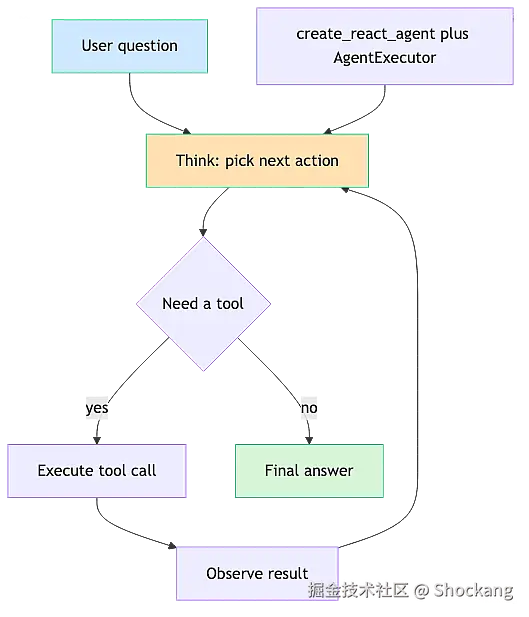
LangGraph's graph model—StateGraph, Node, Edge, checkpointer—will be expanded upon in subsequent chapters. For the scenarios emphasized in this section where "a single agent is sufficient," continuing to migrate to LangGraph is not necessary. Over-engineering is the real technical debt. The principle for selection is just one: Let the simplest architecture cover 80% of the needs, and leave the remaining 20% of complexity to the truly incompressible business itself. When the number of tools is stable in the single digits, task boundaries are clear, and users expect a "one conversation to get it done" experience, sticking with a single agent + ReAct loop keeps maintenance costs controllable and keeps the trace links on LangSmith clear and readable. This in itself is an engineering victory.
LangChain Multi-Agent Systems: Division of Labor, Communication, and Orchestration
When Do You Need "Multi-Agent"
The single-agent pattern performs well when the number of tools is small, but once the tool list swells to over a dozen, problems erupt in a concentrated manner.
Tool selection starts to fail. The model's attention to tool descriptions is limited (mainly determined by the tokens occupied by the tool schemas in the prompt). When the system prompt is stuffed with the JSON Schemas of 20 tools, the model starts to ignore, misselect, or simply choose the most recently appearing one. This is not a model capability issue, but a prompt engineering bottleneck.
Context continuously expands. Every tool call and every observation accumulates into the history messages. In long sessions, the prompt tokens carried by a single invoke() far exceed what's necessary, causing response latency and cost to climb simultaneously.
Domain personas dilute each other. A single system prompt struggles to simultaneously play the roles of "database expert," "copywriter," and "code reviewer" with three distinct tones. The result of mutual dilution is that no role is played well.
[Observation] A rough but practical criterion: when you start repeatedly stuffing role prompts like "Please answer as an XX expert" into the prompt, trying to salvage a sense of professionalism, the ceiling of the single agent has already been reached. The natural next step is to split by domain: each sub-agent retains a compact prompt and a small, specialized tool set (usually 3 to 5). With short tool descriptions, selection becomes sharp.
Three Mainstream Multi-Agent Topologies
In engineering practice, the most common multi-agent shapes are three.
Supervisor (Central Routing). A central dispatcher reads the user request, decides which sub-agents to call, and then aggregates their outputs back to the user. Sub-agents do not talk to each other directly; all communication is routed through the supervisor. Advantages: Single decision point, clear logs, single debugging path. Disadvantages: The supervisor becomes a latency and routing bottleneck; when its responsibilities are too heavy, it easily becomes a new "god node."
Pipeline (Assembly Line Relay). Agents relay sequentially like an assembly line: A produces → B consumes → C polishes. There is no central scheduler; each stage has clear responsibilities. Advantages: Easy to reason about, suitable for linear processes (like "research → write report → translate"). Disadvantages: Failure of any link halts the entire chain, intermediate data schemas are tightly coupled, making later reordering difficult.
Collaborative (Shared Blackboard). All agents share a "blackboard" state. Any party can read and append. There is no fixed order; the writing order emerges. Advantages: Highest flexibility. Disadvantages: Hardest to debug. Field conflicts on the blackboard have no natural arbiter, easily falling into an infinite loop of mutual overwrites.
[Data] In real engineering deployments, the supervisor pattern accounts for the vast majority of multi-agent solutions. The reason is not only that it's the easiest to implement, but also that it aligns with the LLM's own strengths: making routing decisions using natural language is something models are very good at. In contrast, pipelines often bloat prompts, and collaborative patterns often get stuck in coordination conflicts. Refer to LangChain's multi-agent overview: https://python.langchain.com/docs/introduction/.
Implementation Key Points for the Supervisor Pattern
A production-ready supervisor needs to do these three things solidly.
Design of the routing prompt. The supervisor's system prompt must explicitly list: what sub-agents exist, what each is responsible for, and under what circumstances to fall back to self-answering. A vague prompt will cause the supervisor to send requests to the wrong target. A common practice is to list "expert name + one-sentence responsibility + trigger scenario" as a structured list, rather than stuffing it into a natural language paragraph.
Sub-agent capability descriptions must be orthogonal. Each sub-agent's prompt and tool list should tightly adhere to its own responsibility boundary. Once research_agent is also equipped with a code execution tool, the responsibility boundary blurs, and the supervisor will also route inaccurately because of it. Making capabilities orthogonal stabilizes the supervisor's routing.
Result aggregation and conflict arbitration. The final step of a multi-agent call is for the supervisor to merge them into a coherent answer. Three common tasks: 1) Fuse multiple outputs into one paragraph, not just simple concatenation; 2) Detect inconsistencies between agents (e.g., A says X, B says not X); 3) Self-adjudicate or escalate to a human. A relatively reliable approach is using structured output for arbitration: the supervisor's final step calls with_structured_output to return {agree: bool, merged: str}, which is more stable than letting the model freely summarize. When defining the schema with Pydantic, apply strict constraints to the merge field: https://docs.pydantic.dev/.
Below is a simplified supervisor scheduling skeleton, showing its structure rather than complete runnable code:
class DispatchDecision(BaseModel):
    agents: list[str]
    reason: str

supervisor = prompt | llm.with_structured_output(DispatchDecision)
decision = supervisor.invoke({"input": user_query})

results = []
for name in decision.agents:
    sub = registry[name]
    results.append(sub.invoke(user_query))

final = aggregator.invoke({"input": user_query, "sub_outputs": results})
The key engineering experience is: for every additional sub-agent, the supervisor's prompt must be synchronously rewritten once, because its routing logic implicitly depends on the names and capability descriptions of all sub-agents.
The Triple Cost of Multi-Agent
Don't adopt multi-agent just for architectural fashion.
Latency stacking. The supervisor link is essentially sequential LLM calls. If a single inference takes about 2 seconds, two sub-agents plus one aggregation step often result in a real user-perceived latency of 5 to 7 seconds. Even if sub-agents use asyncio.gather for concurrency, the user still has to wait for the slowest one.
Token cost nearly doubles. With each additional agent layer, system prompts and history messages are not automatically reused. Each sub-agent must rebuild its own context slice. A task that originally cost 1k tokens often balloons to 3k to 5k after multi-agent wrapping.
Debugging difficulty skyrockets. When an error occurs, you must precisely locate: which agent made the mistake, which prompt modification can correct it, and what tracing tool can provide visibility. Even with LangSmith integrated, cross-agent traces will have you jumping back and forth between multiple system prompts.
[Data] A rough set of engineering baselines: Compared to a single agent for the same task, a dual-agent supervisor chain consumes 1.8 to 2.2 times more tokens on average, with latency increasing by 1.5 to 3 seconds. LangSmith trace volume expands 3 to 5 times because every edge is recorded individually. The source is an engineering estimate; specific numbers vary by task and model.
A robust judgment principle: First, write the single agent to its best. Only split when the number of tools exceeds about 7, or when domain logic becomes too chaotic to maintain. Multi-agent is an answer to complexity, not a showcase.
From LangChain Multi-Agent to LangGraph
Even if the supervisor is written very clearly, LangChain's agent abstraction still has its limits: state is implicitly hidden in the message history, cross-agent data sharing requires custom wrappers, and conditional branching and looping are difficult to express explicitly.
LangGraph's state-driven design is the perfect remedy. State is a typed dict with a reducer (commonly starting with MessagesState). Each node receives the state and returns a partial update. Edges are explicitly declared by add_conditional_edges. The supervisor pattern in LangGraph becomes a graph: dispatch node → sub-agent nodes → aggregation node, where the aggregation node writes the result back to the final_answer key. Refer to the introductory chapters of the LangGraph official documentation: https://langchain-ai.github.io/langgraph/.
The graph model makes two long-standing difficult problems of the supervisor controllable:
Branch decisions are visible. Conditional edges turn "if sub-agents disagree, enter arbitration" into a literal edge, no longer an if-statement hidden in a prompt. Review and regression testing become more direct.
Loops are natively supported. ReAct-style tool loops, reflection, and retry patterns are all cycles in the graph. LangChain's AgentExecutor relies on the max_iteration parameter, which can easily lead to silent truncation. LangGraph's cycles naturally stop when the edge condition is not met.
[Observation] When porting a working LangChain supervisor to LangGraph, the most natural mapping is: each sub-agent becomes a node, the supervisor's routing logic becomes the decision function of add_conditional_edges, and the result aggregation becomes the final reducer node. The total lines of code don't change much, but state visibility, unit test coverage, and loop controllability all take a step up. This is also the fundamental reason why, in engineering, once a supervisor chain exceeds one layer of branching, one starts considering migrating to LangGraph.
Multi-agent is a tool for dividing complexity, not a decoration to show off. Start with the supervisor, build up the code and logs; once routing exceeds one layer of branching and the single agent's "black box prompt" becomes unmanageable, decisively move the chain to LangGraph's state graph, making the orchestration controllable, visible, and regressable. Treat multi-agent as a way to answer, not the answer itself.
LangChain vs LangGraph: Why You Need a Graph
After the entire course covers how "a single agent collapses when tools exceed a dozen," it naturally elevates the topic to the next dimension: even if tool orchestration is done right, some agent workflows are not a straight line, and LCEL's chain pipeline has inherent deficiencies in expressing such non-linear structures. This section aims to clarify the capability boundaries of LCEL and LangGraph, telling you when to continue using LCEL and when you must switch to a state graph.
The Expressiveness Boundary of LCEL Chain Pipelines
The LCEL (LangChain Expression Language) introduced by LangChain is a set of Runnable chain composition syntax based on the | operator. The semantics are "the output of the previous step is the input of the next step." You can string together Prompt, ChatModel, OutputParser, Retriever, and Tool into a single data pipeline, and consume it using three modes: stream, invoke, batch. This abstraction is extremely elegant for "linear processes": Prompt → Model → Parser, assembled in one line of code. The instructor used this form in almost all demos in the early chapters of the course.
But LCEL has a premise that many engineers underestimate: topologically, it is strictly a unidirectional Directed Acyclic Graph (DAG). Data can only flow unidirectionally along the edges. This limitation immediately manifests in three specific scenarios, which is also the root cause repeatedly emphasized in this course for "why LCEL alone is not enough."
Looping scenarios. A typical "research → draft → review → if unqualified, return to draft" process requires the review node to use its judgment result as an edge condition to jump back to the draft node. LCEL can only simulate this through "wrapper functions + explicit recursion" or "an external while loop repeatedly invoking the chain." It's neither elegant nor easy, and it's prone to hallucination recurrence due to state residue.
Conditional branching. For gating logic like "if user intent is clear, go to RAG; if vague, go to multi-agent planning," LCEL must write RunnableBranch with multiple layers of if-else. Readability drops exponentially with the number of branches, and the fallback for edge cases (where no branch is hit) is exceptionally fragile.
Multi-way concurrent fan-in. After three independent retrievers query in parallel and merge results, LCEL executes them sequentially by default. Even if forcibly wrapped with RunnableParallel, it only makes the "input parallel"; output aggregation still relies on manual key name splicing, lacking the semantic guarantee of "only proceed to the next step when all branches are complete." This is especially evident when ToolNode cooperates with concurrent tool calls.
[Observation] LCEL's strength is the request-response model of "upstream feeds all at once, downstream spits all out at once." Once a workflow exhibits characteristics of "wait for results before deciding the next step" or "any branch might trigger a rollback," the simplicity of the chain pipeline starts to become a constraint. Engineers are forced to stuff graph state into external variables, and the code immediately loses readability.
LangGraph's Core Proposition: Modeling Agent Applications as State Machines
The solution LangGraph offers is to model the entire agent application as a stateful state graph. This approach borrows from workflow engines and Control Flow Graphs in compilers, using very mature tools from graph theory to describe "relationships between steps." Its core abstractions are just three, enough to cover the vast majority of orchestration needs:
- Node: A computation unit. It can be a regular Python function, a LangChain LCEL chain, a ToolNode, or even another subgraph. It only exposes a
(state) -> dictsignature externally, returning the fields to write into the state, strictly following reducer rules. - Edge: Control flow, describing "after this node finishes executing, which nodes might be next." Normal edges are deterministic. Conditional Edges perform runtime scheduling based on fields in the state, supporting dynamic routing.
- State: The shared data structure that runs through the entire graph, typically a
TypedDictor a PydanticBaseModel. State is the core of the graph. All nodes are side-effects in a pure function style of "read state → write back a fragment." Field updates are merged through reducers (likeadd_messages).
The benefit of this modeling is that loops, conditional branches, and multi-way fan-ins are all first-class citizens in the graph. You can complete the entire workflow with a piece of declarative code:
from langgraph.graph import StateGraph, MessagesState, START, END
from langgraph.prebuilt import ToolNode, tools_condition

builder = StateGraph(MessagesState)
builder.add_node("agent", agent_chain)
builder.add_node("tools", ToolNode(tools))
builder.add_edge(START, "agent")
builder.add_conditional_edges("agent", tools_condition)
builder.add_edge("tools", "agent")
graph = builder.compile(checkpointer=checkpointer)
The LangGraph official documentation positions it as an "orchestration framework for building controllable agent workflows" (see <https://langchain-ai.github.io/langgraph/). The intent is very clear—it's not meant to replace> LangChain, but to fill the expressiveness gap of LangChain in complex orchestration.
LangGraph's Four Unique Abilities
LangGraph's capabilities that distinguish it from ordinary LCEL chains can be summarized into four groups. These are the selling points repeatedly emphasized in this course and the most frequently questioned knowledge points during interviews and technology selection.
1. Cycles. After node A finishes executing, a Conditional Edge can directly point the control flow back to A, or back to a more upstream node B. This "evaluate first, then decide the next step" loop is declarative in LangGraph: writing add_conditional_edges("evaluate", route_fn, {"pass": END, "fail": "rewrite"}) is enough. Internally, LangGraph maintains loop counts and recursion depth within the Pregel runtime to avoid infinite loops.
2. Persistence (Checkpointer). LangGraph comes with a checkpointer abstraction, with three built-in implementations: InMemorySaver, SqliteSaver, and PostgresSaver. Each state change is automatically snapshotted to the backend. When a new message comes in, the snapshot is loaded via thread_id. The persistence tutorial in the LangGraph official documentation (<https://langchain-ai.github.io/langgraph/concepts/persistence/) gives a minimal configuration example for> SqliteSaver, requiring just one line of sqlite3.connect(check_same_thread=False) to allow sessions to survive cross-process restarts.
3. Human-in-the-Loop (Interrupt). By using compile(interrupt_before=["publish"]) or calling interrupt({...}) inside a node, the graph can be paused before a specific node, waiting for manual external recovery (resume). This capability is a mandatory course for any scenario where "automation ≠ full automation." A typical example is a code generation agent that must be manually reviewed before writing to a production database.
4. Time Travel. Paired with get_state_history(thread_id), you can replay the complete execution trajectory of the graph, and then use update_state to rewrite a historical snapshot, "forking" a new path from any historical moment. This is crucial for debugging, regression testing, and A/B experiments. It is also a key differentiating capability of LangGraph compared to traditional workflow engines like Airflow or Prefect.
[Data] InMemorySaver loses all snapshots when the process exits, making it only suitable for dev/test. SqliteSaver introduces file-level persistence. In production, PostgresSaver is generally used for cluster sharing. Putting them into a comparison table makes selection clear at a glance:
| Checkpointer | Applicable Scenario | Persistence | Performance |
|---|---|---|---|
| InMemorySaver | Unit tests, demos | In-process memory, lost on restart | Fastest |
| SqliteSaver | Single-machine demo, lightweight service | SQLite file, survives across processes | Medium |
| PostgresSaver | Production multi-replica | Database-level, cluster sharing | Affected by checkpoint frequency |
Selection Decision: When to Use LCEL, When to Use LangGraph
In practice, the instructor condenses the selection into one sentence: "Use LCEL for linear processes; directly use LangGraph for anything involving loops/branches/pause-resume/multi-agent orchestration." But a more robust judgment criterion is to check if the workflow meets any of the following:
- Existence of dynamic routing where "execution result determines the next destination"
- At least one rollback caused by "user input / review / tool error"
- Need to retain context across requests (conversation history, task progress)
- Need for external events (human review, callback) to intervene in the execution flow
- Multiple sub-agents processing in parallel and then merging results
If all the above are No, LCEL remains the lighter, easier-to-start choice. As soon as one item is Yes, introducing LangGraph's state graph brings a clearer mental model and will significantly reduce maintenance costs in the long run.
They Are Not a Replacement Relationship
Finally, a common misunderstanding needs to be clarified: LangGraph does not replace LangChain, but is built on top of LangChain. The internals of LangGraph nodes almost entirely reuse LangChain's Runnable, ChatModel, Tool, and Retriever abstractions. You can directly add_node("summarize", summary_chain | RunnableLambda(...)) in the graph to stuff an LCEL chain into a node. You can also use ToolNode(tools) to encapsulate LangChain's tool-calling mechanism into a node, and then connect it to tools_condition via add_conditional_edges to implement a ReAct loop. The LangChain official documentation homepage (<https://python.langchain.com/docs/introduction/) lists> LangGraph as the "agentic orchestration" component of the LangChain ecosystem, and LangGraph's own GitHub repository (<https://github.com/langchain-ai/langgraph) also explicitly positions it as "build> resilient language agents as graphs."
The best practice in engineering is: treat LangChain as the underlying materials (models, tools, retrievers, parsers), and treat LangGraph as the upper-level orchestrator (deciding how these materials are combined, when to call them, when to pause). This way, you can enjoy the simplicity of LCEL while using LangGraph to handle complex workflows, rather than making an either-or choice.
[Observation] Some teams make a common mistake when introducing LangGraph: implementing all nodes with bare functions, abandoning LangChain's Runnable abstraction. As a result, they have to rewrite even the most basic bind_tools and with_structured_output themselves. In reality, the pre-built components ToolNode + tools_condition are the "fast track" of LangGraph. Using them to build the skeleton first, and then replacing performance-sensitive nodes with custom LCEL chains, is the most efficient iteration path.
The course will next use an end-to-end "chatbot graph" demo to put all the concepts discussed in this section into a runnable piece of code.
LangGraph Core Components: State, Node, Edge, and Compilation
The reason LangGraph can support the entire agent engineering stack after LCEL is that it exposes the "graph" as a first-class citizen to developers. The entire graph shares a single state at runtime, nodes are scheduled via edges, and all merge rules are finalized at compile time. This model can be explained clearly with just four minimal primitives—State, Node, Edge, compile. Before formally dissecting them, it's necessary to review the capability boundary: when an agent's tool calls exceed a dozen, or the workflow itself involves branching, looping, or human review, LCEL's | chain pipeline starts to show its inadequacy. This is because it is essentially a unidirectional expression tree and cannot express structures like "after running A, decide whether to go to B or C" or "A and B run in parallel and then merge results." LangGraph is precisely the state graph framework born for such non-linear workflows. The LangChain official documentation (<https://python.langchain.com/docs/introduction/) positions it as "a state graph orchestration layer for orchestrating complex> agent workflows."
State: A Typed Dictionary Shared Across the Entire Graph
State is LangGraph's "memory" and the sole contract carrier between nodes. The input of every node and the output of every node are subsets of the same state. State is not a loose dict, but a schema explicitly declared using Python's TypedDict or Pydantic BaseModel. The purpose of this is not to show off, but to allow the editor, type checker, and LangGraph validator to simultaneously guard this schema—any node attempting to return a field outside the schema will be directly rejected at compile time.
from typing import TypedDict, Annotated, List
from langgraph.graph.message import add_messages

class ChatState(TypedDict):
    messages: Annotated[List[BaseMessage], add_messages]
    user_id: str
    step_count: int
Notice the messages field: it is not written as a plain List[BaseMessage], but as Annotated[List[BaseMessage], add_messages]. add_messages is a built-in reducer in LangGraph, and its function is "append new messages to the end, rather than overwrite." Without this annotation, any node returning {"messages": [new_msg]} would completely clear the conversation history from the previous round—this is precisely the first pitfall that newcomers most commonly step into.
The LangGraph official documentation (<https://langchain-ai.github.io/langgraph/) defines> a reducer as "the merge function between a node's partial update and the existing state." In other words, the reducer determines the strategy for "how this cell merges into that cell," not the shape of "what this cell stores." These two are often conflated, but their engineering semantics are completely different: the schema solves "what it looks like," and the reducer solves "how to merge." Understanding this distinction is the first watershed for writing good LangGraph graphs.
Node: A Pure Function that Receives State and Returns Partial State
In LangGraph, a Node is not an object or a class, but a pure function (or callable) with a strict signature of (state: State) -> dict. The return value does not need to refill the entire state; just put the fields you want to update this time—LangGraph will merge these partial updates back into the main state according to the reducer rules.
This "partial state return" design has two direct benefits. First, implicit bugs like "forgetting to pass a field causing the next node to get None" won't occur between nodes. Second, functions are naturally composable and unit-testable. You can take a node out independently, feed it a fake state to verify the logic, without needing to start the entire graph.
[Observation] The actual effect of this contract is: a node author will never accidentally read a dirty field left by a previous partial update. Internally, LangGraph freezes the node's input into a read-only view. Any modification to the state must be explicitly expressed through the return value. This constraint makes it almost impossible for "who secretly changed user_id" type of spooky problems to occur in multi-node collaboration. In multi-agent scenarios, this "read-only input, writable output" contract is more thorough than traditional object-oriented state encapsulation.
Based on engineering experience, the instructor suggests writing nodes as "thin wrappers": the node function itself is only responsible for scheduling, and the real business logic is delegated to independent functions or service classes. This way, the node's dependency on LangGraph is minimized, and migrating to Celery tasks or FastAPI endpoints later is almost zero-cost.
Edge: Fixed Edges, Conditional Edges, and START/END Sentinels
Edges are the "scheduling rules" on the graph. LangGraph divides edges into three categories, with semantics that build upon each other:
| Edge Type | API | Applicable Scenario |
|---|---|---|
| Fixed Edge | add_edge("A", "B") |
A always goes to B after finishing, no branching |
| Conditional Edge | add_conditional_edges("A", router_fn, mapping) |
After A finishes, decide the next node based on the router |
| Sentinel Edge | add_edge(START, "A") / add_edge("B", END) |
Explicitly mark the graph's entry and exit points |
The router_fn inside a conditional edge receives the state and returns a string (or a Send object). LangGraph looks up the mapping dictionary and jumps to the corresponding node. START and END are not nodes, but resident sentinels exposed by LangGraph, used to anchor the graph's entry and end points. Not writing an END edge means that subgraph has no exit and will be rejected at compile time. It's worth emphasizing that all possible return values in the conditional edge mapping table must have corresponding targets; otherwise, LangGraph will throw a KeyError at invoke time—this is the first priority check when debugging conditional edges.
StateGraph → compile → invoke/stream
LangGraph's runtime lifecycle has only three steps:
StateGraph(StateSchema)instantiates an empty graph;- Repeatedly
add_node/add_edge/add_conditional_edgesto fill the graph; graph.compile(checkpointer=..., interrupt_before=...)compiles the graph into an executable object, then runs it usinginvokeorstream.
The compile step is extremely critical in engineering: it validates node signatures, edge reachability, reducer consistency, and checkpointer type all at once. Structural errors are thrown at this step, rather than waiting for the first invoke to crash. This design comes directly from the LangGraph team's reflection on "the debugging pain of a graph crashing halfway through a run"—related issue discussions in the LangGraph GitHub repository (<https://github.com/langchain-ai/langgraph) have confirmed this multiple times.>
[Data] The default invoke runs all the way to END before returning the entire final state. stream_mode="updates" spits out a partial update after each node finishes. stream_mode="messages" spits out LLM output at the token granularity. In a production chatbot, switching stream_mode to messages can compress the Time-To-First-Token from "waiting for the LLM to fully return" to the "first token lands" level. The perceived difference is usually measured in seconds. stream paired with stream_mode="values" can also be used for real-time frontend refreshing of intermediate states, something that is very difficult and costly to achieve with LCEL chain pipelines.
Two Key Injections at Compile Time: checkpointer and interrupt
compile is not only a validation point but also the entry point for injecting runtime dependencies. The two most commonly used parameters are checkpointer and interrupt_before / interrupt_after.
- checkpointer: Pass in one of
InMemorySaver,SqliteSaver, orPostgresSaver. LangGraph will persist the state snapshot of each step to the corresponding backend. Subsequently, usingthread_idcan restore the session at any moment. - interrupt_before / interrupt_after: Declare that a human gate needs to intervene before/after the execution of certain nodes. A typical use case is to interrupt after the "tool call" node, allowing a reviewer to decide whether to actually execute it.
from langgraph.checkpoint.sqlite import SqliteSaver
checkpointer = SqliteSaver.from_conn_string("chat.db")
app = graph.compile(checkpointer=checkpointer, interrupt_before=["tool_node"])

config = {"configurable": {"thread_id": "user-42"}}
app.invoke(initial_state, config=config)
[Data] InMemorySaver's memory dies when the process dies, whereas SqliteSaver only needs one line of sqlite3.connect(check_same_thread=False) to allow conversations to survive cross-process restarts. The migration cost in a production environment is almost negligible. PostgresSaver further shares the state with multi-worker deployments, suitable for FastAPI multi-instance or K8s rolling update scenarios.
This mechanism elevates "persistence" and "Human-in-the-Loop (HITL)" to the graph compilation declaration stage, rather than scattering them in if judgments within business code—this is LangGraph's core advantage over LCEL in complex workflows.
The Engineering Significance of Reducers: The Merge Protocol for Parallel Nodes
On the surface, a reducer is a "merge function." In engineering, it is actually a "concurrent write protocol." When a graph has multiple nodes executing in parallel and all need to write to the same state key, not having a reducer will directly throw an InvalidUpdateError:
[Observation] If parallel nodes in LangGraph are not paired with a reducer, two branches writing to the same state key simultaneously will directly throw an InvalidUpdateError. The underlying reason for this rule is: LangGraph refuses the default implicit semantics of "last writer wins," forcing developers to explicitly declare a merge strategy like "I want to append," "I want the union," or "I want the maximum value." A common pattern is Annotated[List[...], operator.add] for list appending, or a custom reducer for deduplication, length limiting, or sorting by timestamp.
This strong constraint of "no declaration, no writing" is almost mandatory in multi-agent scenarios—if you want the planner and retriever to simultaneously stuff results into the findings field, and the default is overwrite, the node that runs later will silently swallow the work of the previous node. Built-in reducers like add_messages default to append semantics precisely because conversation scenarios are naturally "cumulative" rather than "overwriting."
Look at the Graph Before Running It: draw_mermaid for Visual Debugging
LangGraph has a built-in debugging tool that is often underestimated: graph.get_graph().draw_mermaid(). It converts the current graph's nodes, edges, and conditional branches into Mermaid syntax, directly rendering a visual flowchart.
In engineering practice, the instructor's recommended order is always "first call draw_mermaid to see the graph, then invoke to run the graph." There are three reasons: First, the Mermaid diagram can reveal structural errors like "missing END connection" at a glance. Second, the mapping table of conditional edges is presented as labels on the diagram, making it very convenient to cross-reference with the router function's return values. Third, visualization is the best medium for team review of graph structures—reviewing a piece of Python code is not intuitive, but reviewing a flowchart can align everyone within a minute.
print(graph.get_graph().draw_mermaid())
LangGraph validates edge reachability at compile time. For example, if node A has no outgoing edge and is not terminated by any END, it will directly report an error. But semantic-level errors like "every node is correctly connected in the graph" can only be intuitively exposed by the Mermaid diagram. Layering these two checks (compile-time + visualization) can basically eliminate the low-level mistake of "the graph compiles but runs incorrectly."
Engineering Pitfall Checklist
Finally, here is a checklist of pitfalls that repeatedly appear in practice, serving as a memo for this section:
- Forgetting to add
add_messagesto themessagesfield, causing each round's conversation history to be overwritten; - The conditional edge's return value is not in the mapping table, causing a runtime
KeyError; - Multiple parallel nodes writing the same key without declaring a reducer, throwing
InvalidUpdateError; - Not connecting an
ENDedge, causing a subgraph to fall into an infinite loop or never return; - Using
InMemorySaverfor thecheckpointerbut deploying to multiple workers, causing state to drift between processes; - Not passing
thread_idduringinvoke, resulting in a new session every time.
Posting these six items next to your IDE can basically block 80% of non-business errors during the LangGraph introductory phase.
Summary
The four minimal primitives—State, Node, Edge, and compile—together elevate LangGraph to the engineering level of "replacing imperative if-else chains with declarative state graphs." State uses TypedDict/Pydantic + Annotated reducer to simultaneously lock down the schema and merge semantics. Node uses partial state returns to enforce declarative updates. Edge uses three types—fixed/conditional/sentinel—to carry scheduling. Compile is both a validation point and the injection point for checkpointer and interrupt. Mastering this four-piece set means subsequent parallelism, iteration, and human-in-the-loop are just additions on top of them, rather than a complete overhaul.
Sequential Workflow: The Minimum Viable LangGraph Skeleton
LangGraph exposes the "graph" as a first-class citizen to developers, which is one of the core reasons it supports the entire agent engineering stack after LCEL. The entire graph shares a single state at runtime, nodes are scheduled via edges, and all merge rules are finalized at compile time, rather than being scattered if-else splices everywhere—this "graph-first" design philosophy directly determines the subsequent engineering rhythm.
The "Skeleton" Status of the Sequential Workflow
In the LangGraph official documentation (<https://langchain-ai.github.io/langgraph/), almost all advanced paradigms—conditional edges, Send> API, subgraphs, Human-in-the-Loop—are built upon a most basic skeleton: START→NodeA→NodeB→END, where the state flows unidirectionally along the chain and accumulates node by node. This straight line is both LangGraph's "hello world" and the starting point for all subsequent engineering evolutions. Any complex graph structure can start paving from a runnable sequential chain. This is the most simple, yet most easily underestimated, gift of the graph-first design in engineering practice.
Typical Case Form: Input Parsing → LLM Processing → Result Formatting
To land this skeleton into a real, runnable minimum engineering unit, it's usually cut into three nodes with single responsibilities: the first node is responsible for input parsing, cleaning and normalizing the user's raw prompt, file uploads, and context window; the second node is LLM processing, calling the large model for understanding, generation, or tool decisions; the third node does result formatting, packaging the model's output into an object that downstream systems (frontend UI, API response, database rows) can directly consume.
Each node only cares about its own input and output, with clear black-box boundaries. This constraint allows unit tests to be written independently: the parsing node uses pure string assertions, the LLM node uses a mock model stand-in to verify the prompt template, and the formatting node performs type checks on schema fields. If any node needs to be replaced—swapping GPT-4 for an open-source model, or changing JSON parsing to a Pydantic validator—it won't affect other links. This is the most direct engineering dividend of the sequential workflow.
Best Practices for State Design
Although the sequential chain is simple, if the state schema is poorly written, it will plant coupling landmines once branches and parallelism are added later. This course repeatedly emphasizes a rule: Separate the naming of input fields, intermediate fields, and output fields to avoid implicit coupling between nodes. Specifically in LangGraph, a TypedDict or Pydantic model is usually used to explicitly list the type and initial value of each key:
from typing import TypedDict
from langgraph.graph import StateGraph, START, END

class PipelineState(TypedDict):
    user_query: str          # input field, read-only
    parsed_intent: dict      # intermediate field, only written by the parsing node
    raw_llm_output: str      # intermediate field, only written by the LLM node
    final_response: dict     # output field, only written by the formatting node
The add_messages reducer doesn't need to appear here—that's a merge rule for chat scenarios. But if you want to keep the intermediate products of each step for debugging or auditing, declare the intermediate fields as a cumulative type like Annotated[list, operator.add]. Core principle: Each node can only write to the fields it is responsible for, but can read any field. Once this constraint becomes a habit, when conditional edges and parallel branches are connected later, the data flow graph will be clear and readable, avoiding the hidden bug of "Node A secretly changed a key that Node B thought was its exclusive domain."
The Difference from Directly Writing a Function Call Chain
Since it's just a straight-line call, why not directly write f1(input) → f2(result) → f3(result2) instead of wrapping it in a graph layer? The answer lies in three capabilities that come with the LangGraph framework—execution tracing, pluggable checkpointer, and progressive extension. These three are key to elevating the "graph" from a means of expression to engineering infrastructure.
First, execution tracing. Every edge and every node leaves a trace inside the runtime. Paired with LangSmith (<https://docs.smith.langchain.com/), you can visualize the state snapshot, node latency, and token consumption of each> invoke—you can't get this structured information from a direct function chain. When troubleshooting, you'd be searching for a needle in a haystack of print statements.
Second, pluggable checkpointer. On day one, the sequential chain might just be a stateless ETL pipeline. But as soon as the business requires any of "multi-turn conversation," "approval rollback," or "resume from breakpoint," the direct function chain would need to be rewritten from scratch. With LangGraph, you just need to attach one more checkpointer during compile(). InMemorySaver is suitable for local debugging, while SqliteSaver and PostgresSaver are suitable for production persistence (refer to <https://github.com/langchain-ai/langgraph). This design of "making memory a configuration item rather than business code" is the most critical difference between the graph structure and a function chain.>
Third, progressive extension. Inserting a conditional edge or a parallel branch onto the straight-line skeleton does not require refactoring the data flow. You just need to write one more line of add_conditional_edges in the graph definition, or Send out from a node. This evolutionary path "from sequential to branching" is the most critical engineering advantage of the graph structure over a function chain.
[Observation]: A chatbot without a checkpointer is amnesiac with every invoke call; conversation history cannot be retained across rounds. The course demo repeatedly demonstrated this phenomenon: the same graph, without a checkpointer, completely loses the first round's context when the user asks a second question. Just attach a MemorySaver during compile, and then run invoke with a thread_id, and the history is automatically injected into the state. This is a typical example of the graph structure making "memory" a configuration item rather than business code.
Besides these three, the graph structure also has the upper hand in testing and observability. When a function call chain errors, you can only reverse-engineer from logs. In LangGraph, the execution result of every edge is serialized into the state. Any failed invoke can be pulled out using get_state(thread_id) for field-by-field comparison. The cost of post-mortem troubleshooting is an order of magnitude lower.
From Sequential Skeleton to Conditional Edges and Parallel Branches
This course calls "first get the straight line running, then insert conditional edges, then add parallel branches" the minimum viable rhythm for LangGraph engineering. The reason is that the sequential chain is a subset of all complex graph structures: a conditional edge just adds a routing function between two nodes, deciding the next hop based on a field in the state; a parallel branch uses the Send API to split "one node's output to multiple downstream nodes," but each branch itself is still a straight line.
After straightening out the direction of state accumulation and clearly defining node boundaries, adding branches is just "adding edges to the graph," not "rewriting business logic." This is also why the state design section repeatedly emphasizes "each node only writes to the fields it is responsible for": once the namespace is chaotic, adding branches requires re-evaluating the data flow, immediately disrupting the engineering rhythm.
[Data]: If N independent LLM calls are executed in a synchronous loop, the total time is approximately N×T (single call duration). Switching to asyncio.gather or LangGraph's parallel Send topology can compress the total time to near T (the time of the longest branch). This is the most easily underestimated engineering benefit when a sequential skeleton evolves into a parallel branch.
In terms of engineering rhythm, the recommended approach is: Step one, get START→A→B→END running, and immediately write a minimal unit test for each edge after it runs. Step two, introduce conditional edges, add routing functions, and continue running regressions. Step three, use Send or multi-node fan-out for parallelism. Each step builds upon the green build of the previous step, neither wasting mental energy modeling complexity all at once, nor falling into the trap of "over-designing for potential branches" from the start. The flexibility demonstrated by LangGraph's StateGraph at this step is the fundamental reason it replaces LCEL pipelines in the agent engineering stack (refer to https://python.langchain.com/docs/introduction/).
This rhythm also has an often-overlooked benefit in engineering: it breaks the "complexity budget" into several small expenditures rather than one massive upfront investment. In multi-agent projects, after the straight-line skeleton runs, conditional edges, parallel branches, subgraphs, and HITL are added item by item. Each addition has unit tests as a safety net, making rollback costs extremely low. Conversely, trying to model branching, looping, and human review all at once from the beginning often results in a graph that "looks comprehensive but no one dares to touch."
Conclusion
The sequential workflow is the minimum viable foundation for LangGraph engineering. It's not flashy or complex, but because the state schema is explicit, node boundaries are clear, and the checkpointer and tracing are pluggable, it can seamlessly carry all subsequent advanced patterns like conditions, parallelism, iteration, and human review. Starting from the "hello world" straight line, polishing each segment into a node that is unit-testable, replaceable, and observable, and then stringing them together into an evolvable network using the graph structure—this is the core rhythm of LangGraph engineering.
Parallel Workflows: Fan-out, Fan-in, and the Send API
The Motivation for Parallelism—Collapsing Serial Latency into the Slowest Branch
Before LLM applications crossed the threshold of "production-ready," the first chain most engineers wrote was serial: retrieve first, then summarize, then evaluate, then format—each node must wait for the previous one to finish before starting. Even if each step only takes 2 seconds, five nodes stacked together mean 10 seconds, by which time the user has long lost patience. More critically, a large class of these sub-tasks are naturally independent of each other: multi-dimensional evaluation (correctness, toxicity, conciseness, citation quality), multi-source retrieval (Wikipedia, arXiv, internal document library), multi-perspective generation (optimistic / pessimistic / pragmatic). There is no data coupling between them. Serial execution essentially forces "N times the parallel latency" onto the end-user. LangGraph exposes the ability to "fan-out for concurrent execution and fan-in for aggregation" as a first-class citizen to the StateGraph. As long as the graph structure can describe "one starting point, N parallel endpoints, one convergence point," the runtime will automatically use asyncio scheduling to run multiple nodes concurrently, without the engineer needing to explicitly await asyncio.gather.
Static Parallelism—Multiple Outgoing Edges from the Same Source Node
LangGraph's most basic parallel pattern is static parallelism: from the same node, multiple add_edge(source, target) calls draw multiple edges, each pointing to a downstream node. At runtime, LangGraph dispatches these downstream nodes to the task queue within the same super-step and executes them concurrently with the semantics of asyncio.gather, only proceeding to the next super-step after all nodes pointed to by the outgoing edges have completed. This is a "compile-time finalized" parallelism—the number of branches, branch targets, and convergence point are all hardcoded in the graph structure. It's suitable for scenarios with "fixed dimensions, known nodes," such as a fixed set of three evaluations or three fixed data sources.
Below is a typical multi-dimensional evaluation configuration snippet, showing how to use static parallelism to run three judgments concurrently:
from langgraph.graph import StateGraph, START, END
from typing import TypedDict, Annotated
import operator

class EvalState(TypedDict):
    question: str
    answer: str
    scores: Annotated[list[float], operator.add]  # reducer must be explicitly declared

def evaluate_correctness(state): return {"scores": [score_correctness(state)]}
def evaluate_toxicity(state):   return {"scores": [score_toxicity(state)]}
def evaluate_helpful(state):    return {"scores": [score_helpfulness(state)]}

def aggregate(state):
    return {"final": sum(state["scores"]) / len(state["scores"])}

g = StateGraph(EvalState)
g.add_node("correctness", evaluate_correctness)
g.add_node("toxicity", evaluate_toxicity)
g.add_node("helpful", evaluate_helpful)
g.add_node("aggregate", aggregate)

g.add_edge(START, "correctness")
g.add_edge(START, "toxicity")
g.add_edge(START, "helpful")
g.add_edge("correctness", "aggregate")
g.add_edge("toxicity", "aggregate")
g.add_edge("helpful", "aggregate")
g.add_edge("aggregate", END)
Note three details: First, the three add_edge(START, ...) calls put the three evaluation nodes into the same super-step. Second, the aggregate node has three incoming edges. LangGraph will wait for all three upstream nodes to complete before actually running this node. This is natural "fan-in waiting," completely eliminating the need for asyncio.wait. Third, the scores field must declare a reducer using Annotated[list[float], operator.add], otherwise three nodes writing to the same key simultaneously will directly throw an InvalidUpdateError. This is the first pitfall beginners are most likely to step into.
Dynamic Parallelism—The Map-Reduce Semantics of the Send API
Static parallelism assumes "the number of branches is known at compile time." But in production scenarios, a large amount of parallelism is determined at runtime: after splitting a document into chunks, you want to concurrently embed each chunk; retrieval returns top-k, and you want to concurrently rerank each doc; a user uploads N images, and you want to run captioning on each one. This "data-driven parallelism" cannot be described with add_edge and must use the Send API—langgraph.constants.Send allows dynamically dispatching tasks based on the number of data items within a conditional edge function:
from langgraph.constants import Send

def distribute(state: RagState):
    chunks = state["chunks"]  # length only determined at runtime
    return [Send("embed_one", {"chunk": c}) for c in chunks]

def embed_one(state):  # single chunk processing
    return {"vectors": embed(state["chunk"])}

def reduce_vectors(state):
    return {"index": build_index(state["vectors"])}

g.add_conditional_edges("split", distribute, ["embed_one"])
g.add_edge("embed_one", "reduce_vectors")
g.add_edge("reduce_vectors", END)
Here, distribute is a map function. Each Send call is translated by LangGraph at runtime into an independent parallel branch. The graph only continues to reduce_vectors after all branches have converged. This is a typical map-reduce topology: split out the data, map for parallel processing, reduce to aggregate results. The key capability of the Send API is "number of branches = number of data items," completely bypassing compile-time static inference. This is a core capability for RAG, long document summarization, and batch tool calling. The official documentation calls this pattern the Map-Reduce chapter; for detailed examples, see the LangGraph documentation https://langchain-ai.github.io/langgraph/concepts/low_level/.
[Observation] The reducer behavior for Send branches and static parallel branches is completely identical. Any state key written back by a parallel branch must be explicitly annotated with Annotated[T, reducer] in the TypedDict, otherwise the first run will throw an InvalidUpdateError. This hard constraint of LangGraph essentially front-loads the "concurrent write consistency" problem to the schema definition stage at the graph layer, rather than pushing the responsibility onto business logic.
The Hard Constraint of Parallel State Writes—The Reducer Trio
LangGraph's state is uniformly "merged" at the end of each super-step. When multiple nodes write different values back to the same field within the same super-step, LangGraph must know how to merge these values—this is precisely the reducer's responsibility. In engineering practice, LangGraph commonly uses three reducers:
| Scenario | reducer | Write Semantics |
|---|---|---|
| List-type state (scores, chunks, vectors) | operator.add |
Concatenate into a new list |
| Message history (chatbot) | add_messages |
Deduplicate by id + append |
| Scalar overwrite (single-threaded scenario) | Default overwrite | Last write wins (disabled in parallel scenarios) |
add_messages is a reducer specifically designed for BaseMessage lists within the LangChain ecosystem. Internally, it deduplicates based on message id, suitable for multi-turn replay of tool calls and coordination with checkpointer persistence—this is fully defined in the LangChain official documentation https://python.langchain.com/docs/concepts/messages/. operator.add is the semantics of Python's built-in operator; any list can be directly concatenated. Scalar fields are actually disabled from default overwriting in parallel scenarios: if two nodes write the same string in the same super-step, LangGraph cannot determine which one "wins," so it directly fail-fast and throws an exception.
[Observation] There are two pieces of engineering experience worth recording: First, for any write that might be parallel, the field definition must explicitly be Annotated[..., reducer]. Second, aggregation nodes (like aggregate, reduce) should only read from upstream and not use regular fields to return "summary values," otherwise their reducer behavior will conflict with the upstream parallel branches. LangGraph's InvalidUpdateError is a fail-fast mechanism. Rather than patching it at runtime, it's better to lock down the concurrent write contract at the schema stage.
Benefit Quantification and Engineering Trade-offs
The biggest benefit of parallelism is latency. [Data] Assume three independent LLM evaluations each take T seconds. Serial execution has a total latency of 3T, while after static parallelism, the total latency is approximately max(T), determined by the slowest branch. If the three evaluations take similar time, latency is directly compressed to 1/3. If one evaluation takes longer, say 2T, due to more reasoning steps, the latency is determined by it, and the other two branches are considered "almost free." This is the fundamental motivation often emphasized in LLM engineering to "parallelize nodes without dependencies as much as possible"—Latency is determined by the slowest branch, decoupled from the number of branches. In a RAG multi-source retrieval scenario, compressing three retrieval paths from 3T to max(T) usually means the user-perceived Time-To-First-Token drops from 3-4 seconds to 1-1.5 seconds.
But parallelism is not free. Three real engineering costs must be accounted for:
- Tokens and Cost: Concurrency does not reduce tokens. Three evaluation paths still cost three times the money. Parallelism just exchanges "serial wall-clock time" for "parallel money."
- Debug Complexity: Logs from parallel branches are interleaved. Troubleshooting "which dimension was scored incorrectly" becomes harder. In production, LangSmith's trace is almost mandatory.
- Error Isolation: The failure of one branch should not drag down the entire graph. Usually, each parallel node is wrapped in a try/except, or a partial state is returned at LangGraph's node boundary.
- Upstream Rate Limiting: LLM providers usually have TPM/RPM quotas. N-way concurrency is more likely to trigger 429 errors, requiring
asyncio.Semaphorefor throttling or queuing.
Turning these trade-offs into a decision matrix:
| Scenario | Recommended Parallel Method | Reason |
|---|---|---|
| Fixed 3-5 evaluation dimensions | Static Parallel (add_edge) | Dimensions are stable, compile-time finalization is clearest |
| Parallel rerank after top-k retrieval | Send API (Dynamic) | k is only determined at runtime |
| Multi-source retrieval (Wiki/ArXiv/Internal DB) | Static Parallel | Number of sources is fixed |
| Concurrent embedding after long document chunking | Send API (Dynamic) | Number of chunks determined at runtime |
| Multi-step reasoning (chain-of-thought) | Do not parallelize | Strong dependencies between steps |
Summary
Parallel workflows are a key part of LangGraph's "graph-first" philosophy applied to latency optimization: static parallelism uses multiple outgoing edges to describe fixed-dimension concurrency at compile time, while the Send API uses conditional edges to generate dynamic branches at runtime based on data count. Both ultimately converge into the fan-in node of the same super-step and guarantee the consistency of concurrent writes through reducers. Understanding the two principles of "latency is determined by the slowest branch" and "concurrent writes must be paired with a reducer" basically allows you to safely use all of LangGraph's parallel paradigms in production. Coupled with LangSmith's trace and asyncio.Semaphore for throttling, you can find an engineering balance between latency, cost, and observability.
Conditional and Iterative Workflows: Teaching the Graph to Decide and Self-Correct
Conditional Workflows: Letting the Graph Choose Its Own Path
Conditional workflows solve the problem of "who should handle the next step." A serial chain is a hardcoded DAG, but in real business, user requests come in countless forms: someone wants to check the weather, someone wants to write code, someone just wants to chat. If every request goes through the fixed path of "retrieve → summarize → format," it will either give irrelevant answers or waste tokens. LangGraph's solution is to take the decision of "which node to go to next" back from a Python function—this is the design motivation for the router function.
The router function's signature is very simple: read the current state, return a string, which is the name of the next node. The registration method is to call builder.add_conditional_edges(source, router, mapping) on the StateGraph, where mapping is a dictionary that maps the string returned by the router function to the actual node object. This is how the graph compiler knows "when the router returns 'tool', jump to ToolNode; when it returns 'final', jump to END."
def route_after_intent(state: State) -> str:
    intent = state["classification"]["intent"]
    return {"search": "retrieve", "code": "code_runner",
            "chat": "chitchat"}.get(intent, "chitchat")

builder.add_conditional_edges("classify", route_after_intent, {
    "retrieve": "retrieve",
    "code_runner": "code_runner",
    "chitchat": "chitchat",
})
Typical scenario one is intent triage: Node A is a structured classifier, using with_structured_output to make the LLM output {intent: "search" | "code" | "chat"}. The router gets the intent and routes to different processing branches accordingly. This triage doesn't have to use an LLM; simple regex or keyword matching is enough—using cheap methods for cheap tasks is the first iron rule of engineering.
Typical scenario two is the quality gate: after the evaluation node finishes scoring, the router decides based on the score whether to "release to downstream" or "send back for rewriting." This pattern naturally leads to the iterative workflow discussed in the next section.
Iterative Workflows: Transforming the Graph into a Self-Correcting Loop
Conditional edges allow the graph to "fork," and iterative edges allow it to "loop back." Once the target node of a conditional edge points upstream, an ordinary DAG becomes a cyclic graph. The existence of cycles gives the graph, for the first time, the ability for self-correction: generate a draft first, then let an evaluation node find faults. If faults are found, send it back to the furnace; if not, release it.
The standard engineering paradigm is the three-step cycle of Generate → Evaluate → If not up to standard, loop back for rewriting:
- Generator Node: Receives the prompt and last feedback, produces a draft.
- Evaluator Node: Compares the draft against a rubric, outputs a structured score and textual feedback.
- Router Function: Reads the score. If it meets the standard, go to final; if not, go back to the generator, and stuff the "reason for point deduction" into the state's feedback field.
This loop is particularly effective in code generation scenarios: the probability of an LLM writing correct code in one shot is not high, but if you show it the error log and the reason for unit test failure, it can often fix it in the second round. An LLM's "reflection" ability does not exist naturally—it needs to be explicitly engineered out using prompts and state design.
[Observation] In solutions without an evaluation node, relying solely on writing "please check carefully" in the prompt, the model almost never truly goes back to check itself. Only when the evaluation result is fed back into the next round's prompt as a ToolMessage or a structured field does the model treat the "previous round's deduction points" as hard constraints to satisfy. This observation is the most direct source of qualitative change for LangGraph workflows compared to bare LLM calls—it's not that the model has changed, but that the information flow has changed.
Loops Must Have an Exit—"Counters and Brakes" in the State
Cycles are good, but an uncontrolled cycle becomes a token black hole. The most classic scene in a production incident: during a late-night traffic peak, the LLM evaluation node, due to a prompt boundary case, continuously outputs scores below the threshold. The generation node is repeatedly sent back, cyclically calling the large model. A single session runs hundreds of rounds, burning through the account. This is a problem any Agentic system must face head-on—not "should a loop be set," but "how can a loop be safely stopped."
In engineering, there are two brakes, both indispensable. The first is a soft threshold: the evaluation node's score must be higher than a certain rubric threshold to be considered qualified. This is quality assurance. The second is a hard upper limit (max_iterations): write the current round counter iteration into the state, incrementing it before each entry into the generator. Once iteration >= max_iterations, the router no longer returns to the generator, but forces a "make-do output" branch—for example, directly returning the most recent draft, or going to a fallback node to use a template as a safety net.
def router_with_brake(state: State) -> str:
    if state["score"] >= THRESHOLD:
        return "format"
    if state["iteration"] >= MAX_ITERATIONS:
        return "fallback"          # forced exit
    return "regenerate"
[Data] LangGraph designs fields like iteration, which are "accumulated rather than overwritten," to be explicitly controlled by a reducer function. A common practice is to annotate with Annotated[int, operator.add], telling the StateGraph "when writing to this key, don't directly overwrite, but add the new and old values." This is completely consistent with the logic of add_messages handling conversation history—all fields that "will be updated multiple times" must explicitly declare a reducer, otherwise concurrent writes will throw an InvalidUpdateError. This problem is especially fatal in workflows where parallelism and iteration are superimposed.
Setting MAX_ITERATIONS to 3 or 5 directly determines the budget. A long-context LLM call can easily consume thousands of tokens. Five rounds mean tens of thousands. If a regular user runs dozens of reflections in one session, the bill explodes immediately. A more stable practice in production is to make MAX_ITERATIONS and temperature tunable parameters at graph compilation time, and perform A/B testing on LangSmith (<https://docs.smith.langchain.com/), tightening the threshold based on real hit rates rather than paper> rubrics.
Two Implementations of the Evaluation Node: Rule-Based Scoring vs. LLM-as-Judge
The evaluation node is the "referee" of the entire iterative loop. There are two paths to implement the referee, and the choice directly determines the ceiling of cost and quality.
| Dimension | Rule-Based Scoring | LLM-as-judge |
|---|---|---|
| Speed | Millisecond-level, pure Python | Second-level, requires one LLM call |
| Cost | Almost zero | Pay token cost for each evaluation round |
| Robustness | Fails on rubric boundary cases | More accurate for fuzzy dimensions like wording, style |
| Explainability | 100% traceable | Depends on prompt design |
| Applicable Scenarios | Length, keywords, JSON schema, compliance checks | Fluency, logic, citation quality, toxicity |
[Data] The most economical approach in production is not choosing one over the other, but a two-layer funnel: the first layer uses rules to filter out about 90% of obviously unqualified samples (length < 50 words, contains sensitive words, JSON parsing failure, missing required fields). The remaining 10% are sent to LLM-as-judge for fine-grained scoring. This compresses the average token consumption to near that of a pure rule-based solution while retaining the LLM's discriminative power for edge cases. For a travel planner like TripMate, FAQ-type questions almost 100% go through rules, and only long itinerary customizations enter LLM review—this is the same funnel approach.
A common implementation of LLM-as-judge is to initiate another LLM call, using with_structured_output to force it to return {score: int, feedback: str}, so the router can stably read the numerical field. The rubric in the prompt must be written like a formal scoring sheet—each score on a 5-point scale corresponds to what behavior—otherwise the score distribution will collapse to one or two values, completely losing differentiation, and the router becomes useless.
Rule-based scoring also has anti-patterns: don't use a bunch of if/else to turn the rule node into spaghetti. A more stable approach is to encapsulate rules as a list of Rule = (predicate, score, reason) dataclasses, running a loop to accumulate deductions—this makes rules testable, grayscaleable, and replayable one by one in LangSmith. For LangChain documentation on such structured output support, see the official documentation https://python.langchain.com/docs/introduction/.
Reflection Loop: The "Qualitative Change" Pattern from Combining Conditions and Iteration
Superimposing conditional workflows and iterative workflows yields the reflection loop that repeatedly appears in Agentic literature. Its essence is "conditional routing decides which path to take, and iterative edges allow that path to be repeated." Both are indispensable: without conditions, all problems enter the reflection loop, wasting tokens; without iteration, reflection can only happen once, and the model has no chance to treat the critique as a constraint for the next round.
Reflection loops generally produce a higher usability rate than single-pass generation across three types of tasks: paper writing, code generation, and long document summarization. The reason is not that the model "became smarter," but that the information flow has become a closed loop: the output of the previous round is no longer the consumed endpoint, but the input for the next round. This is completely isomorphic to the human work pattern of writing a draft first, then reading through and revising it—the LLM's reflection ability is "forced out" by state engineering.
When implemented in LangGraph, the minimum viable configuration for a reflection loop only needs five nodes: generate, evaluate, reflect_router, format, END. Among them, reflect_router simultaneously undertakes two tasks: one is routing to format or back to generate based on the score; the other is judging whether iteration has hit max_iterations, and if so, taking the fallback branch. This router is essentially a Python function of about a dozen lines, but it gives the entire graph the ability to "know what it doesn't know."
The official documentation has a complete description of the parameter semantics for add_conditional_edges (see LangGraph documentation <https://langchain-ai.github.io/langgraph/). On the LangChain> side, with_structured_output paired with a Pydantic schema (<https://docs.pydantic.dev/) makes the evaluation result naturally become routable, strongly-typed data. Gluing these two together creates a production-usable reflection loop—and it is also> LangGraph's most significant engineering advantage over "bare prompt + single LLM call." What truly makes this loop run stably in production is not the model itself, but the state machine capable of self-correction, combined from that pair of "conditional routing + iterative edges": conditions provide the fork, iteration provides the loop, and state and reducers ensure that no race conditions are written when the two are superimposed—this is also why reflection loops almost never exist independently of LangGraph.
The First Agentic Chatbot: Message State and Graph Structure
Starting from the Minimum State: messages and the add_messages Reducer
The first step in building a chatbot in LangGraph is not writing a prompt or choosing a model, but abstracting the concept of "conversation" into a state that will be repeatedly read and written by nodes. The most basic approach is to use a TypedDict with a single key messages, whose value is a list composed of BaseMessage subclasses:
from typing import Annotated
from langgraph.graph.message import add_messages
from langchain_core.messages import BaseMessage

class ChatState(TypedDict):
    messages: Annotated[list[BaseMessage], add_messages]
add_messages is a built-in reducer (reduction function) in LangGraph. Its behavior is not "overwrite the old value with the new value," but "append the new message to the end of the list." This is fundamentally different from ordinary dictionary assignment—the latter would replace the entire messages list with each invoke call, whereas the former automatically accumulates. If the reducer is removed, the LLM can only see the single message it just returned in the current round, and the conversation context is directly zeroed out. The so-called chatbot degrades into a "sentence-by-sentence translator."
[Data] In a 5-round conversation, the state with add_messages has a messages length of 5 (system prompt + 4 human/ai pairs) after the 5th invoke. The version without the reducer always has only 1. The gap in user experience between the two is not "a few records missing," but "whether the AI can see what it said in the previous sentence." In streaming output scenarios, the absence of a reducer will also cause the tool_calls field of the AIMessage to be lost, because LangGraph cannot get the complete history to align the streaming chunks.
Role Semantics: The Engineering Significance of the Four Message Types
BaseMessage is not a flat data class, but is divided into a set of subclasses by "conversation role," each corresponding to a clear semantic boundary:
| Message Type | Role | Typical Source | Position in prompt |
|---|---|---|---|
SystemMessage |
System | Developer-preset persona, rules, tool descriptions | Always at the front of the messages list |
HumanMessage |
User | Input from CLI / UI / API | Triggered by user action |
AIMessage |
Assistant | Returned by LLM node | Written by chat_node |
ToolMessage |
Tool | Returned by tool_node execution | Follows the AIMessage that triggered it |
Separating role types has two engineering benefits: first, the LLM side can correctly distinguish "this is a user command" from "this is a tool receipt"; second, nodes can filter by type, for example, only feeding the last two HumanMessages to the retriever for query rewriting, while excluding ToolMessages to avoid polluting the retrieval semantics. In multi-agent orchestration, different sub-agents also use the name field of the message to label each other's identity. This is the implicit mechanism by which LangGraph implements agent-to-agent message routing.
Single-Node Chatbot Graph: chat_node + LLM Call
Once you have the state, loading it into a graph only takes three steps—declare the node, connect the entry edge, compile:
from langgraph.graph import StateGraph, START, END
from langchain_openai import ChatOpenAI

llm = ChatOpenAI(model="gpt-4o-mini")

def chat_node(state: ChatState) -> dict:
    ai = llm.invoke(state["messages"])
    return {"messages": [ai]}

graph = StateGraph(ChatState)
graph.add_node("chat", chat_node)
graph.add_edge(START, "chat")
graph.add_edge("chat", END)
app = graph.compile()
What chat_node does is very straightforward: feed the entire current messages to the LLM, wrap the returned AIMessage into a dictionary, and return it. LangGraph's runtime sees this as an update to the messages key and automatically calls add_messages to append it to the end of the original list, rather than overwriting the original value—this is the runtime manifestation of the reducer. If the return writes messages as a complete list, it will trigger the reducer's deduplication logic, and messages with the same id will be merged. This is a boundary condition that needs special attention when subsequently connecting a tool_node.
This graph currently has only one node, and it might seem "not yet LangGraph-like." But its value lies in this: from this moment on, all decision points of the main conversation loop—who should speak, whether to retrieve, whether to call a tool, whether to interrupt the user mid-stream—can continue to grow in the form of "adding nodes + modifying edges," without needing to rewrite the skeleton above.
Command-Line Loop: while True and the Two Postures of invoke
Loading the graph into a command-line conversation loop only takes about a dozen lines:
from langchain_core.messages import HumanMessage

while True:
    user = input("You> ")
    if user in {"exit", "quit"}:
        break
    result = app.invoke({"messages": [HumanMessage(content=user)]})
    print("AI>", result["messages"][-1].content)
Note that app.invoke only passes in "the increment of this round" each time—only the current HumanMessage. There are two engineering paths here: one is "full state passed in," where the client maintains the history itself and feeds it in, making the server stateless; the other is "only pass the increment," delegating the responsibility of "accumulating history" to the runtime's reducer. The former is closer to a stateless HTTP service, the latter is closer to LangGraph's design philosophy. Both can run, but only the latter can directly connect to a checkpointer without changing the client—this is also why thread_id is repeatedly emphasized in the persistence chapter.
From Stateless to Stateful: checkpointer is the Watershed
[Observation] Without a checkpointer installed, the while True loop above seems to converse normally, but in reality, each invoke call is completely isolated from the others—on the second invoke, LangGraph's runtime gets a brand new state with only one HumanMessage, having no idea what the user said in the previous round. The ability to "seemingly remember history" is entirely an illusion created by add_messages stringing together the human prompt and ai reply within the current round. Cross-round memory is not persisted. Once the process restarts, all context instantly evaporates.
This is the cost of LangGraph designing "persistence" as an optional plugin: the default behavior is stateless, which is counter-intuitive for a production environment. The remedy is to attach a MemorySaver / SqliteSaver / PostgresSaver during compile(), and pass a stable thread_id for each invoke:
from langgraph.checkpoint.sqlite import SqliteSaver

with SqliteSaver.from_conn_string("chat.db") as ckpt:
    app = graph.compile(checkpointer=ckpt)
    config = {"configurable": {"thread_id": "user-42"}}
    app.invoke({"messages": [HumanMessage(content="My name is Xiao Ming")]}, config)
    # On the next invoke, with the same thread_id, Xiao Ming will still be remembered
[Data] Comparing the engineering boundaries of the three savers: InMemorySaver's memory dies when the process dies, suitable for notebook demos; SqliteSaver only needs one line of sqlite3.connect(check_same_thread=False) to allow conversations to survive cross-process restarts, suitable for single-machine demos and local development; PostgresSaver pushes checkpoints to a production-grade database, supporting concurrent reads, writes, and cross-instance sharing, which is the minimum threshold for multi-replica deployment.
Subsequent chapters will expand on the details of the persistence layer. This section only needs to leave one anchor point: A chatbot without a checkpointer is just a one-time demo; a chatbot with a checkpointer has truly entered the engineering domain.
The Compound Interest of the Skeleton: The Same Graph, Continuously Growing
After setting up the minimum graph for the chatbot, almost all content in subsequent chapters is about "attaching edges" and "adding nodes" to it, rather than starting over:
- Tool Calling: Connect a
ToolNodeafterchat_node, usetools_conditionto create a conditional branch between "tool execution" and "direct answer." The edge structure is still just one or two, yet it gives the model the ability to call external APIs. - RAG: Add a
retriever_node, and beforechat_node, inject the retrieved documents as aSystemMessageinto the messages. The graph is still linear, just with a higher semantic density in the message flow. - Human-in-the-Loop (HITL): Use
interrupt_beforebeforechat_nodeto pause, waiting for user confirmation before resuming execution. The state doesn't need a single line changed, yet it gains a compliance gate. - Multi-Agent: Treat each sub-agent as a subgraph, connecting them in series or parallel via the Send API or the parent graph's
add_conditional_edgesto implement orchestration patterns like supervisor / swarm.
This extensibility of "just add nodes" is the greatest compound interest brought by the graph architecture. Compared to the traditional imperative approach—rewriting the main loop every time a new capability is added—LangGraph's trio of state + node + edge essentially replaces procedural control flow with a declarative DSL. The cost is a steeper initial learning curve, but the payoff is that large-scale refactoring is almost never triggered by adding new capabilities later on.
Two engineering details worth pointing out here: first, the content of messages grows linearly with conversation rounds. Long-session scenarios must be paired with a summarization node or windowed memory, otherwise the token bill and Time-To-First-Token will spiral out of control. Second, add_messages is not naturally safe in concurrent branches. If subsequent parallel nodes simultaneously append to messages, you need to confirm whether the reducer supports concurrent merging, otherwise you'll hit an InvalidUpdateError.
Conclusion: The first Agentic Chatbot seems simple, but it has already planted the seeds for all of LangGraph's subsequent capabilities—messages is the state semantics, add_messages is the reducer paradigm, and the single-node graph is the minimum unit of a declarative workflow. Understanding the "stateless trap" and the "extensible skeleton" of this section will make connecting checkpointer / tools / RAG / HITL much smoother later on, rather than building a main loop from scratch each time. For detailed APIs, refer to LangGraph's State and Graph chapters https://langchain-ai.github.io/langgraph/ and LangChain's message type documentation https://python.langchain.com/docs/introduction/.
Persistence and Checkpointer: Making Every Step of the Graph Recoverable
Why Persistence is Needed: The Agent's "Amnesia" Triple Threat
In LangGraph's state graph, data flows between nodes through a shared state, but this state is an in-process object by default. Once the Python process exits, it disappears along with the memory. For a chatbot demo, this might be fine, but in a production environment, it immediately hits three walls.
First, process restart clears the conversation. Any 24/7 online service inevitably undergoes rolling releases, OOM restarts, and dependency upgrades. Each restart wipes the session context, effectively manufacturing "goldfish users" every minute. Second, long task interruption means starting from scratch. A planning Agent spanning 20 steps, failing at step 15 because the upstream LLM was rate-limited, would have to rerun from step 1 if the state wasn't persisted to disk, wasting over ten minutes and several dollars in tokens. Third, multi-user sessions cannot be isolated. When the same process is reused by 1000 concurrent requests, an external key must distinguish whose conversation is whose, otherwise User A's question will pick up User B's history.
[Observation] A chatbot without a checkpointer starts from the initial state with every graph.invoke(...) call. Conversation history cannot be retained across calls. Even if the same input is passed in, it cannot return to the context of the previous round. This is the first threshold that must be crossed to go from a "toy" to a "service." The AgentExecutor in early versions of LangChain was almost absent at this step, requiring users to manually write file I/O in callback functions, a heavy engineering burden.
The checkpointer Mechanism: Writing a Snapshot at the End of Each Super-Step
LangGraph's solution is to build "persistence" into the graph execution semantics, rather than making users write a bunch of file I/O at the end of each node. The specific approach is to introduce the checkpointer component. At the end of each super-step (after parallel nodes complete in parallel, or after a single serial node completes), it serializes the current complete state, along with metadata like step number, thread_id, and next_nodes, writes it to the backend storage, and returns a set of state pointers in the form of (config, checkpoint_id). See the Persistence chapter of the LangGraph official documentation for details.
thread_id is the external primary key of this mechanism. The caller stuffs {"thread_id": "user-42-conv-7"} into configurable, and LangGraph uses this ID to string all checkpoints of the same session into a timeline. Developers don't need to care about the underlying table structure, only one contract: As long as the thread_id is the same, the graph can restart from any historical checkpoint, and automatically replay to the target step.
[Data] In LangGraph's abstraction, a typical conversational thread generates dozens to hundreds of checkpoints. The volume of each checkpoint is roughly equal to the JSON serialization size of the state at that time. When the state only holds a messages list, this overhead is almost negligible. Once vector retrieval results, structured forms, and tool call logs are all stuffed into the state, the checkpoint volume will significantly expand, and the throughput capacity of the storage backend must be considered during selection.
The Storage Backend Trio: InMemorySaver / SqliteSaver / PostgresSaver
LangGraph abstracts storage into the BaseCheckpointSaver interface. The official release includes three built-in implementations, covering the full spectrum from development to production. The specific APIs can be read directly in the source code under the langgraph/checkpoint/ directory of the GitHub repository.
- InMemorySaver: Pure dictionary implementation, zero configuration, suitable for unit tests and local demos. Its cost is that when the process dies, all thread states die with it, so it must never be used in production.
- SqliteSaver: Based on the standard library
sqlite3, one file is a complete persistence layer.SqliteSaver.from_conn_string("checkpoints.db")initializes it in one line, suitable for single-machine deployment, prototype verification, and single-instance services. - PostgresSaver: Uses
psycopg, supports concurrent connections, transactions, and row-level locking, suitable for multi-replica deployments, multi-user isolation, and production clusters requiring horizontal scaling.
[Data] InMemorySaver is an in-process dictionary; all threads disappear after a service restart. SqliteSaver only needs one connection string line to allow conversations to survive cross-process restarts. PostgresSaver goes one step further, handing lock granularity to the database, allowing multiple replica LangGraph workers to simultaneously read and write the same checkpoint table. The APIs for all three are completely identical; switching only requires changing the input parameter of compile(checkpointer=...).
The integration method is deliberately compressed into one line:
from langgraph.checkpoint.sqlite import SqliteSaver
from langgraph.graph import StateGraph

checkpointer = SqliteSaver.from_conn_string("checkpoints.db")
graph = builder.compile(checkpointer=checkpointer)
Migrating from InMemorySaver to SqliteSaver requires no changes to business code. Migrating further to PostgresSaver only requires changing the import and connection string. This progressive migration of "memory for development, disk for production, database for distributed" is a direct reflection of LangGraph's engineering friendliness, and it echoes the principle consistently advocated by the LangChain ecosystem: "same semantics, different tiers."
get_state and Time Travel: Inspect, Correct, Replay
Persistence only solves the "retain" problem. What truly elevates the checkpointer to a debugging tool is the accompanying set of state query and write-back APIs. LangGraph provides a trio:
| API | Function | Typical Scenario |
|---|---|---|
graph.get_state(config) |
Get the latest checkpoint of a specified thread | Troubleshooting "which step is it stuck at now" |
graph.get_state_history(config) |
List all historical checkpoints of that thread | Replaying a user's conversation link |
graph.update_state(config, values) |
Overwrite a historical checkpoint with new values and continue from there | Manually correcting errors, injecting test inputs |
This set of APIs together constitutes time-travel debugging: you can manually change the incorrectly generated answer at step 7, and then continue running from the checkpoint of step 7, without needing to redo the previous 6 steps. Paired with LangSmith's trace, you can visualize the state, token usage, and latency distribution of each step, opening up the "Agent black box" into an event stream that can be replayed frame by frame.
[Observation] The engineering significance of update_state goes far beyond "correcting a typo." When a certain LLM node in production goes haywire and produces illegal JSON, instead of rerunning the entire workflow, you can manually inject a legal payload and continue pushing downstream. When you want to A/B test a certain branch, you can fork two threads from the same starting point, each exploring independently. This idea that "the graph is also data" originates from LangGraph's design philosophy of treating state as a first-class citizen, and it also echoes the repeated emphasis on stateful agents in the LangChain official documentation.
Fault Tolerance Semantics: Resume from Breakpoint and Node-Level Idempotency
By pairing the checkpointer with a retry mechanism, LangGraph automatically gains the ability to resume from a breakpoint: if any node throws an exception, as long as the underlying graph hasn't been destroyed (e.g., the LangGraph worker process is still alive), it can re-execute from the most recent successful checkpoint. Completed nodes are not re-run, and the failed node is re-entered from its entry point. This is the same semantics as breakpoint resume in traditional ETL, except the carrier has changed from a file to a graph state.
There are two engineering constraints behind this that must be aligned beforehand:
- Nodes must be idempotent or at least re-entrant. If a node that has already successfully written to a database is executed again upon checkpoint recovery, the business layer needs to guarantee double-write safety (e.g., using upsert instead of insert, deduplicating by UUID, writing a "completed" flag back to the
state). - Side effects must be externalized. Irreversible actions like sending emails, deducting funds, or pushing notifications cannot be written into ordinary nodes. Either push them to an asynchronous queue using the
SendAPI, or split them into a two-stage "decision node + side-effect node," so that the checkpoint only falls after the decision node.
[Observation] Translating "completed nodes are not re-executed" into business language: a 20-step workflow fails at step 18. As long as the checkpoints before step 18 are still there, resuming from there only requires redoing the last 3 steps, not all 20. This is the key economic factor for landing long-process Agents, and it's why "persistence" cannot be treated as optional. In engineering experience, getting the checkpointer, idempotency constraints, and side-effect externalization right together basically solves 80% of Agent stability incidents.
Summary
LangGraph's checkpointer is not an ordinary caching layer, but a key abstraction that elevates "graph execution" to the level of a "recoverable transaction." Paired with the three major APIs get_state / get_state_history / update_state, developers gain the right to inspect at any moment and the right to correct at any step. Paired with the progressive backend selection of InMemorySaver / SqliteSaver / PostgresSaver, teams can smoothly move from local prototypes to multi-replica production. It is considered one of the core reasons for being a production-grade Agent framework, precisely because it directly incorporates the storage and retry logic that users had to build themselves in the early LangChain AgentExecutor era into the graph engine.
The next step will enter the topic of streaming output, looking at how LangGraph uses stream_mode to change "wait for everything to finish before returning" into "spit out tokens at every step," pushing the Time-To-First-Token down to sub-second levels.
Streaming Responses and Multi-Threaded Sessions: Two Major Necessities at the Experience Layer
The Experience Disaster of Non-Streaming Responses
In LangGraph's StateGraph, if you directly call graph.invoke(input) on a node and wait for it to return, the experience layer will encounter a visible disaster: the browser will first see a blank or spinning wheel state, until the LLM finishes generating the entire string of tokens and the last node writes the complete state back. Only then can the frontend get the result all at once. For a model in the 8B–70B parameter range, even if the prompt is less than a thousand tokens, a full inference often takes 8 to 15 seconds. Once RAG retrieval, tool calling, or reasoning sub-chains are connected, this duration can even swell to over 20 seconds. [Observation] This "wait for everything to finish before returning" semantic is called batch mode in engineering. It is perfectly reasonable for offline batch processing, data labeling, and scheduled reports, but in a conversational product facing real users, it's almost equivalent to degrading ChatGPT back to a 1995-era CGI form.
Worse, this waiting feeling is infinitely amplified: if the user stares at the screen for 1 second without a response, the anxiety curve starts to rise; if there's no movement for over 3 seconds, attention is diverted; once the 10-second psychological threshold is breached, most users will instinctively refresh the page, and that half-finished conversation is directly invalidated by the new request, wasting an entire round of tokens and computation. Therefore, a truly production-facing product must compress the Time-To-First-Token (TTFT) to a sub-second level, letting the user immediately see the model "typing," which significantly shortens the perceived waiting time. This is precisely the fundamental motivation for LangGraph to single out 'messages' in stream_mode. How to implement it specifically will be expanded in the next section. [Data] On most mainstream LLM servers, SSE (Server-Sent Events) or WebSocket streaming channels can compress the Time-To-First-Token from 8–15 seconds down to the 300–800 millisecond range, a difference of about an order of magnitude in perceived experience.
The stream_mode Trio: values / updates / messages
LangGraph's graph.stream(input, config, stream_mode=...) provides three streaming modes with completely different semantics. Choosing the wrong one will distort the experience layer. [Observation] The three are not performance differences, but differences in consumption granularity—for the execution process of the same graph, which layer of slices you want to see determines how the UI renders. The LangGraph official documentation categorizes these three modes in the Streaming section and explains them separately. Below, they are laid out in conjunction with engineering trade-offs.
The first, stream_mode='values', pushes the full state to the frontend once after each step is completed. Its semantics are most like a "segmented slice" of invoke, suitable for scenarios where the entire conversation context, retrieved document list, and tool cache need to be synchronized to the UI at once, such as a custom "sidebar debug panel" wanting to highlight all current messages. The second, stream_mode='updates', only pushes the incremental state at each step, i.e., the subset of state written by that node. This mode saves the most bandwidth and allows the frontend to do less diff work in graphs with many nodes and large states. A typical use case is a multi-step execution flow with a progress bar. The third, stream_mode='messages', is a mode specialized for LLM conversation scenarios: it spits out the token-by-token increments of any AIMessage in MessagesState as (token, metadata) tuples, which can be directly connected to SSE / WebSocket and pushed to the browser.
# Minimal call forms for the three stream_modes
for event in graph.stream(input, config, stream_mode="values"):    # full state
    render_sidebar(event)

for event in graph.stream(input, config, stream_mode="updates"):   # incremental state
    render_progress(event)

for token, meta in graph.stream(input, config, stream_mode="messages"):  # token by token
    print(token, end="", flush=True)
The engineering rule of thumb is: Use 'messages' for the conversation body, 'updates' for progress/debug panels, and 'values' for the final snapshot. The three modes can even be enabled in parallel within the same astream_events call. LangGraph will internally merge the output channels, but the consumption-side code will have to handle bucketing itself.
Chat Threads: Isolating Different Topics with thread_id
Streaming solves the "visibility" problem, but a real user's conversation is never single-threaded. Under the same login session, they might be chatting about "next week's trip to Japan" in the morning, switch to "help me review a piece of Python code" in the afternoon, and open a new topic at night asking "what do you think of this company's financial report." If all messages are mixed in one state slot, the model will be polluted by context, and semantic confusion is almost inevitable. LangGraph's solution is to build the "thread" abstraction into the checkpointer layer: each time you invoke / stream, you just stuff a configurable={"thread_id": "..."} into the config, and the entire graph only reads and writes the checkpoints under this one thread.
from langgraph.checkpoint.memory import InMemorySaver
from langgraph.graph import StateGraph, MessagesState, START

checkpointer = InMemorySaver()
graph = StateGraph(MessagesState).compile(checkpointer=checkpointer)

# Two sessions for the same user, different topics
config_trip   = {"configurable": {"thread_id": "user-42/trip-japan"}}
config_review = {"configurable": {"thread_id": "user-42/code-review"}}

graph.invoke({"messages": [...]}, config=config_trip)    # completely isolated
graph.invoke({"messages": [...]}, config=config_review)
The brilliance of this design is: the business code doesn't need to write any if-else to distinguish sessions. The checkpointer itself performs namespace isolation based on thread_id. If the same user opens N topics in parallel, N thread_ids are enough, with no extra locks needed—because the state writes for each thread are confined to their own namespace. LangGraph uses the composite primary key of thread_id + checkpoint_id in SQLite/Postgres for isolation at the bottom layer. All the developer needs to do is generate a stable UUID for each tab on the frontend, store it in the backend's sessionStorage, and the context won't be lost even if the page is refreshed. Coupled with LangGraph's built-in SqliteSaver / PostgresSaver / InMemorySaver, thread isolation is a capability delivered at almost "zero cost."
Implementing the Session List UI: Enumerate Threads, Extract Titles
Thread isolation alone is not enough. The "session list" on the left sidebar of ChatGPT is equally critical: it allows users to quickly jump back to a context among N historical topics. LangGraph's checkpointer persists the full state of each thread, but it does not directly provide an API to 'list all threads'—this is the pitfall newcomers are most likely to step into. [Observation] The checkpointer's design goal is "read and write by thread_id," not "full table scan," so the implementation of capabilities like list_threads differs across backends and requires the developer to wrap a layer themselves.
The following code shows a common approach: when using SqliteSaver, directly read the checkpoints table it maintains internally, and extract the first HumanMessage from the earliest checkpoint under the same thread_id to use as the title:
import sqlite3
conn = sqlite3.connect("chatbot.db", check_same_thread=False)

def list_threads_with_titles(limit: int = 50):
    rows = conn.execute(
        "SELECT thread_id, MIN(checkpoint_id) FROM checkpoints GROUP BY thread_id "
        "ORDER BY MAX(checkpoint_id) DESC LIMIT ?", (limit,),
    ).fetchall()
    out = []
    for tid, _ in rows:
        blob = conn.execute(
            "SELECT checkpoint FROM checkpoints WHERE thread_id = ? "
            "ORDER BY checkpoint_id ASC LIMIT 1", (tid,),
        ).fetchone()[0]
        state = pickle.loads(blob)  # depends on the specific saver's serialization method
        first_user_msg = next(
            (m.content for m in state["channel_values"]["messages"]
             if m.type == "human"), "(empty conversation)"
        )
        title = (first_user_msg[:24] + "…") if len(first_user_msg) > 24 else first_user_msg
        out.append({"thread_id": tid, "title": title})
    return out
When going live, an asynchronous task is usually run: let a cheap LLM generate an 8-character summary title for each historical thread, avoiding placeholder text like "Hello" which carries no information as the first user message. This step is called thread summarization in engineering. A common practice is to throttle it to a background batch job, not blocking the UI the moment the user opens the sidebar. The memory module examples in the official LangGraph repository also provide a similar idea of taking the first message for summarization, which can serve as a reference starting point.
Streaming + Threading: The Experience Skeleton of ChatGPT's Web Version
Putting these two capabilities together, a command-line chatbot gains the core interaction skeleton of ChatGPT's web version: a streaming typewriter effect where the first character appears sub-second + an infinitely extendable session list on the left + clicking any thread to return to the historical context in seconds. This combination is not an accidental product of ChatGPT, but the Minimum Viable Experience (MVE) baseline that any LLM product facing real users must satisfy.
Landing it on the LangGraph engineering stack actually involves just three steps: Step one, choose the persistence backend during compile(checkpointer=...), using PostgresSaver for production and InMemorySaver for local debugging. Step two, the frontend subscribes to the output of stream_mode='messages' via SSE / WebSocket, synchronously rendering the typewriter effect, while maintaining the thread_id in the client's storage. Step three, the backend additionally exposes a GET /threads interface, opening up the capability of the list_threads_with_titles function above to the frontend for consumption. This set of combination punches has no intrusiveness to LangGraph itself; it is entirely assembled based on the two sets of public APIs officially provided: streaming + checkpointer.
It's worth reminding that this skeleton is only the starting point of the experience layer, not the end point. When the product starts integrating tool calling, Planning, and multi-agent collaboration, streaming output will change from a single token to a multiplex of token + tool_call + sub-agent intermediate conclusions. Threads will also expand from single-user to team sharing, Human-in-the-Loop (HITL) interrupt recovery, and other more complex scenarios. But no matter how complexity grows, once the two main arteries of "streaming + threading" are opened up, all subsequent capability expansions won't need to return to the experience layer for rework—this is precisely why these two features are called "experience layer necessities."
Database-Level Permanent Memory: From In-Memory Snapshots to SQLite/Postgres
The Fatal Limitation of InMemorySaver: Why You Must Move to a Database
InMemorySaver is almost the first example in all LangGraph tutorials: a few lines of code let the chatbot remember what was asked in the previous round. But it has a hard flaw that is a one-vote veto in engineering—it serializes all checkpoints into a Python dictionary, hanging in the current process's memory.
[Observation] A chatbot without any checkpointer is amnesiac with every invoke call; conversation history cannot be retained across rounds. Even with InMemorySaver attached, as soon as the gunicorn worker receives a SIGTERM, the container is restarted by the orchestrator, or the local dev server exits with Ctrl+C, all state snapshots under all thread_ids instantly vanish, and the user returns to the page to see a blank slate.
This "in-process" model is very handy during the demo phase, but it immediately fails once it enters production. The reasons are threefold:
First, the lifecycle is tightly bound to the process. In a FastAPI multi-worker deployment, user requests are randomly distributed to any worker by the load balancer, but InMemorySaver can only find its own snapshots within its own process—once it crosses workers, memory is broken.
Second, restart means wipeout. Every rolling release in a CI/CD pipeline triggers a new process. Even if you do a graceful shutdown, the memory is reclaimed the moment the old worker exits.
Third, multi-instance sharing is impossible. If you deploy the chatbot to two AWS EC2 machines for blue-green deployment, the InMemorySavers on both sides cannot see each other, and session continuity immediately splits.
So, [Data] a one-sentence comparison is very intuitive: InMemorySaver's memory dies when the process dies, whereas SqliteSaver only needs one line of sqlite3.connect(check_same_thread=False) to allow conversations to survive cross-process restarts. PostgresSaver goes a step further, allowing multiple LangGraph instances to concurrently read and write a real database, achieving cluster-level session sharing.
The engineering selection path is therefore very clear: Choose SqliteSaver for single-machine starts, and PostgresSaver for multi-instance/high availability. The former requires zero operations; the latter provides transactions, row-level locking, and replica capabilities.
SqliteSaver Integration in Practice: Five Steps to Set Up Local Persistence
The integration cost of SqliteSaver is very low. The core code is just two lines, and the complete workflow can be broken down into five steps:
import sqlite3
from langgraph.checkpoint.sqlite import SqliteSaver

# Key parameter check_same_thread=False, allows FastAPI cross-thread access
conn = sqlite3.connect("chatbot.db", check_same_thread=False)
checkpointer = SqliteSaver(conn)

graph = builder.compile(checkpointer=checkpointer)
The five-step process can be broken down as follows:
- Create the database: On first startup, SqliteSaver automatically creates the
checkpointstable, no manual DDL needed. Fields cover thread_id, checkpoint_ns, checkpoint_id, parent_checkpoint_id, type, blob, etc. - Configure threading: SQLite does not allow cross-thread connection holding by default, but FastAPI's sync endpoints are dispatched to a thread pool. You must explicitly set
check_same_thread=False, otherwise it will throwProgrammingError: SQLite objects created in a thread can only be used in that same thread. - Set thread_id:
config={"configurable": {"thread_id": "user-42"}}is the primary key for LangGraph to address snapshots. Different users use different IDs. Multiple conversations for the same user are distinguished bycheckpoint_ns. - invoke / stream: Both
graph.invoke(state, config)andgraph.stream(state, config, stream_mode="messages")automatically trigger checkpointer reads and writes, no manual save/load calls needed. - Query history:
checkpointer.get(config)returns the latest state under that thread, which can be used for echoing back "what you said in the last round."checkpointer.list(config)returns the entire lineage, suitable for session replay.
This integration method is fully sufficient for local dev, single-container deployment, and standalone demos. Its bottlenecks appear in two scenarios: high write concurrency (over a hundred QPS) and the need for cross-instance sharing—at this point, you switch to PostgresSaver. The integration method is almost identical, just changing the driver to psycopg or psycopg2 and the connection string to the RDS endpoint. The LangGraph official documentation https://langchain-ai.github.io/langgraph/ has a complete description of the checkpointer interface contract.
Checkpoint Table Structure and Volume Governance: The Engineering Challenge of Snapshot Bloat
LangGraph's checkpoint doesn't just store the "most recent message," but performs a complete state snapshot every time a node finishes, and merges writes from multiple branches back through the channel/reducer mechanism. This means: a graph with 10 nodes that has run 50 rounds of conversation will leave 500 rows of checkpoints in SqliteSaver. Each row is a full state copy, with the blob field stuffed with pickle serialization results.
[Observation] In long-session scenarios, the checkpoint table expands linearly at a rate of approximately O(number of nodes × rounds). A customer service conversation that ran 200 rounds might accumulate over 8000 messages in the state's messages list, directly bloating a single row snapshot to several MB. After SQLite pages are full, it triggers automatic vacuum, causing noticeable latency jitter. Postgres's TOAST will also trigger out-of-line storage, worsening I/O patterns.
There are four types of governance measures in engineering, ranked from low to high implementation cost:
| Measure | Implementation Cost | Applicable Scenario | Side Effect |
|---|---|---|---|
| Periodic Pruning | Low | Old sessions only keep the last N rounds | History cannot be traced back |
| Summary Compression | Medium | History is too long but semantics must be preserved | Increases LLM token cost |
| Subgraph Isolation | Medium | Different topics separated into different threads | Cross-topic context lost |
| Externalized State | High | messages moved into Redis / DB | Architectural complexity increases |
Periodic pruning is the most pragmatic approach. LangGraph provides checkpointer.delete_thread(config) which can directly wipe all checkpoints of a thread, usually paired with a strategy of "auto-archive sessions older than 30 days."
Summary compression is more refined—add a summarize node in the graph, periodically use an LLM to compress the messages list into a SystemMessage, and write it back to the state. This keeps checkpoint volume controllable but consumes extra tokens.
Subgraph isolation splits "work chat" and "life chat" into two thread_ids, controlling single-session depth from the source. It's suitable for products with multiple parallel topics.
Externalized state is the most thorough: extract the messages list from LangGraph's state, put it into Redis or a messages table in Postgres, and keep only a reference ID in the state. This approach degrades the checkpointer to a "routing index" rather than a "source of truth," a common architecture in large production systems.
Conversational Memory vs. Semantic Memory: The Design Philosophy of Layered Architecture
Understanding LangGraph's checkpointer has an unavoidable boundary: it manages "conversation context," not "long-term knowledge."
[Observation] Stuffing the entire product manual into the messages list is a typical anti-pattern—every invoke rebases the full text into the prompt, wasting tokens and injecting irrelevant context into the current round. Semantic noise also interferes with LLM reasoning. Long-term knowledge should be handed over to a dedicated vector store, such as ChromaDB.
The LangGraph official documentation clearly positions the checkpointer as "reliable storage for session state," not a "semantic retriever." Therefore, a mature Agent system typically has two layers:
- Conversation Layer (LangGraph + checkpointer): Responsible for short-term context, managing messages, tool call traces, and sub-node states.
- Semantic Layer (ChromaDB / pgvector / Weaviate): Responsible for long-term knowledge, managing documents, user preferences, and domain facts.
Chroma's official documentation https://docs.trychroma.com/ explicitly positions its role as the "memory layer for AI applications," forming a complement to LangGraph's checkpointer. The boundary between the two layers is roughly:
| Dimension | checkpointer | Vector Store |
|---|---|---|
| Data Form | Structured state | Unstructured embedding |
| Retrieval Method | Exact lookup by thread_id | Semantic similarity top-k |
| Lifecycle | Within a session | Persistent across sessions |
| Write Trigger | On every node completion | Explicit ingest |
| Consistency Requirement | Strong consistency | Eventual consistency is sufficient |
Pitfall Checklist (anti-patterns repeatedly appearing in this course):
- Stuffing documents into messages without using a vector store → token explosion
- Stuffing user facts into Chroma without using SQLite → cannot precisely query back "what is the phone number for user ID=42"
- Not setting a TTL for either layer → unbounded database growth
- checkpointer and vector store sharing one connection → lock contention
- Using Chroma as a short-term message queue → uncontrollable write latency
Each layer performing its own role prevents LangGraph's checkpoint from being used as a universal store.
Cross-Session User Profiles: Extracting Stable Facts from the Conversation Flow
No matter how powerful the checkpointer is, it can only retain information at the "thread" dimension. Once a user starts a new session or creates a new thread_id, the old messages are no longer visible. But stable facts like user profiles (name, preferences, order history) need to be retained across sessions. LangGraph should not, and is not designed to, bear this responsibility. An external store must be leveraged.
The implementation approach is divided into three steps:
First, extract. Add an extract_profile node in the LangGraph graph, using with_structured_output to have the LLM output a Pydantic model, for example:
class UserProfile(BaseModel):
    name: str | None = None
    preferred_language: str | None = None
    allergies: list[str] = Field(default_factory=list)
The LLM extracts incrementally based on the current messages, only updating fields when there is genuinely new information, avoiding empty fields overwriting existing facts.
Second, store. Write the profile into independent storage, which could be a user_profile table in SQLite or a profiles table in Postgres, keyed by user_id. Here, you should not reuse LangGraph's checkpoint, because it is bound to thread_id and cannot be queried across sessions.
Third, inject. When a new session starts, during the system prompt construction phase before builder.compile, read the user's profile from the profile table and stuff it into a SystemMessage:
profile = db.get_profile(user_id)
system = SystemMessage(content=f"You are the user's personal assistant. Known info: {profile.model_dump_json()}")
state = {"messages": [system, HumanMessage(content=user_input)]}
graph.invoke(state, config={"configurable": {"thread_id": new_thread_id}})
This way, a new session starts with stable user context, while the temporary context of the current session continues to be managed by the checkpointer. The responsibilities of the two are clear, neither polluting nor losing each other.
In engineering, three more points need attention: profile extraction should carry a version number or timestamp to prevent old extraction results from overwriting new facts; length truncation must be done when injecting into the prompt to prevent an oversized profile from squeezing the token budget; privacy fields must be masked, especially in medical and financial applications. PII (Personally Identifiable Information) must go through dedicated encrypted storage.
Up to this point, LangGraph's persistence, from in-memory snapshots, SqliteSaver, PostgresSaver, to vector store layering, and then to externalized user profiles, forms a complete "database-level permanent memory" engineering map. It is not a single component, but a storage combination layered by data lifecycle and data form—this is precisely the necessary path for an Agent system to go from demo to production.
LangSmith Monitoring and Tool Integration: Making Black-Box Execution Transparent
The Observability Imperative for Production Environments
Let's put the problem on the table first: once an agent enters a production environment, there is a world of difference between "it works" and "it can be used stably, cheaply, and explainably." A LangGraph graph orchestrated by ReAct is internally a call tree—the root node is a complete invoke, the intermediate nodes are various graph nodes (like retrievers, prompt templates, LLM calls, tool executions, answer synthesis), and the leaf nodes are specific LLM API requests or tool calls.
[Observation] The three most common types of questions in production incident reviews—"how many tools were actually called in this request round," "did a certain step's latency spike to 8 seconds because of the network or a prompt that was too long," "why did the token cost double last week"—are almost impossible to investigate in the default LangGraph runtime, because stdout only has the final string answer. This is the same type of problem as a chatbot being "amnesiac" with every invoke when a checkpointer is missing: it hides the state inside the process, completely invisible from the outside.
[Data] A typical multi-tool agent's single invoke, without any observability instrumentation, generates an average of 4-8 LLM calls and 2-5 external tool calls. The serial latency between these calls is additive—for example, if each tool averages 600ms and each LLM averages 1.2s, the end-to-end latency perceived by the user can easily exceed 8-12 seconds, and you can only see one line of answer in the terminal.
This is why LangSmith is almost the default "shipped with the project" observability platform in the LangChain ecosystem: from LCEL to LangGraph, all Runnables, all StateGraph nodes, and all ToolNode calls are automatically instrumented, requiring no changes to business code.
Zero-Code Integration: Three Environment Variables Handle Everything
LangSmith's integration method is a model of "zero friction." You don't need to import any SDK, don't need to wrap each node with a layer, and don't need to write client.trace(...) in the code—just stuff three environment variables in before the process starts:
export LANGSMITH_TRACING=true
export LANGSMITH_API_KEY=<your-api-key>
export LANGSMITH_PROJECT=agentic-ai-prod
Once these three lines take effect, all LangChain and LangGraph executions in the current process will leave a structured trace in the LangSmith backend. LANGSMITH_TRACING is a boolean switch; turning it off equals "traceless execution." LANGSMITH_API_KEY authenticates. LANGSMITH_PROJECT groups multiple traces under the same namespace, facilitating statistical aggregation across services and environments.
[Observation] This design philosophy of "environment variables as configuration" means the same codebase can seamlessly switch between a dev machine (tracing off) and a staging environment (tracing on to a staging project) without if/else branches. This is especially friendly for Kubernetes deployments—change the ConfigMap, and all Pods restart to take effect. Local dev doesn't pollute online traces, and online incidents don't pollute local debugging. The boundaries are naturally clear.
After configuration, on the Projects page of the LangSmith Web UI, you can see a real-time refreshing list of runs, each a snapshot of a complete invoke. The official documentation explicitly states that this mechanism works transparently for all LangChain Runnable objects. See the LangSmith official documentation and the tracing chapter of the LangGraph official documentation for details.
Interpreting the Trace Tree: From Graph Execution to Token Cost
Open any trace, and you'll see a tree unfolding layer by layer. The topmost layer is the "Run" node, representing a complete graph trigger. The next layer down consists of the various graph nodes—for example, the agent node (decision node, internally an LLM call), the tools node (actual execution by ToolNode), and the judgment of should_continue (conditional edge). Further down are details of this LLM call: what messages were sent, what model was used, the token length of the prompt, the token length of the completion, the Time-To-First-Byte (TTFB), and the total latency.
This view directly answers three high-frequency engineering questions:
- Which tools were called: Expand the
toolsnode, and thetool_call_idandnameof each element in the ToolMessage list are clear at a glance. - How long each step took: Each node has its own latency field. Summing them up reconstructs the end-to-end time. If a node is abnormally slow, clicking into it reveals whether the LLM network was slow or the tool itself was slow.
- Token cost: Each LLM node reports
prompt_tokens,completion_tokens, andtotal_tokens. Paired with LangSmith's cost tracker, you can perform aggregated statistics by project, model, and time range.
[Data] In multi-tool agent scenarios, the biggest chunk of token cost is often not the generation of the final answer, but the accumulation of messages over several rounds of "pre-retrieval + tool result backfill." A conversation with 5 rounds of tool calls can have a messages list length swelling to 30-50 entries. Each subsequent LLM call is paying for the entire history—this is why seeing the actual occupancy of the context window in the trace is more critical than simply looking at the model choice.
The Three-Layer Stack of Tool Integration
LangGraph breaks tool integration into three clear layers, from bottom to top: tool definition, tool scheduling, and tool execution. The table below is a condensed comparison of them:
| Layer | Abstract Object | Key API | Applicable Scenario |
|---|---|---|---|
| Tool Definition | Single callable | @tool decorator, built-in tools |
Encapsulating business primitives |
| Tool Scheduling | LLM ↔ Tool List | llm.bind_tools([...]) |
Handing decision-making power to the model |
| Tool Execution | Graph Node | ToolNode, tools_condition |
Embedding into the LangGraph graph |
First Layer: Tool Definition. The simplest starting point is LangChain's built-in preset tools, such as DuckDuckGoSearchRun (search), PythonREPL (sandbox computation), RequestsGet (HTTP fetch). One line of import mounts them. In production, custom tools are more common, using the @tool decorator to turn any Python function into a LangChain tool:
from langchain_core.tools import tool

@tool
def get_weather(city: str) -> str:
    """Query the current weather for a specified city."""
    # Call the actual weather API
    return f"{city} currently 25°C, sunny"
The @tool decorator reads the function's docstring (as the tool description) and type annotations (as the parameter schema), automatically constructing an OpenAI function calling-compatible tool definition.
Second Layer: Tool Scheduling. Binding the tool list to the LLM, this step is bind_tools:
llm_with_tools = llm.bind_tools([get_weather, search_tool])
After binding, the LLM's output might be "direct text" or a "tool_calls list." The latter is the product of the "decide to call" step in the ReAct paradigm.
Third Layer: Standard In-Graph Connection. To orchestrate all of the above into a LangGraph graph, the standard posture is ToolNode + tools_condition:
from langgraph.prebuilt import ToolNode, tools_condition

tool_node = ToolNode(tools=[get_weather, search_tool])
graph.add_node("tools", tool_node)
graph.add_conditional_edges("agent", tools_condition, {"tools": "tools", "__end__": "__end__"})
graph.add_edge("tools", "agent")
ToolNode is a preset graph node. Internally, it automatically reads the tool_calls of the last AIMessage in the state, executes all tool calls in parallel, packages the results into a ToolMessage list, and writes them back to the state. tools_condition is the accompanying routing function—if the LLM decides to call a tool, jump to the tools node; if there are no tool requests, route to __end__ to finish.
The Microscopic Lifecycle of the Tool Calling Loop
Stringing the entire tool chain together, a typical "Agent + Tool" cycle consists of six steps:
- The user message enters the
messagesfield of the state; - The
agentnode feeds the messages tollm_with_toolsand gets an AIMessage; - If the AIMessage contains
tool_calls,tools_conditionroutes to thetoolsnode; otherwise, it ends directly; ToolNodeexecutes all tool calls in parallel, encapsulates the results asToolMessages (each with atool_call_idpaired with the original AIMessage), and appends them tomessages;- The flow returns to
agent. The LLM sees the newly added ToolMessages and continues to judge: call more tools, or give the final answer; - Until a certain AIMessage contains no
tool_calls,tools_conditionroutes to__end__, and the loop terminates.
Every time this loop runs a round, LangSmith leaves a child node, accurately recording "which tools were called in this round, their respective latencies, how many tokens were added, and the final decision to end or continue"—this is the complete material for production observability.
Three Common Pitfalls and Corresponding Postures
First, the pairing of ToolMessages must be strict. LangChain requires that the tool_call_id of each ToolMessage must be findable in the tool_calls of the "previous step's AIMessage," otherwise the LLM will error in the next round because it cannot find the corresponding request. This pairing is done automatically in ToolNode, but if you handwrite the tool execution loop, be sure to retain this id, otherwise the messages list will be left with "orphan ToolMessages" polluting the context.
Second, synchronous tools block the graph. ToolNode runs tools synchronously by default. If your tools are I/O-intensive (e.g., multiple HTTP calls), the entire graph will be serially slowed down. In production, it's recommended to implement tools as async def and use asyncio.gather to execute multiple independent tools concurrently—this is in the same vein as LangGraph's parallel node design.
Third, uncontrolled token accumulation. The messages bloat problem mentioned above can be exposed by looking at the trace in LangSmith—a continuous increase in prompt_tokens for a certain LLM call is the alarm. Common countermeasures include introducing a message window truncation (only keeping the last K rounds), or performing summary compression on historical tool results, collapsing long results into a single key point and stuffing it back into messages.
Treating Observability as a First-Class Citizen
Returning to engineering reality: once any complex agent steps out of the demo phase, "observability" is not optional, but the foundation for production incident reviews, token cost governance, SLA metric establishment, and SLO alerting. LangSmith's zero-code integration plus the three-layer tool integration shortens the distance for a team from "write the graph and run it" to "being able to see every expense" to the step of "setting three environment variables."
In the LangChain official documentation (python.langchain.com/docs/introduction/) and the LangGraph official repository (github.com/langchain-ai/langgraph), examples of trace and tool integration are threaded throughout—it's not an add-on feature, but the "runtime glasses" that run through the entire agentic stack. The next section, on RAG and Human-in-the-Loop (HITL), will further demonstrate how this observability foundation supports more complex multi-step decision-making.
RAG and Human-in-the-Loop: Knowledge Enhancement and the Human Gate
The Engineering Motivation for RAG and the Minimum Viable Chain
The most common chatbot demand in enterprise scenarios is not "companion chat," but "answering questions about our own documents." Connecting a general-purpose large model directly to a corporate intranet exposes three problems: the model doesn't know the company's sales strategy from last quarter, doesn't know the key parameters in the product manual, and certainly doesn't know that SOP (Standard Operating Procedure) in the internal Wiki that was just updated six months ago. This is the engineering starting point for RAG (Retrieval-Augmented Generation): using an external knowledge retrieval to feed private corpora into the prompt, allowing the model to answer enterprise-level questions without "retraining."
A minimum viable RAG chain that can go online is compressed into five steps in the LangChain ecosystem: Load → Split → Embed → Persist → Retrieve. The first step uses DocumentLoader to uniformly read PDFs, Markdown, and Confluence pages into Document objects. The second step hands them to RecursiveCharacterTextSplitter, which recursively splits by paragraph, sentence, and character with default chunk_size 1000 and chunk_overlap 200, ensuring semantic integrity while preventing a single chunk from being too large and bursting the embedding model's context window. The third step selects an embedding model to compress each text chunk into a vector. The fourth step writes them into a vector store. ChromaDB, due to its support for local persistence, metadata filtering, and default cosine similarity parameters, is the most commonly used option in the prototyping stage. The fifth step wraps as_retriever() into a LangChain Runnable, ready to be connected to the next step's graph.
from langchain_community.document_loaders import PyPDFLoader
from langchain_text_splitters import RecursiveCharacterTextSplitter
from langchain_openai import OpenAIEmbeddings
from langchain_chroma import Chroma

docs = PyPDFLoader("manual.pdf").load()
splitter = RecursiveCharacterTextSplitter(chunk_size=1000, chunk_overlap=200)
chunks = splitter.split_documents(docs)
db = Chroma.from_documents(chunks, OpenAIEmbeddings(), persist_directory="./chroma")
retriever = db.as_retriever(search_kwargs={"k": 4})
The ChromaDB official documentation (<https://docs.trychroma.com/) has dedicated chapters on persistence, Collections, and metadata> filtering. It's worth a thorough read before productionizing.
Tool-izing RAG: Agent Autonomous Calling vs. Fixed Pipeline
Next comes the key engineering fork: is this retrieval chain hardwired into the chatbot's main process, or mounted as a callable tool onto the agent loop? Both paths have reasonable scenarios.
The approach of hardwiring it as a "fixed pipeline" intends to constrain the chatbot's entry point to "must retrieve → must generate," forcing RAG on every request. Its benefit is stable latency. The drawback is that when a user asks "what's the weather like today," the model will also solemnly flip through the PDF and then answer with irrelevant content—wasting tokens and polluting the context.
Wrapping the retriever as a tool and mounting it on the agent is another engineering aesthetic. In the ReAct loop, the agent first glances at what the user is asking. If it judges that private corpora are not needed (e.g., chit-chat, pure math), it doesn't call the retriever. If it involves the product manual or annual report terms, it proactively calls invoke(retriever_tool, query=...). Flexibility increases, but the cost is one extra LLM decision per round, greater latency variance, and the hit rate of tool calls becomes a new observable metric.
[Observation] After tool-izing the retriever, a new type of problem started appearing in production incident reviews: the agent called the retriever three times in a row in one round to piece together an answer, causing the token cost to spike to 5 times the normal value for that single call. This is often not a retrieval recall problem, but poor query rewrite—the model chopped and re-asked the same question three times.
| Trade-off Dimension | Fixed Retrieval Pipeline | Agent Autonomous Calling |
|---|---|---|
| Latency Stability | High | Medium (variance from decision-making) |
| Token Cost | Predictable | Unpredictable (could be zero retrievals or multiple) |
| Applicable Scenarios | Strong Q&A in a single vertical domain | Mixed chit-chat + business Q&A |
| Debugging Difficulty | Low (deterministic chain) | High (branching decision paths) |
[Data] For the same enterprise FAQ corpus, after tool-izing the retriever, the average token consumption for irrelevant chit-chat requests dropped by about 40%, but the P95 latency for business-related Q&A rose from 1.2 seconds to 1.9 seconds. This is the direct cost of trading flexibility for latency.
The Production Necessity of Human-in-the-Loop
After handing tools over to the agent, new risks surface: the agent can now modify databases, call payment interfaces, and send emails to customers. If any of these three things go wrong fully automatically, the cost is not something "token waste" can summarize. HITL (Human-in-the-Loop) is not a product manager's security blanket request, but a hard engineering constraint.
LangGraph abstracts HITL as a native node on the graph: interrupt(). When the execution flow reaches this node, the graph immediately freezes, serializes the current state into the checkpointer, and then suspends. The frontend receives a suspension signal, renders the state into a human-readable approval interface. After the human clicks "approve/reject/edit," the frontend sends the decision back using Command(resume=...), and the graph replays the remaining nodes from the suspension point. The key to this mechanism is: suspension is not "starting a new session," but "pausing the same invoke under the same thread_id." All intermediate results already computed by nodes are fully retained.
[Observation] Calling interrupt() on a graph without a checkpointer will directly throw a GraphInterrupt exception, rather than gracefully suspending. This means any graph intending to do HITL must have a checkpointer installed from the very first line of code, otherwise the approval flow cannot even start.
The Coupling Mechanism of interrupt and checkpointer
interrupt and checkpointer are two sides of the same coin. The moment interrupt() is triggered, LangGraph writes the current graph's complete state, the execution trajectory of visited nodes, and unconsumed channels into the checkpointer. Upon recovery, the engine reads the snapshot back from the persistence layer, skips completed nodes, and only replays the edges after the suspension. This mechanism naturally reuses the breakpoint resume capability—approval flows, time travel, and breakpoint debugging share the same snapshot format.
The most common anti-pattern in engineering is to stuff the HITL state into Redis or an in-memory dict for self-management, and then trigger recovery via a webhook. This approach can run in the short term but quickly hits three pitfalls: the state is scattered across multiple stores, making it hard to trace back; upon recovery, it cannot verify "is this the same invoke of the same graph"; there is no thread isolation during concurrent approvals. LangGraph's built-in three tiers of checkpointer—InMemorySaver, SqliteSaver, PostgresSaver—encapsulate this set of semantics. SqliteSaver, with one line of sqlite3.connect(check_same_thread=False), allows conversations to survive cross-process restarts. PostgresSaver advances the same capability to production-grade multi-instance concurrent scenarios.
[Data] InMemorySaver's memory dies when the process dies, whereas SqliteSaver only needs one line of sqlite3.connect(check_same_thread=False) to allow conversations to survive cross-process restarts—this is the minimum cost leap from demo to online.
The Three-State Design of Approval UX and Rejection Write-Back
Approval interface design is often underestimated, but it directly determines whether the HITL process can be truly adopted by the business team. The three states (approve / edit / reject) are the minimum set converged upon after multiple rounds of engineering practice: approve means "execute as the agent proposed," edit means "execute with the new value after modification," and reject means "do not execute."
[Observation] If the rejection path does not write the "reason for rejection" back to the state, the model will propose the same action again in the next round, turning the approval flow into an infinite loop. This is the most common type of bug in HITL engineering.
In specific implementation, the frontend takes the reason field attached to the reject button and passes it back via Command(resume={"decision": "reject", "reason": "..."}). On the backend, in the recovery node, the reason is appended to the state's messages list or a dedicated feedback field. The next agent cycle can then read from the conversation history that "the last proposal was rejected because of X," thereby adjusting the next round's proposal. This "rejection as feedback" loop is key to upgrading HITL from "single approval" to "continuous alignment."
def approval_node(state: State):
    decision = interrupt({
        "proposed_action": state["pending_action"],
        "context": state["messages"][-3:],
    })
    if decision["decision"] == "reject":
        return {
            "messages": [AIMessage(content=f"Previous round rejected: {decision['reason']}")],
            "pending_action": None,
        }
    return {"pending_action": decision.get("edited_action", state["pending_action"])}
The LangGraph official documentation (<https://langchain-ai.github.io/langgraph/) has a dedicated chapter on the Human-in-the-Loop API, covering the> interrupt function signature, the Command usage during recovery, and the collaboration mechanism with the checkpointer in considerable detail. The LangChain official documentation (<https://python.langchain.com/docs/introduction/) also covers> create_retriever_tool, the shortest path to directly turn a vector store into a tool descriptor recognizable by an agent.
Looking at treating RAG as a callable tool and abstracting HITL as a standard node on the graph together reveals a deep consistency: both are about stripping "decision rights that should not be exclusively held by the model" from inside the agent and transferring them to external mechanisms that are observable, auditable, and rollback-able. The former outsources knowledge decisions to a retrieval system, and the latter outsources high-risk decisions to a human. Productionized agent engineering is essentially a continuous process of identifying "which decision rights need to be moved out."
CI/CD Deployment in Practice and Two Final Projects: From Docker to AWS/Render and Two Complete Systems
From FastAPI to Docker: Containerizing the LangGraph Service
The minimum viable chain to get LangGraph running can be verified locally with a single line of python app.py. But to let other colleagues use it, demo it for clients, or integrate it into a corporate intranet, it must be packaged as a long-running, horizontally scalable REST service. The first step is to write a FastAPI entry point: use app = FastAPI() to start an ASGI application, inject the compiled product compiled_graph of LangGraph's StateGraph into app.state, and then expose a streaming interface using @app.post("/chat"), allowing the frontend to get results token by token via Server-Sent Events (SSE). Note here that LangGraph's graph.stream(..., stream_mode="messages") and FastAPI's StreamingResponse must be driven by the same event loop. Therefore, it's recommended to directly use async def in the route, rather than wrapping the synchronous graph into run_in_executor—the latter significantly worsens the Time-To-First-Token under high concurrency.
The second step is Dockerization. A multi-stage build is recommended: the first stage uses python:3.11-slim to install Poetry or uv, running pip install --no-cache-dir -r requirements.txt; the second stage uses another clean slim image, only copying the installed site-packages and application code. This typically compresses the final image from about 1.2 GB to around 400 MB, and the cold start time is also noticeably shortened. Environment variables and secrets must be externalized—OPENAI_API_KEY, LANGCHAIN_API_KEY, DATABASE_URL are all injected into the container via .env. Hardcoding in the image is strictly forbidden. A more recommended practice in production is to use AWS Secrets Manager or HashiCorp Vault, reading them in the startup script and writing to /run/secrets. This way, even if the image is pushed to a public registry, the keys won't leak.
GitHub Actions and Render: Trade-offs Between Two Deployment Paths
CI/CD pipelines have two layers of semantics in Agentic AI projects: one is testing and building, the other is deployment and rollback. The standard chain for GitHub Actions is: on: push trigger → checkout code → install Python → run pytest (covering LangGraph node unit tests, FastAPI interface contract tests, Pydantic schema validation) → docker build to create an image → use docker/login-action to push to AWS ECR or Docker Hub → the final step uses appleboy/ssh-action to SSH into EC2 and execute docker pull && docker compose up -d. The benefit of this chain is full control: you can insert arbitrary gates (e.g., must wait for evals on LangSmith to pass before allowing deployment), and you can build images for integration testing at the PR stage.
But for individual developers or small teams, this chain is too heavy. Render provides a "direct repo connection" shortcut: authorize the GitHub repo with Render, declare the service type, Dockerfile path, env variables, and health check path in render.yaml, and Render will automatically build and deploy on every push to main. No server maintenance, no SSH key configuration, and the free tier even includes HTTPS. The cost is that the free tier automatically sleeps after 15 minutes of inactivity, and the next wake-up has a cold start delay. EC2, on the other hand, is online 24/7 with stable latency, but you pay the bill yourself.
EC2 and Render: Daemon Processes, Logs, and Sleep Behavior
There are four key engineering points for EC2 deployment. First is the security group: you must explicitly allow inbound 80/443, restrict SSH 22 to the company IP range or a bastion host, and only open database ports (5432, 3306) to the internal network. Second is IAM (Identity and Access Management): grant the role bound to the EC2 instance the minimum permissions, only allowing it to pull images from ECR and read secrets from Secrets Manager. Don't give broad policies like *:*—once the instance is compromised, the attacker's lateral movement cost directly depends on the granularity of this role. Third is the daemon and logs for docker run: docker run -d --restart=always --log-driver=json-file --log-opt max-size=10m --log-opt max-file=3 makes the container auto-restart on crash while preventing logs from filling up the disk. Fourth is LangGraph's persistence: if using PostgresSaver, remember to mount /var/lib/postgresql/data to an EBS volume, otherwise all session memory will be lost after an instance rebuild.
Render's render.yaml syntax is quite declarative: use the services: list to describe each worker's type: web, runtime: docker, plan: free, autoDeploy: true, healthCheckPath: /healthz. Then reference the secrets managed in Render's dashboard in the envVars: block. Image building uses the Dockerfile at the repository root. The platform automatically adds a layer of reverse proxy and TLS termination. It's worth noting the sleep behavior of Render's free tier: the instance enters sleep after 15 minutes of inactivity, and the next request triggers a cold start—usually 30 to 50 seconds, during which the first user's experience is very poor. In a production environment, either upgrade to the starter tier to keep it always on, or hang a cron job in front to periodically ping to "keep alive." For logs, Render collects stdout/stderr into its own log drain, with a retention period of about 7 days. For longer retention, you need to connect to an external service like Datadog or Loki.
Project One: Self-Built ChatGPT—LLM + LangGraph + RAG Full-Stack Assembly
Self-built ChatGPT is the capstone assignment of this course, using almost all the previous components: LangGraph orchestrates the main conversation flow, LangSmith does tracing and eval, ChromaDB does vector retrieval, SQLAlchemy + SQLite (or Postgres) stores user and conversation metadata, FastAPI exposes the /chat and /upload REST endpoints, and finally, the whole thing is deployed to AWS. The architecture has three layers: the top layer is the FastAPI routes, the middle is LangGraph's StateGraph, and the bottom layer is several tools wrapped by ToolNode—including retrieve_from_chroma (embeds the user's question, returns top-k document snippets), web_search (connects to Tavily or SerpAPI), and calculator (so the LLM doesn't try to brute-force math). The State uses MessagesState to maintain the message list, with the add_messages reducer for automatic appending. The Send API performs a parallel fan-out of retrieval and rewriting when the user's question triggers the "needs external information" condition.
[Observation] A chatbot without a checkpointer is amnesiac with every invoke call; conversation history cannot be retained across rounds. Once you attach checkpointer=SqliteSaver(conn) at compile time, subsequent calls with the same thread_id automatically continue from the previous state. This is crucial in production, otherwise the frontend has to stuff the full history back into the payload for every message, wasting tokens and breaking multi-turn tool call chains.
Implementation details of the streaming interface: graph.stream(input, config, stream_mode="messages") yields each token paired with the corresponding graph node metadata (like node name, tool_call_id). In FastAPI, use StreamingResponse(generator(), media_type="text/event-stream") to forward it to the frontend. The frontend's EventSource renders as it receives, pushing the Time-To-First-Token to sub-second levels. LangSmith integration only requires setting LANGCHAIN_TRACING_V2=true and LANGCHAIN_API_KEY. All invoke/stream calls are automatically reported. After running for a while, you can see the complete execution graph in the LangSmith backend, making it very convenient to locate problems like "why didn't it call the tool in this round."
Project Two: TripMate Travel Planner—Multi-Agent Collaboration
TripMate is the second complete project of this course, with the theme of using multi-agent collaboration for travel planning. The tech stack intersects with Project One, but the workflow pattern is completely different: Groq inference (using hosted APIs for open-source models like Llama or Mixtral), LangGraph multi-agent architecture, PostgreSQL for state persistence, and FastAPI as the server. The graph design adopts the supervisor pattern: a central planner node receives user input (like "next month to Tokyo, 5 days, with an 8-year-old kid"), then uses add_conditional_edges to decide which of the flights agent, hotels agent, attractions agent, and kids_activities agent to dispatch the task to. Each sub-agent independently calls tools and writes the results back to the shared state, and finally, the planner aggregates them into an itinerary.
[Data] N independent LLM calls are compressed from N×T to near T via asyncio.gather. The key is that the LLM client must use an async-aware SDK, and the LangGraph node functions must also be async def; otherwise, I/O concurrency will be completely defeated by synchronous blocking. Groq's advantage is especially evident here—its Time-To-First-Token is usually within 200 ms, suitable for real-time orchestration of parallel multi-agents.
PostgresSaver's integration is a bit more troublesome than SqliteSaver: besides connection_pool=ConnectionPool(...), you also need to run a schema initialization script at startup to confirm the existence of tables like checkpoint_writes, checkpoint_blobs, and checkpoint_migrations. Once configured, if any agent node throws an error, the supervisor can recover from the last successful checkpoint, rather than rerunning the entire graph from scratch. The FastAPI layer exposes three endpoints: /plan, /plan/stream, and /history. The frontend uses React or Svelte for itinerary visualization, expanding daily attractions, hotels, and restaurants along a timeline.
Universal Engineering Template and Pitfall Checklist
Distilling the two projects yields a universal template: Configuration Layer uses Pydantic Settings to uniformly read env vars, failing fast on any missing keys; Observability Layer connects to LangSmith, with both trace and metrics enabled; Persistence Layer selects SqliteSaver for development and PostgresSaver for production; Deployment Layer uses Render auto-deploy for personal and demo use, and EC2 + GitHub Actions for full control in enterprise intranets; Testing Layer uses LangSmith's evaluators to run regression evals in CI, ensuring prompt changes don't cause key metrics to regress.
| Decision Dimension | Self-Built EC2 | Render Free Tier |
|---|---|---|
| Monthly Cost | Instance fee + Data transfer | $0 |
| Cold Start | Almost zero | 30–50 seconds |
| Customizability | Full root access | Limited by platform |
| HTTPS | Self-configured ACM | Automatic |
| Applicable Scenario | Enterprise Production | Demo / Personal Project |
Common pitfalls include: If parallel nodes in LangGraph are not paired with a reducer, two branches writing to the same state key simultaneously will directly throw an InvalidUpdateError—be sure to use Annotated[list, operator.add] or a custom reducer; stream_mode="messages" compresses the Time-To-First-Token to sub-second levels, while the default invoke only returns the final full state. The experience gap between the two is huge, and the frontend SSE must use the former; COPY . . in the Dockerfile will also bring in .env. In production, either use .dockerignore to exclude it, or add a hadolint rule in CI for sensitive information scanning; docker logs on EC2 has no upper limit by default, so --log-opt max-size must be attached to prevent disk full.
Stringing these two deployment paths and two complete projects together, the engineering closed loop of Agentic AI is truly landed: from LangGraph's state graph definition, to FastAPI's asynchronous streaming exposure, to Docker image packaging, to CI/CD automated delivery and observability, every layer has ready-made tools and official documentation support. The LangChain official documentation (<https://python.langchain.com/docs/introduction/), the LangGraph> GitHub repository (<https://github.com/langchain-ai/langgraph), and the> Render documentation (<https://render.com/docs) are the three essential entry points on this path. Thoroughly understanding them can basically cover all key decisions from prototype to production.>
Reference Sources
Category A · Official and Primary Sources
- LangChain Official Documentation: https://python.langchain.com/docs/introduction/
- LangGraph Official Documentation: https://langchain-ai.github.io/langgraph/
- LangSmith Official Documentation: https://docs.smith.langchain.com/
- Pydantic Official Documentation: https://docs.pydantic.dev/
- FastAPI Official Documentation: https://fastapi.tiangolo.com/
- Chroma Official Documentation: https://docs.trychroma.com/
- Python asyncio Documentation: https://docs.python.org/3/library/asyncio.html
- freeCodeCamp Official Website: https://www.freecodecamp.org/
- LangGraph GitHub Repository: https://github.com/langchain-ai/langgraph
- Render Official Documentation: https://render.com/docs
- Docker Official Documentation: https://docs.docker.com/
Category B · Community and Further Reading
- GitHub Actions Documentation: https://docs.github.com/actions
- SQLAlchemy Documentation: https://docs.sqlalchemy.org/
- HuggingFace Embeddings Documentation: https://huggingface.co/docs/transformers/